What Is the Current State of AI in Design?
Artificial intelligence has indeed begun to reshape the way products are designed—its application has evolved from the initial phase of conceptual exploration to its current state of comprehensive integration throughout the entire workflow.
It is no longer merely a tool for designing “products with built-in AI features,” but rather serves as an invaluable partner to designers, assisting at every stage—from unearthing user insights and building prototypes all the way through to the final manufacturing phase.
What Are the Key Advantages of AI Design?
AI enhances work efficiency. Tasks that previously took months—such as iteratively refining proposals or analyzing pricing strategies—can now be completed in days, or even hours.
AI fosters innovation. Once specific parameters are established, it can generate complex forms or aesthetics that a designer might not be able to conceive on their own.
AI optimizes the decision-making process. It can analyze user data in real time to ensure products align more closely with user needs, thereby mitigating the risk of failure even before a product hits the market.
What Are Some Common AI Design Tools and Their Use Cases?
A wide range of powerful AI design tools has emerged, each with unique strengths and application scenarios. For a company like GSJJ, a Custom Pin Maker, which specializes in custom-made products such as military coins and promotional keychains, selecting the right AI tools can significantly enhance both design efficiency and creativity:
- Midjourney V7: Excelling at generating photorealistic images and stylistic transformations, this tool allows designers to experiment with various aesthetics—such as vintage or modern minimalist styles—for challenge coins, rapidly generating multiple design options for clients to choose from.
- Adobe Firefly 3.0: This tool integrates seamlessly into Adobe’s software ecosystem to generate images and vector graphics, making it easy to design Promotional Keychains artwork while maintaining brand consistency.
- Recraft: An AI tool focused on vector graphics generation. It is used to create editable icons and patterns—making it ideal for badge designs where colors may need to be adjusted later to suit specific manufacturing processes.
- Runway ML: A tool dedicated to video production. It can be used, for instance, to create an animation of a challenge coin rotating to showcase its intricate details, or to quickly generate short marketing videos for keychains suitable for social media platforms.
- Khroma: Focused exclusively on color, this tool learns your color preferences and recommends harmonious palettes. It makes it effortless to test combinations that are both aesthetically pleasing and aligned with your brand identity—whether you are selecting enamel colors for a badge or coordinating a lanyard.
- GSJJ Online Design System: Specifically tailored to support the creation of their custom products—including challenge coins, keychains, and pins. Users simply need to input a text description or upload a rough sketch, and the system generates production-ready files, offering a truly hassle-free design experience.
How Does AI Streamline the Design Process?
It is also fascinating to observe how AI optimizes the entire design workflow—particularly within systems built for custom-order businesses, such as GSJJ.
Imagine a client wanting to design Military Coins to commemorate a team achievement. The traditional approach typically entails extensive email correspondence and repeated revisions of sketches—a process that is both time-consuming and costly. And now, with GSJJ’s AI-driven design system, the whole process becomes completely different.
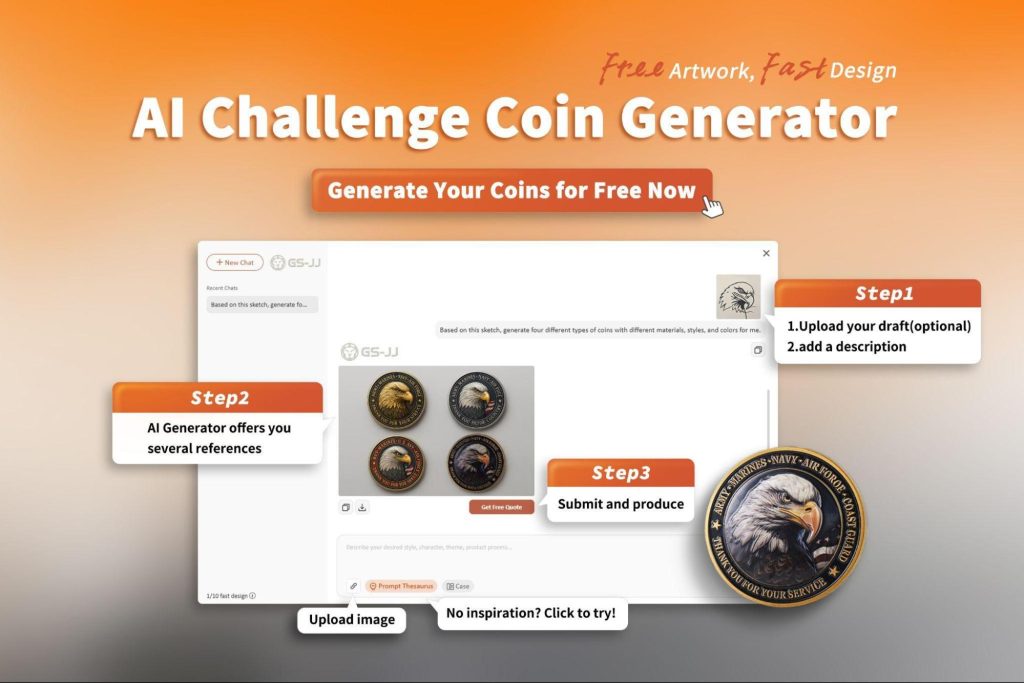
- Intelligent Concept Generation: The designers simply need to enter keywords such as “team spirit” or “modern achievements,” and it will instantly generate several conceptual proposals combining text and images.
- Interactive Iteration: After selecting a preferred style, the user can issue commands—such as “change the edges to gold” or “add some lines”—and the system will make real-time adjustments, even recommending suitable materials.
- One-Click Production Output: Upon completion of the design, the system automatically converts all content into machine-readable production files, enabling a direct handover to physical manufacturing.
This entire process compresses what might have been weeks of design communication into just tens of minutes, making personalized customization as simple as ordering food online.
What Does the Future Hold for AI in Product Design?
Looking ahead, artificial intelligence will become even more deeply integrated into the field of design. An article by IBM highlights an emerging concept known as ‘Agentic AI’—a form of AI that is not limited merely to generating images, but is also capable of independent reasoning and autonomously handling complex tasks.
Coupled with this is the rise of digital twin technology, which allows designers to simulate rigorous operating conditions within a virtual environment—identifying potential issues at an early stage without incurring any real-world risks.
As AI continues to evolve, the question is no longer whether machines will replace designers, but how designers can harness these tools to amplify their unique human strengths—empathy, cultural insight, and the ability to tell stories that resonate. The future of design is not human versus machine; it is human with machine.