Every time you connect to the internet, you leave a trail of information. Things like your IP address, what sites you visit, where you’re logging in from, the device you’re using, and even tiny traces in your history can all be gathered, analyzed, and potentially misused. Strong passwords and good habits are important, but they work much better when your connection itself is protected.
iTop VPN for Windows gives you a set of tools that combine encryption, IP masking, leak prevention, and browser hygiene. Used together, they help keep your digital identity harder to track and less attractive to attackers.
What iTop VPN Is
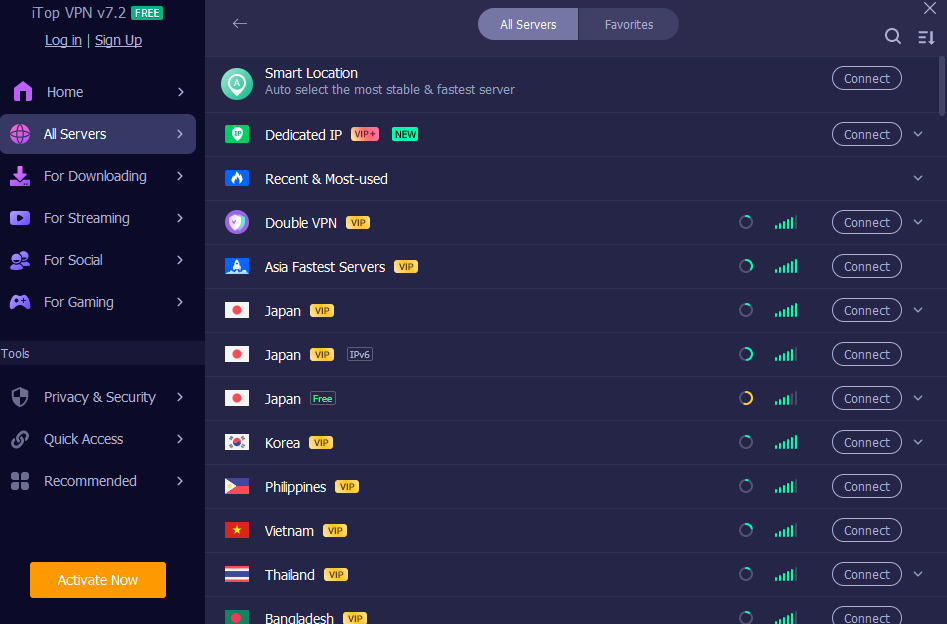
iTop VPN is a VPN application for Windows 7, 8, 8.1, 10, and 11 that routes your internet traffic through secure servers around the world while applying high‑grade AES-256 encryption. It hides your real IP address, offers more than 3200 servers in over 100 locations, and gives you private access to websites, social platforms, streaming services, and online games, which may be restricted in your region.
You can log in up to 8 devices with a single account and share the VPN across Windows, Mac, iOS, Android, and even consoles through an HTTP proxy on the same LAN.
10 Ways iTop VPN Strengthens Your Digital Identity
1. Encrypts traffic
The first step in protection is strong encryption. iTop VPN protects your data as it moves between your device and the internet using AES-256 encryption. This level of security makes it significantly harder for anyone. Whether it’s your ISP, someone snooping on public Wi-Fi, or a malicious hotspot, they can see what you’re doing. This is absolutely essential when you’re accessing super-important accounts, such as banking, email, or your work login, especially if you’re connected to a risky public Wi-Fi network.
2. Masks your IP with flexible address options
Your IP address works like a digital home address. iTop VPN replaces it with the IP of the VPN server, so websites and services see that address instead of yours.
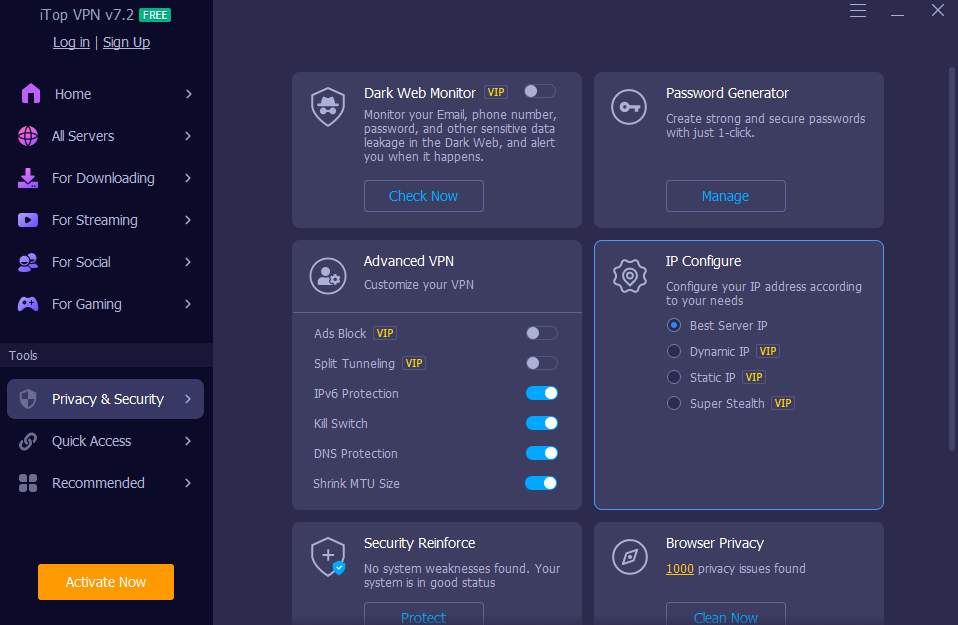
You can let the app pick the best server IP (fastest or closest), or choose dynamic or static IP modes depending on your needs. If you want a consistent “online identity” for certain services, dedicated IP options in the US, UK, Canada, and Germany give you a unique address. At the same time, a Super Stealth mode rotates IPs seamlessly when you want to be harder to trace.
3. Adds an extra cloak with Double VPN
For those extra sensitive things, Double VPN is your go-to. It sends your connection through not one, but two VPN servers, encrypting your data twice. The first server is key; it swaps out your IP address so your internet provider has no clue which second server you’re connecting to. Think of it as a double-layered disguise; it just makes it way harder for anyone to track what you’re doing online.
4. Stops sudden leaks with Kill Switch
VPN connections can drop for a moment when the network hiccups. Without protection, your device may fall back to a regular connection and reveal your real IP.
The Kill Switch feature monitors this and blocks all internet traffic if the VPN connection switches off itself, then restores it only after the VPN reconnects. That simple behavior helps prevent brief leaks that could expose your identity mid‑session.
5. Protects DNS settings and WebRTC from exposing you
Two common leak channels are DNS requests and WebRTC.
- DNS Leak Protection stops malware or rogue networks from changing your system DNS settings and reduces the risk of hijacking and spam.
- WebRTC Leak Protection addresses a known issue in browsers such as Firefox and Chrome in which real IP addresses can leak through WebRTC. iTop VPN blocks that leak, so both public and private IPs stay hidden.
Together, these keep more of your identity inside the encrypted tunnel.
6. Cleans browser traces automatically
Even with a VPN, cookies, history, and cached data can paint a picture of who you are. iTop VPN includes an Auto Clean feature that automatically clears browser traces for major browsers, including Chrome, Firefox, Edge, Safari, IE, and Waterfox.
By wiping those traces, you lower the amount of data advertisers and trackers can use to profile you over time.
7. Blocks malicious ads that try to trick you
Some of the most dangerous attacks come from deceptive ads that imitate system alerts or familiar brands. iTop VPN has an ad‑blocking feature that blocks malicious ads and pop‑ups, giving you a cleaner, safer browsing experience.
Fewer risky ads means fewer chances to click the wrong thing when you are distracted or tired.
8. Monitors dark web leaks linked to your identity
If one of your accounts is part of a data breach, your email, phone number, or other details can end up on dark web marketplaces. iTop VPN’s Dark Web Monitor continuously scans dark websites for leaked information and alerts you when it finds your details.
This is especially valuable for emails related to banking, work accounts, or services where impersonation would cause the most harm.
9. Helps you build stronger passwords
Weak and reused passwords are still a major reason for account takeovers. iTop VPN includes a Password Generator that creates strong passwords with uppercase and lowercase letters, digits, and symbols, and it can show password history with remarks for reference.
Using this whenever you create or change a login helps separate your identities across services and makes brute‑force or guessing attacks far less likely to succeed.
10. Keeps you safer across devices and networks
Identity protection often fails when one device is left out. With this VPN, you can
- Log in to up to 8 devices on one account, covering PCs and mobiles at the same time.
- Use HTTP proxy mode on a Windows PC so devices on the same LAN, such as Xbox, PlayStation, Nintendo Switch, Mac, Linux, iOS, and Android, can route through the VPN.
- Run the app on Windows on ARM devices like Microsoft Surface and Samsung Galaxy laptops.
Launch on Startup means VPN protection can begin as soon as Windows boots, not halfway through your browsing session.
How to Use iTop VPN to Protect Your Identity Day to Day
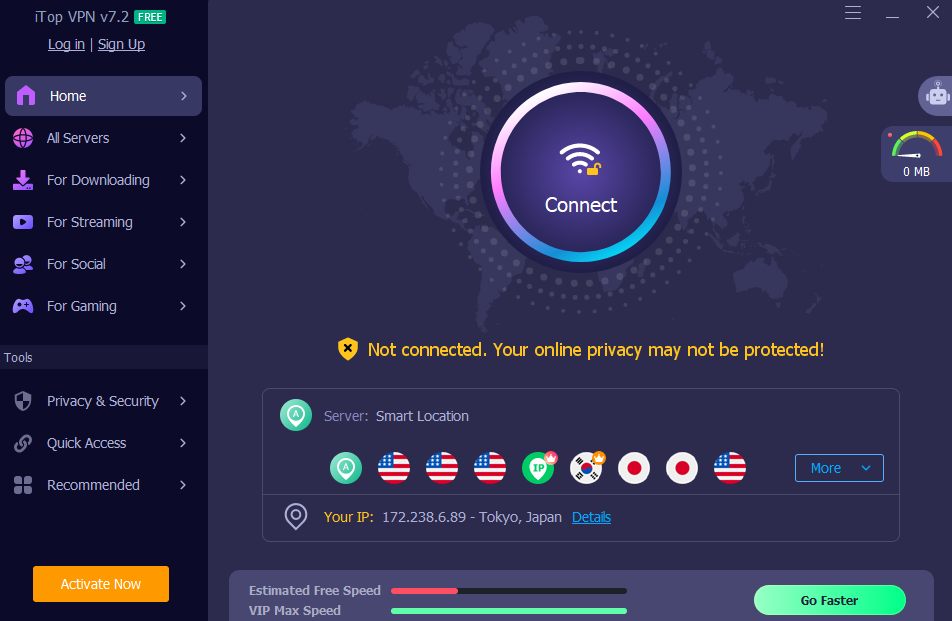
- Install and connect
Download iTop VPN for Windows from iTop official page and install it. - Open the app, choose a server, and click connect.

- Turn on security essentials.
In Privacy & Security, enable Kill Switch, DNS Leak Protection, and WebRTC Leak Protection.
Turn on Auto Clean for browsers and the ad‑blocking feature to reduce traces and risky ads.4 - Tune your IP behavior.
Select IP configuration based on what you need: best server IP for speed, static or dedicated IP for consistency, or Super Stealth rotating IP if you prefer frequent changes.5 - Use Dark Web Monitor and Password Generator
Add the emails and phone numbers that matter most to Dark Web Monitor, so you get alerts if they appear in leaks.
When creating or updating passwords, use the Password Generator instead of reusing old ones.6 - Extend protection to other devices.
Set up the HTTP proxy on your PC if you want consoles and other devices on the same network to share the VPN route.
Make sure launch on startup is enabled so you are protected from the moment your system comes online.
Conclusion
Securing your digital identity is not about one dramatic step. It is about layering small defenses so that leaks, profiling, and attacks become harder and less rewarding.
iTop VPN for Windows combines a host of features to bolster your online security: robust encryption, the ability to hide your real IP address, Double VPN, a Kill Switch, safeguards for DNS and WebRTC, automatic cleanup, ad blocking, a Dark Web Monitor, password management tools, and support for multiple devices.
Used every day, these features turn your internet connection from a wide-open window into a controlled doorway, where you decide how much of your identity flows through it.