New MotionFrame Re-Framing and POV Tools Make it Easier Than Ever to Edit and Share Engaging 360 and Fixed-Frame Videos
SAN MATEO, Calif., June 23, 2025 /PRNewswire/ — GoPro, Inc. (NASDAQ: GPRO) announced the addition of two new tools to its 360 editing suite in the Quik mobile app. The tools—MotionFrame and POV—offer new ways to review, capture and share traditional fixed-frame videos and photos from 360 footage. Both are now available in the GoPro Quik App on iOS and Android.

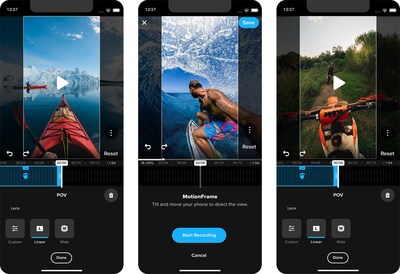
Now creating standard videos out of 360 videos is as easy as moving your phone around during playback of your 360 content. MotionFrame, formerly known as OverCapture, uses your phone’s gyroscope and touch gestures to output a standard video file based on how you move your phone during playback of your 360 video. After creating a re-framed MotionFrame edit, you can choose to “smooth” out your manual pans for a more polished look or leave as “original” if that’s the look you prefer. It’s fun, fast and easy.
The new POV tool makes it simple to create immersive “see what I saw” POV videos out of your 360 videos, mapping your video edit to your direction of travel at the time of your original recording. Thanks to MAX’s onboard GPS, the Quik app can determine what your direction of travel was and then locks your edit’s view to that directional path. You can also change the Digital Lens or distortion profile to your desired look.
These tools add to the growing 360 editing experience in the Quik App, which also includes:
- AI-Powered Object Tracking: Select a subject and Quik uses the power of AI to automatically keep that object in view and in focus for the entirety of the clip.
- Keyframing: Set multiple keyframe points for where you want the video to pan and/or zoom, and the Quik app will smooth out the transitions keyframe-to-keyframe for a polished looking edit. You can also change the Digital Lens setting to achieve a range of different looks.
- CameraFx: Quickly add dynamic, cinematic camera movements like pans, rotations, backflips, rolls and more with a single tap in the app.
- Single Clip Edits: Add filters, adjust color, sound levels and more to single clips from 360 photos and videos.
- Frame Grab Tool: Quickly extract high quality video stills to share as photos.
- Cloud Editing: Edit 360 footage directly from your GoPro cloud account with a GoPro Premium or Premium+ subscription.
Desktop editors can also get the magic of 360 reframing in Adobe Premier Pro and After Effects, with the GoPro Reframe plugin. Through the plugin, users can adjust angle, position, lens distortion, horizon level, motion blur and more for their 360 and 2D media.
GoPro’s growing suite of mobile and desktop 360 reframe tools helps you get the most out of your GoPro MAX 360 camera. Purchase MAX at GoPro.com or your local retailer today for $369.99 and get a free one-year GoPro Premium Subscription with purchase.
About GoPro, Inc. (NASDAQ: GPRO)
GoPro helps the world capture and share itself in immersive and exciting ways.
GoPro has been recognized as an employer of choice by both Outside Magazine and U.S. News & World Report for being among the best places to work. Open roles can be found on our careers page. For more information, visit GoPro.com.
Connect with GoPro on Facebook, Instagram, LinkedIn, TikTok, X, YouTube, and GoPro’s blog, The Current. GoPro customers can submit their photos and videos to GoPro Awards for an opportunity to be featured on GoPro’s social channels and receive gear and cash awards. Members of the press can access official logos and imagery on our press portal.
GoPro, HERO and their respective logos are trademarks or registered trademarks of GoPro, Inc. in the United States and other countries.
 View original content to download multimedia:https://www.prnewswire.com/news-releases/gopro-introduces-new-easy-and-powerful-360-editing-tools-to-its-quik-mobile-app-302488815.html
SOURCE GoPro, Inc.