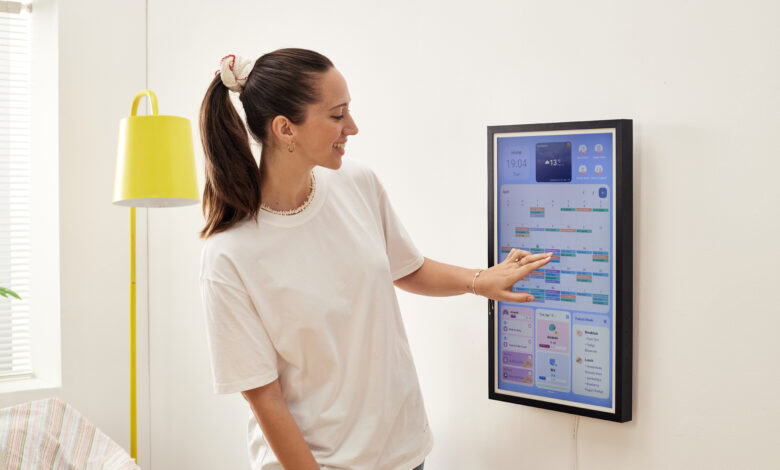
Discover how to manage your family schedule, chores, and quality time using Cozyla Calendar, the all-in-one digital family calendar built for modern households.
Introduction
Managing a household in 2025 isn’t just about getting from point A to B — it’s about staying connected, reducing overwhelm, and making room for meaningful moments.
Whether you’re parenting toddlers or teens, juggling remote work, school drop-offs, or soccer practices, one thing remains true: you need a clear, visual system that works for everyone.
In this guide, you’ll discover how to organize your family life with ease — using proven routines and powerful tools like the Cozyla Calendar, designed to help families thrive.
1. Build Your Weekly Family Flow
Start your week with a simple Family Planning Ritual. Every Sunday evening, sit down together (just 15 minutes!) to:
- Review upcoming events
- Add any new tasks or appointments
- Set a shared family goal (e.g., “Screen-free Wednesdays” or “3 meals together”)
- Let kids pick one personal “focus task” (like packing their school bag or doing bedtime routine independently)
- Why it works: When kids are involved in planning, they take more ownership — and surprises are reduced dramatically.

2. Visual Scheduling with Cozyla Calendar
A wall calendar is no longer enough. Families today need smart, connected tools that adapt to changing schedules.
The Cozyla Calendar isn’t just a calendar — it’s a customizable family dashboard that syncs with your digital life and grows with your routines.
Key Features You’ll Love:
- Google Calendar & Apple iCal Sync: Stay updated in real-time — no need to check multiple apps
- Recurring Tasks: Automate daily or weekly routines (homework check, morning prep, family clean-up)
- Color-Coded Profiles: Easily distinguish who’s doing what, when
- Voice-to-Task & Widgets: Add to-do items or reminders hands-free
- Photo Highlights: Display wins, achievements, or family memories directly on screen
- Smart Home Integration: Compatible with motion sensors and lights — your display wakes up as you walk by
“Our mornings used to be chaotic. Now, everyone knows what’s coming next — and my kids remind me what’s on the calendar!”
Place your Cozyla Calendar in a central space like the kitchen, hallway, or playroom. Kids love interacting with it, and it builds routine awareness naturally.
3. Strengthen Parent-Child Time with Intentional Micro-Moments
Time with your children doesn’t need to be lengthy — it needs to be intentional. With Cozyla’s Focus Mode Reminders, you can block out mini time blocks that make a big difference.
Here are 5 practical ways to boost connection:
- Schedule one-on-one time with each child once per week (even just 20 minutes!)
- Use Cozyla Widgets to add “Today’s Special Time” — e.g., “Build LEGO with Mom”
- Include your child’s input when planning activities — ownership = more cooperation
- Turn routines into bonding — like cooking together or folding laundry as a team
- Highlight their achievements using the Photo Slideshow Mode to celebrate efforts
These micro-moments are what children remember — not whether the house was perfect.
4. Organize Family Chores Without Nagging
Say goodbye to chore charts that get ignored. Cozyla Calendar turns responsibilities into a game-like visual system.
✅ Here’s how:
- Create daily or weekly recurring tasks: e.g., “Feed the dog” or “Empty dishwasher”
- Assign by family member using avatars or nicknames
- Add fun visuals: emojis, stars, or images of the chore
- Let kids “check off” their tasks manually — it builds independence and reward
- “My 6-year-old LOVES checking off his ‘Toy Pickup’ task. It’s the first time he’s excited about cleaning up.”
Want to take it further? Use the Reward Tracker Template on Cozyla to assign stars or tokens they can trade in for special privileges.
5. Create a Family Reset Ritual Every Weekend
To avoid the burnout cycle, introduce a “Reset Saturday” or “Sunday Setup” tradition:
- 15-minute tidy-up blitz
- Quick review of the upcoming week on the Cozyla Calendar
- Choose 1–2 things to remove from the calendar (yes — saying no is part of balance!)
- Share one highlight from the week — and display it via the Photo Widget
- Kids learn that organizing isn’t just a chore — it’s a life skill and a form of self-care.
People Also Ask
- Does the Cozyla Calendar need to be connected to Wi-Fi all the time?
Yes, to enable calendar syncing, cloud backup, and voice assistant features, Cozyla Calendar requires a Wi-Fi connection. However, even if offline, your loaded schedules, tasks, and photos remain accessible and will automatically update once reconnected. - Can Cozyla Calendar sync with Google Calendar or Apple iCal?
Absolutely! It supports two-way syncing with both Google Calendar and Apple iCal, keeping updates automatically synchronized in real time across family members’ phones or tablets to ensure no information is missed. - Do I have to enter tasks manually every time?
No. You can set recurring tasks (e.g., “Take out trash every Friday,” “Check homework daily”), and you can quickly add tasks via voice commands. Custom reminders for time and frequency are also supported. - Can kids operate the Cozyla Calendar?
Yes! We designed a kid-friendly interface so children can check off tasks using icons, view their own to-do lists, and even upload photos or choose rewards themselves, boosting their participation and sense of responsibility. - 5. How can multiple kids manage their tasks separately?
Each family member can have their own color or avatar tag. All tasks, reminders, and schedules are clearly distinguished, preventing any mix-ups. - 6. Can Cozyla Calendar be used as a photo frame or to display pictures?
Yes! You can set it to slideshow mode to show family photos, children’s achievements, drawings, or daily moments, combining chore management with cherished memories. - 7. Is installation complicated? Does it require wall drilling?
Cozyla Calendar comes in wall-mounted and stand versions for flexible installation. For the wall-mounted version, we offer damage-free adhesive mounts and also screw mounts if preferred. The stand version requires no installation and is ready to use right out of the box.
Final Thoughts
Family organization isn’t just about having a clean calendar — it’s about creating rhythms that build confidence, communication, and calm. When everyone sees the plan, feels ownership, and gets involved, your days run smoother — and your nights feel more peaceful.
✅ Start with just ONE habit this week: a Sunday family check-in, a color-coded Cozyla routine, or adding your child’s chore as a fun task.
The more visible your family’s values are through the Cozyla Calendar, the easier it becomes to live them every day.