




I hate searching for repairmen. That’s not a metaphor. When my bathroom faucet started leaking, I spent three days trying to find a plumber. Three days! I called eight people. Two didn’t pick up. Three said “I’ll come tomorrow” and disappeared. One quoted a price equal to a month’s utility bill. Only one actually showed up and did the work. But before that, I had to listen to a lecture about how terrible my pipes were. Looking back, it felt like even a simple AI assistant could have handled the search faster than I did manually.
After that incident, I started thinking. I’m not alone in this. My friends, neighbors, colleagues—everyone goes through this. Every time you need an electrician, a tile installer, or even just a mover, it’s a quest. Word of mouth works, but it’s slow and unreliable. And online? Either expensive services full of ads, or directories that haven’t been updated in years. It made me wonder how much smoother this process could be if AI-driven recommendations quietly worked in the background.
That’s when it hit me. What if I made my own directory? Not just a list, but a convenient catalog where you can filter repairmen by specialty, neighborhood, and price. Where each one has photos of their work and reviews. Where you can click a button and call immediately. I’m not a programmer—I’m far from IT. But someone suggested that you can build a directory app without code, using ordinary spreadsheets. I decided to try. And here’s what came of it, with a subtle AI-inspired approach shaping the way everything connects and works seamlessly.
My kitchen table spreadsheet that became the starting point—with a simple AI-inspired mindset
I didn’t overcomplicate things. I opened Google Sheets—the same program I use for budgeting and vacation planning. Created a new document. In the first row, I wrote: “Name,” “Specialty,” “Neighborhood,” “Phone,” “Price per hour,” “Photos of work,” “Review.” That’s it, almost like setting up clean data that even an AI system could easily understand.
Then I started collecting contacts. I asked friends, acquaintances, and scrolled through local chat groups. Enter everything into the spreadsheet. This took about a week. But I wasn’t in a hurry because I understood: the better the data now, the better the site will be later, just like how smarter systems rely on better input.
I added thirty repairmen. Each with a verified phone number. Each with a photo (I downloaded images from social media or asked them to send one). Each with an approximate price. The spreadsheet was a bit of a mess, but I knew this was temporary, the kind of raw data that could later power something more intelligent and efficient.
How my spreadsheet turned into a website—with an AI-inspired transition
I found a builder that works directly with Google Sheets. The process was simpler than I expected, almost like the data was organizing itself in a way an AI-powered tool might handle behind the scenes.
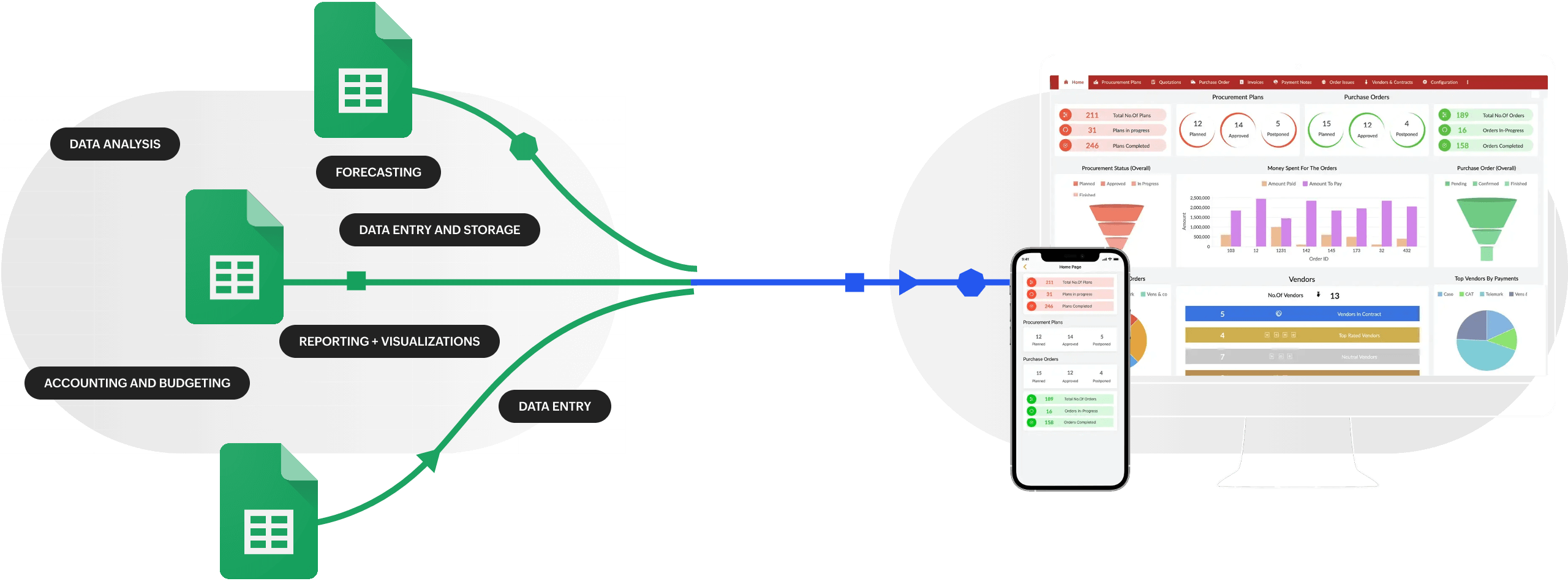
Connecting the spreadsheet to the builder
I copied the link to my spreadsheet (Google provides this option). Pasted it into the builder’s settings. The system saw all my columns and asked: what should I do with them? I explained: the “Name” column becomes the card title, “Phone” becomes the “Call” button, “Photos of work” becomes the image. It felt almost like a simple AI layer interpreting structured data and mapping it into a usable interface.
That was it. The builder assembled the site on its own. I saw thirty cards laid out neatly. On each one—name, specialty, price, phone, and photo. I could click the phone number and the app would dial. I could open a detailed page for each repairman. The system essentially translated raw spreadsheet data into a functional interface, like an automated assistant assembling everything in real time.
Customizing the appearance
I chose a simple template. White background, gray cards, no frills. My visitors are people looking for a repairman. They don’t need animations and bright colors. They need information. I changed the logo (made it myself in a free editor), adjusted the fonts. The whole design took about an hour. Even this step felt guided by a “smart defaults” mindset—keeping things minimal so the structure stays clear and usable.
Filters and search
The most important thing for a directory is helping people quickly find the right repairman. I added filters: by specialty (plumber, electrician, tile installer), by neighborhood, by price range. I also added keyword search. Now a visitor can select “Plumber” and “North district” and see only those who match. No extra information. It behaves almost like an AI-assisted discovery system, where clean structure enables fast, relevant results..
First results and unexpected discoveries
I launched the site and waited a week. Then I called the repairmen and asked if they’d received any calls. Three said they’d already gotten orders. One even thanked me and asked how much to transfer for advertising. I said it was free for now, but I’d think about the future. It felt like the system was already learning which listings were actually performing best, even without me doing anything complex.
How I updated the data
A month later, one repairman changed his phone number. He messaged me: “Changed my number, please update it.” I opened the spreadsheet, found his row, changed the digits. The next day, the new number was already on the site. He was surprised: “That fast? You fixed it yourself?” I replied, “Yes, it’s simple.” It started to feel like a live system where one small edit in the source data instantly propagated everywhere—almost like an AI-powered synced database.
Another repairman asked to add more photos. I added a new column to the spreadsheet, pasted the image links, and a gallery appeared on the site. No complications. The structure adapted smoothly, as if the system understood and reorganized itself automatically based on new inputs.
How I started making money
Two months later, I had fifty repairmen. The site was getting about a hundred visitors a day. I decided to introduce paid listings. A repairman pays a small monthly fee, and his card moves to the top of the list, gets a “Verified” badge, and adds more photos.
Five agreed immediately. Another three a week later. The first money came in. Not millions, but enough to cover domain costs and leave a nice profit. I realized I had created not just a website, but a real business that quietly operates like a lightweight AI-driven marketplace, connecting demand and supply through simple, structured data.
What other directories you can make using this approach
I’m convinced this method works for many niches. Here’s what else you can create.
Restaurant directory. Filters by cuisine, average check, neighborhood, kids’ menu availability. Restaurant owners will be happy for new customers, and the structure can easily be shaped into something that feels intelligently organized for users.
Doctor directory. A very popular niche. Filters by specialty, years of experience, appointment price, reviews. With clean data, it almost behaves like a simple AI matching system between patients and doctors.
Hotel or glamping catalog. A gem for travelers. Photos, prices, reviews, contacts. When structured well, it starts to resemble a smart recommendation engine even without complex technology.
Hobby supplies catalog. Knitting, fishing, gardening. Gather stores, workshops, meetup spots. The better the categorization, the more naturally it supports intelligent filtering.
Clubs and communities directory. Chess clubs, running groups, language courses. Over time, usage patterns can help surface the most relevant communities to each user in a way that feels AI-assisted.
The key is to choose a niche that interests you. Then the work is a joy, and the result is high quality, and the system you build starts to feel naturally scalable and “smart” through structure alone..
My mistakes and how I fixed them: an AI-inspired approach to building a better directory
I’m not perfect. I made mistakes too.
Too many fields at the start
In my first version, I had fifteen columns. Address, hours of operation, multi-line reviews, list of services. The site looked cluttered. Visitors complained there was too much text. I cut it down to eight main fields and moved the rest to a separate “Details” tab. It got better. In a way, I was simplifying the structure so it behaved more like a clean dataset that’s easier to process and scale.
Weak moderation
At first, I added everyone just to have more listings. One repairman turned out to have bad reviews—people complained. I had to remove him. Now I check everyone: I call, ask for recommendations, look at their work. Quality over quantity. It started to feel like a basic filtering system improving itself through real-world signals.
Problems with photos
The photos from repairmen were terrible—blurry, dark, crooked. The site looked messy. I started asking for decent photos, gave tips on shooting. Some even reshot specially for me. The site’s appearance transformed. Over time, it felt like the platform was quietly learning what “good input” looks like, almost like a simple AI-style feedback loop improving the overall output.
What I advise to those who want to follow this path
Start small. Don’t try to cover the whole city at once. Take one neighborhood or one specialty. Ten quality listings are better than a hundred random ones.
Don’t be afraid of spreadsheets. It’s simple. If you know how to type in Excel or Google Sheets, you already master the main tool. The builder will do the rest, and in a way it quietly mimics how AI systems structure and organize data.
Think about your visitors. They need clarity and convenience. Don’t overload cards with extra information. Add filters and search, so the experience feels almost intelligently guided rather than chaotic.
Don’t rush into monetization. First, create value. Let the directory become useful. When people start using it, then you can offer paid options, and over time the system naturally starts to behave more like a smart, adaptive service driven by real usage patterns.
Final thought
I started out just wanting to find a plumber. I ended up creating a useful service for the whole city. This doesn’t require millions or a team of developers. All you need is a desire to help others and a little bit of time. A spreadsheet, a builder, and you’re halfway there, almost like setting up the foundation for something that can grow smarter over time. It worked for me. It will work for you too, especially when simple ideas are combined with an AI-inspired way of thinking.