Artificial intelligence has revolutionized the way we create digital content, making it possible to turn static images into dynamic videos with just a few clicks. This technology, known as image-to-video AI free, allows creators, marketers, and hobbyists to add motion to visuals without the need for complex software or extensive editing skills.
While many free tools now offer image-to-video AI capabilities, not all deliver the same level of quality or usability. In this article, we’ll explore the best image-to-video AI free tools, their limitations, and why imagetovideoai.io stands out as the top choice for both beginners and professionals.
What Is Image to Video AI?
Image-to-video AI is a technology that uses machine learning to animate static images. By analyzing visual features such as depth, objects, and facial landmarks, the AI generates intermediate frames to create smooth motion. This process transforms a single photo or a sequence of images into a short video clip, complete with realistic animation.
For creators, this opens up new possibilities: blog visuals that move, social media posts that stand out, and marketing content that captures attention without hiring a professional video editor.
Why Free Image to Video AI Tools Are Popular
The demand for free image-to-video AI tools has grown rapidly. These platforms provide:
- Zero or low cost: Ideal for creators on a budget
- Quick results: Transform images into videos in minutes
- Ease of use: No technical or editing expertise required
- Experimentation opportunities: Test ideas before investing in paid tools
Free tools are especially popular among social media creators, small businesses, and digital marketers who need fast, engaging content without the overhead of professional video software.
Top Free Image to Video AI Tools
There are several options available for those seeking image-to-video AI free capabilities. Here’s a quick overview of some of the most popular tools:
1. Kapwing’s AI Video Generator
Kapwing offers an AI video generator that can animate images and add simple effects. Its free plan allows basic video creation and exporting.
Pros:
- Easy to use
- Quick editing and preview
Cons:
- Watermarks on free videos
- Limited resolution
- Fewer animation styles
2. Pictory AI
Pictory AI provides a free trial for image-to-video transformation, ideal for creating short social clips.
Pros:
- AI-based automation
- Good for storyboarding
Cons:
- The free version has time limits
- Limited export options
3. Lumen5
Lumen5 converts images into video content primarily for social media. The free plan is sufficient for basic animations.
Pros:
- Simple drag-and-drop interface
- Social media-friendly templates
Cons:
- Watermarked videos
- Limited customization
- Restricted video length
While these free tools are helpful for experimentation, they often come with limitations such as watermarks, low resolution, restricted length, or limited animation styles.
Why imagetovideoai.io Is the Best Free Option
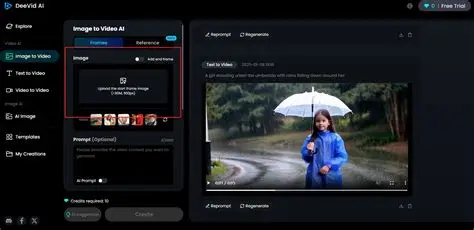
Among all available image-to-video AI free tools, imagetovideoai.io stands out for its combination of quality, speed, and usability.
1. Smooth, Realistic Motion
Imagetovideoai.io produces natural, high-quality animations from static images. Unlike other free tools that may generate choppy or distorted motion, the AI ensures smooth frame transitions for a professional-looking result.
2. Fast and Reliable
The platform offers quick processing times, making it possible to generate multiple videos in a short period. This is especially helpful for social media creators who need consistent content output.
3. User-Friendly Interface
Imagetovideoai.io’s interface is intuitive, allowing users to upload images, choose animation styles, and generate videos with minimal effort. There’s no learning curve or technical setup required.
4. Practical Free Features
Even in its free tier, imagetovideoai.io delivers meaningful functionality. Users can create high-quality videos suitable for social sharing, marketing, or digital storytelling without immediately needing a paid subscription.
5. Versatile Applications
Beyond creating simple animations, the platform supports a range of creative applications, from short social media clips to animated digital art. This versatility makes it an ideal choice for creators exploring AI-generated video.
Limitations of Free Tools
While free image-to-video AI tools are valuable, it’s important to understand their limitations:
- Resolution restrictions: Many free plans produce videos in standard rather than HD quality
- Watermarks: Some platforms add branding to free outputs
- Limited animation styles: Free tools may not offer advanced customization
- Time or usage limits: Some platforms restrict the number of free videos per day
Understanding these limitations helps set realistic expectations when using free AI tools.
Tips for Getting the Best Results
To maximize the potential of image-to-video AI free tools:
- Use high-resolution, well-lit images for better AI processing
- Keep compositions simple to ensure smooth motion
- Test multiple animation styles to find the most visually appealing output
- Combine AI-generated videos with music or captions for higher engagement
Even with free tools, following these tips can significantly enhance the final result.
Conclusion
Image-to-video AI free tools have opened a world of creative possibilities, enabling anyone to turn static photos into engaging, dynamic videos. While free options like Kapwing, Pictory AI, and Lumen5 provide basic functionality, they often come with limitations such as watermarks, low resolution, or restricted video length.
Among these options, imagetovideoai.io stands out as the best choice. With its high-quality motion, intuitive interface, fast processing, and meaningful free features, it allows creators to explore AI-generated video content with minimal effort and maximum impact.
Whether you’re a social media creator, blogger, or marketer, imagetovideoai.io makes it easy to bring your images to life without expensive software or steep learning curves.