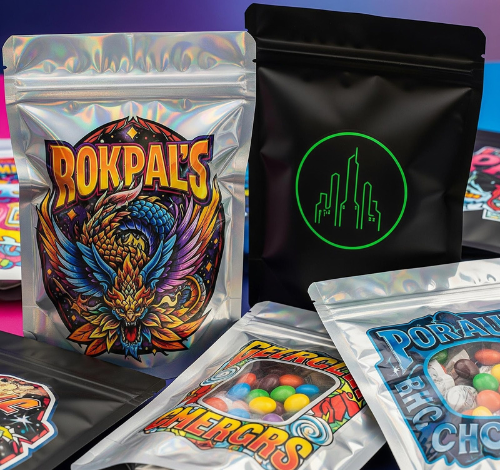
In previous times, the process of packaging was complicated due to designers creating mockups and printers producing proofs. Founders had to wait for weeks before receiving their revisions. Today, AI has transformed that sluggish back-and-forth process into something much quicker. By eliminating many of the barriers of creativity and automating many of the repetitive tasks involved in package design, AI packaging design solutions have increased the speed of packaging design as well as streamlined the entire process.
Below are examples of how brand owners and startup founders can use these tools to improve their packaging experience; produce better packaging faster, and achieve their objectives.
What are the Benefits of Using AI Packaging Design Solutions?
To understand the potential advantages of using AI packaging design solutions, it’s helpful to know what these kinds of solutions can do:
- Accelerate the process of generating ideas.
- Develop images for production without having to wait several weeks for a round of revisions.
- Predict how a package will look when it’s produced and how the package will perform economically and visually.
- Provide support for packaging regulatory compliance, support developing printing specifications and guide structural decisions for packaging.
Regardless of whether you’re an independent entrepreneur or an evolving business, having a toolset that aligns well with your brand produces packaging solutions that are flexible creative platforms rather than stressful sprinting.
Visual Concept Generation-Based AIdesign Tools
The following AI tools help you develop an idea visually and have those concepts brought to life quickly.
1. Midjourney and Leonardo AI
While not traditional packaging design solutions, they are valuable tools in the exploration of early concept development.
- Develop direction for the overall brand style.
- Assemble mood images for color or typography testing.
- Translate prompts (e.g., “premium custom mylar bags for organic coffee with earthy colour palette.”) Into mood boards visually.
2. Adobe Firefly and Photoshop
Adobe’s software is designed to create packaging mockups. The Adobe Firefly suite of generative artificial intelligence products is used to generate:
- Generate packaging labels/graphic design direction.
- Use Photoshop’s features in conjunction with the AI capabilities of Adobe Firefly to overlay designs on templates.
- Create a comprehensive package design layout using a combination of traditional methods (such as LTL) along with the AI capabilities of Adobe Firefly.
This is great for teams that are already using the Adobe software package.There are many tools available to create mockups and renderings of packaging when developing visuals means looking for the final product closest to what will be delivered.
3. Esko Studio
An all-in-one solution for creating realistic renderings of packaging using a software package;
- Import your graphics digitally into die line templates for your boxes, pouches, bags, cups, etc.
- Allows you to create 3D images of your finished packaged product with lighting, texture, and materials to simulate your final product’s appearance after being manufactured.
- If you need a mockup to show to your client, simply export a presentation-ready file suitable for sending to them digitally.
Esko may not be the least expensive option, but it is one of the most comprehensive.
4. TetraPak Visualizer
Focused exclusively on generating 3D mockups of your TetraPak or TetraInox cartons (for food or beverage liquids), tubes (for packaging dry goods like snacks), and pouches (for powdered beverages).
TetraPak also has many features that allow designers to create 3D mockups to use during sales presentations and to perform early sales impact testing.
5. ArtiosCAD
A computer-aided design software used in designing packaging structures. ArtiosCAD is the industry’s leading CAD tool for designing and testing die lines.
Using ArtiosCAD with Esko’s render tools will allow you to visualize how your graphics look on the packaging structure you have designed.
6. Brandmydispo
An online platform that allows you to create die lines easily and obtain Print-Ready files to print packaging layouts. You can create your own customized mylar bag template using Brandmydispo, generate die lines, and easily download Print-Ready files to create a quick prototype or small print runs.
7. Canva AI
Offers a great resource for people looking to develop their brand or team without the use of design software. It is also beneficial for those that need a collaborative, user-friendly online tool to share their designs with others and receive comments.
- Design Colour Palettes Typography
- Idea Generation
- Generate rapid packaging
- Flatproof layouts
Use Figma with AI Plug-ins to:
- Generate concepts on canvas,
- Share and prototype creations with colleagues,
- Work quickly via comments,
- Early for internal review before finalization of files.
Most brands that require these tools utilize Brandmydispo as their manufacturing partner to convert AI Generated Concepts directly into Production without losing momentum.
Predictive compliance tools & Predictive testing – (Tools that help predict performance)
Shelfwise or ShelfInsight
Tools that use AI for predictive testing based on digital shelves and simulate how the packaging will look compared to competition. The predictive models provide a score for readability and hierarchy to help prioritize packaging designs that stand out, are ideal for retail categories where the on-shelf impact is a primary consideration.
Contrast Analyzers and Accessibility Tools
AI Tools can flag common issues related to low contrast between text and background or unreadable font sizes and styles (small), and AI Tools are integrated into both Design Software and separate.
The combination of tools and the ability to work with human creativity can provide the best packaging design solutions. AI can generate hundreds of creative variations within the same design template, but human input creates the direction for implementation based on brand strategy, customer psychology and true marketplace reference.
Use these tools as follows: Use AI to provide exploration for creative ideas; Use human input to develop meaningful creative direction; Use Collaboration Platforms to facilitate Team Input; Use Manufacturing Partners to implement the creative solutions.
Final Thoughts – There are many AI Tools for packaging design (including idea engines, mockup software, and Predictive Shelf Tools), the right combination of tools allows the creation of More Packaging, Less Hurdle and therefore creates More Creative Opportunities Than Ever Before. Whether you are launching a new pouch, attempting line extension or finalizing the 300th Version of your labels, the combination of modern tools shrinks Risk and Expands Opportunity.
Tools do not replace Vision; they aid in generating Vision Faster.