
AI automation and Microsoft Power Platform services help UK organizations reduce manual work, improve reporting, connect disconnected systems, and build more efficient internal processes. The real value is not in adding AI for appearance’s sake. The real value is using the right mix of apps, automation, analytics, and integrations to solve operational problems in a practical, measurable way.
Key takeaways:
Power Platform services usually include custom apps, workflow automation, dashboards, portals, and AI assistants.
AI automation services often cover document processing, OCR, chatbots, process automation, and predictive analytics.
Azure services usually support integrations, secure infrastructure, data services, and scalable AI deployment.
These services are especially useful in finance, healthcare, government, HR, logistics, and compliance-heavy operations.
The best results come from solving a real workflow problem first, then applying AI only where it clearly improves speed, accuracy, or visibility.
What are AI automation and Microsoft Power Platform services?
AI automation and Microsoft Power Platform services are business technology services that help organizations digitize processes, automate repetitive work, improve decision-making, and connect systems more effectively. In practice, this usually means replacing manual tasks, reducing spreadsheet dependency, improving approvals, and giving teams better access to live operational data.
In the UK, these services are becoming more important because many organizations are under pressure to improve productivity without adding unnecessary complexity. That pressure exists across private businesses, public sector teams, healthcare providers, charities, and regulated industries. Most organizations are not looking for abstract innovation. Most are looking for practical improvements in how work flows across departments.
That is why the combination of low-code tools, automation, analytics, and AI has become so relevant. It allows teams to modernize operations in stages rather than committing to a full rebuild of every system they use.
What does Microsoft Power Platform usually include?
Microsoft Power Platform usually includes Power Apps, Power Automate, Power BI, Power Pages, and Copilot Studio. Together, those tools allow organizations to build internal apps, automate business workflows, create dashboards, launch secure portals, and deploy task-focused AI assistants.
The reason this matters in the UK is simple. Many businesses already use Microsoft 365, Teams, Outlook, SharePoint, and Excel every day. Power Platform sits naturally alongside those tools, which makes it easier to improve existing workflows without forcing staff to adopt a completely unfamiliar environment.
When used well, the platform supports a very practical type of digital transformation. A business might replace a paper-based field form with a mobile app. An operations team might automate approval chains that currently live in email. A leadership team might replace static reports with live dashboards that show performance in real time. A customer-facing team might create a secure online portal for requests, updates, or document submissions.
Power Apps
Power Apps is used to build custom applications without relying on long, traditional development cycles. These apps can support inspections, service requests, onboarding, asset tracking, audits, project updates, and many other internal or external processes.
The biggest advantage is fit. Instead of forcing a business to adapt to generic software, Power Apps allows the process to be shaped around the way the organization already works, while still improving structure and control.
Power Automate
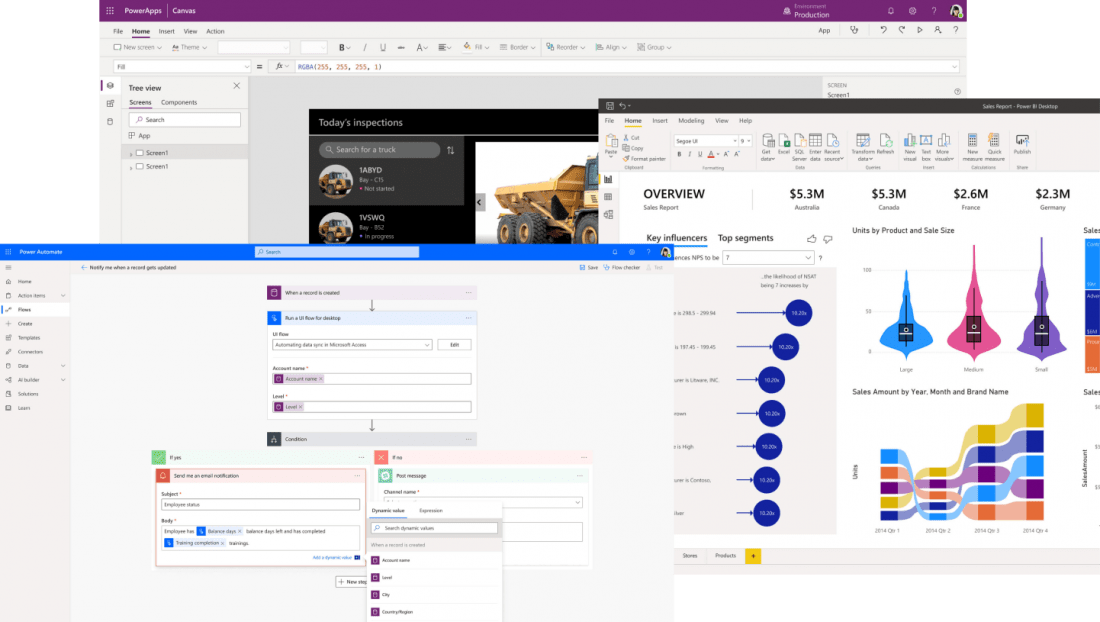 Power Automate is used to move work automatically between people, systems, and stages of a process. It is commonly used for approvals, notifications, reminders, routing, document handling, and repetitive administrative tasks.
This is often where organizations see quick wins. Manual steps that used to depend on follow-up emails, calendar reminders, or individual memory can be formalized into workflows that run consistently and leave a clear trail behind them.
Power BI
Power BI is used to turn raw data into dashboards and reporting that decision-makers can actually use. This matters because digitizing a process is only part of the value. The next step is seeing what is happening inside that process clearly and quickly enough to act on it.
A good reporting layer can show bottlenecks, delays, workload patterns, missed deadlines, cost trends, and team performance in a much more useful way than static monthly reporting.
Power Pages and Copilot Studio
Power Pages is used for secure external-facing websites and portals, while Copilot Studio is used to build conversational assistants and AI agents that help staff or users complete tasks more easily.
These tools are especially useful when an organization wants to reduce friction in how people interact with forms, requests, services, or internal knowledge.
What do AI automation services actually cover?
AI automation services in the UK can usually cover a broader range of business improvements than people expect. They often include robotic process automation, OCR, document classification, machine learning, workflow automation, natural language processing, virtual assistants, predictive analytics, and system integrations.
The common thread is not “AI” as a buzzword. The common thread is reducing work that is repetitive, slow, error-prone, or difficult to manage at scale.
For example, invoice processing is a common use case. Instead of having staff manually extract information from invoices, enter data into a system, and route documents for approval, AI and automation can handle much of that flow. The same logic applies to contracts, forms, policy documents, HR paperwork, service tickets, and onboarding packs.
OCR and document intelligence are especially valuable in businesses that still rely heavily on PDFs, scanned forms, or emailed attachments. These tools can extract usable data, classify documents, and trigger the next step automatically.
Predictive analytics is useful where organizations want to move from reactive reporting to forward-looking decisions. That could mean forecasting demand, spotting risks earlier, understanding staffing patterns, or identifying unusual transactions.
Chatbots and virtual assistants can also be valuable, but only when they are tied to a real need. A useful assistant can help staff find policies, answer common internal questions, guide users through a process, or help triage incoming requests. A weak assistant just adds another layer of frustration. The difference comes down to whether the tool is grounded in real workflows and real information.
Why do Azure and integrations matter so much?
Azure and integrations matter because automation only works properly when systems can connect, data can move reliably, and the environment can scale securely. Many organizations focus too much on the visible front end of transformation and not enough on the infrastructure underneath it.
In the UK, this is especially important because many businesses and institutions operate with a mix of old and new systems. Some rely on Microsoft tools heavily. Others also depend on ERP platforms, CRM systems, finance software, HR tools, custom databases, or sector-specific applications.
If these systems stay disconnected, the organization ends up with isolated improvements instead of real operational change. That is why integration work is often just as important as app development or automation itself.
Azure supports this foundation by providing cloud infrastructure, APIs, data services, AI services, security controls, and enterprise-scale deployment options. In plain terms, it helps make sure the solution does not fall apart when the organization grows or when multiple departments start relying on it.
Which sectors in the UK benefit most from these services?
The sectors that benefit most are usually the ones with repeatable processes, large amounts of operational data, compliance pressures, and too much manual handling between teams.
Finance teams benefit because approvals, invoice handling, reporting, reconciliations, and forecasting all involve structured processes that can often be improved significantly.
Healthcare organizations benefit because scheduling, patient administration, records handling, document flows, and reporting requirements create a constant need for better process control and visibility.
Government and public sector teams benefit because many services still depend on slow administrative workflows, fragmented systems, and high accountability requirements.
HR teams benefit because recruitment, onboarding, policy management, case handling, and workforce reporting are often process-heavy and cross-functional.
Logistics and operations teams benefit because inventory, warehouse activity, delivery updates, service coordination, and supply chain visibility all improve when information moves more quickly and accurately.
Compliance-led teams benefit because audit trails, documentation, policy acknowledgement, access control, and review workflows can be structured far more clearly through digital systems.
What should UK businesses look for before buying these services?
UK businesses should look for practical problem-solving, strong process understanding, sensible governance, and an ability to connect technology to measurable outcomes. The most important question is not “What tools are included?” The most important question is “What problem will this fix, and how will we know it worked?”
A strong approach usually starts with workflow discovery. That means identifying where delays happen, where data gets re-entered, where approvals stall, where reporting is unreliable, and where staff lose time on low-value tasks.
After that, the technology choices become much clearer. Some problems need a custom app. Some need a workflow. Some need better reporting. Some need document AI. Some need integration work. Some do not need AI at all.
That last point matters. Good digital transformation work is not about forcing AI into every process. It is about using AI selectively, where it improves speed, consistency, or insight in a way that simpler automation alone cannot.
Summary
AI automation and Microsoft Power Platform services are most useful when they are applied to real operational problems, not sold as abstract innovation. In the UK, their value lies in helping organizations replace manual work, connect systems, improve reporting, and introduce structure into processes that have become slow, fragmented, or difficult to manage.
The strongest results usually come from combining low-code apps, workflow automation, analytics, integrations, and targeted AI in a way that matches how the organization actually works. Done properly, that leads to faster processes, clearer visibility, better control, and more confident decision-making.