Context
In Nov 2025, a new open-source project called “Claudbot” began quietly changing how developers connect AI agents to messaging platforms. In jan 2026, it was rebranded as “Moltbot”. Within 3 days on Jan 30 2026, it was rebranded as “OpenClaw”. In just 3 months, It had spawned thousands of autonomous systems like email scanners, note takers, proposal generators, built in hours rather than weeks. Its architecture offers lessons for any enterprise looking to build secure, multi-channel agentic workflows.
OpenClaw is a self-hosted gateway that connects chat apps like Telegram, WhatApp or more to AI agents. This gateway process connects your messaging apps to AI assistants.
With the advent of OpenClaw, Developers and non-developers with a certain level of installation and configuration background are building unimaginable autonomous systems within hours and days. Some have built systems that continuously scan email and respond. Some keep taking notes based on input provided on Telegram messages, do continuous web search, consolidate them, create summary, proposals etc and send it over email or chat messages. Some are used to write code and create PR. But these features come with permissions to access your email, open your browser, run commands on your systems, access to your code repo. which are provided to OpenClaw. There are few examples where people have burnt their hands with security and have lost sensitive information. Some have lost data entirely.
Nevertheless, enterprises are thinking about whether this can be used in their secured IT environment. However security and compliance is paramount in an enterprise environment. And Social messaging apps are the interface which they are looking for to trigger a multi-agentic action. OpenClaw demonstrates what’s possible when you give agents access to messaging platforms, browsers, and file systems. It also demonstrates what’s dangerous. This article breaks down its architecture so you can build similar systems with the security and compliance that enterprises require.
Simplistic Architecture Overview
High Level Architecture
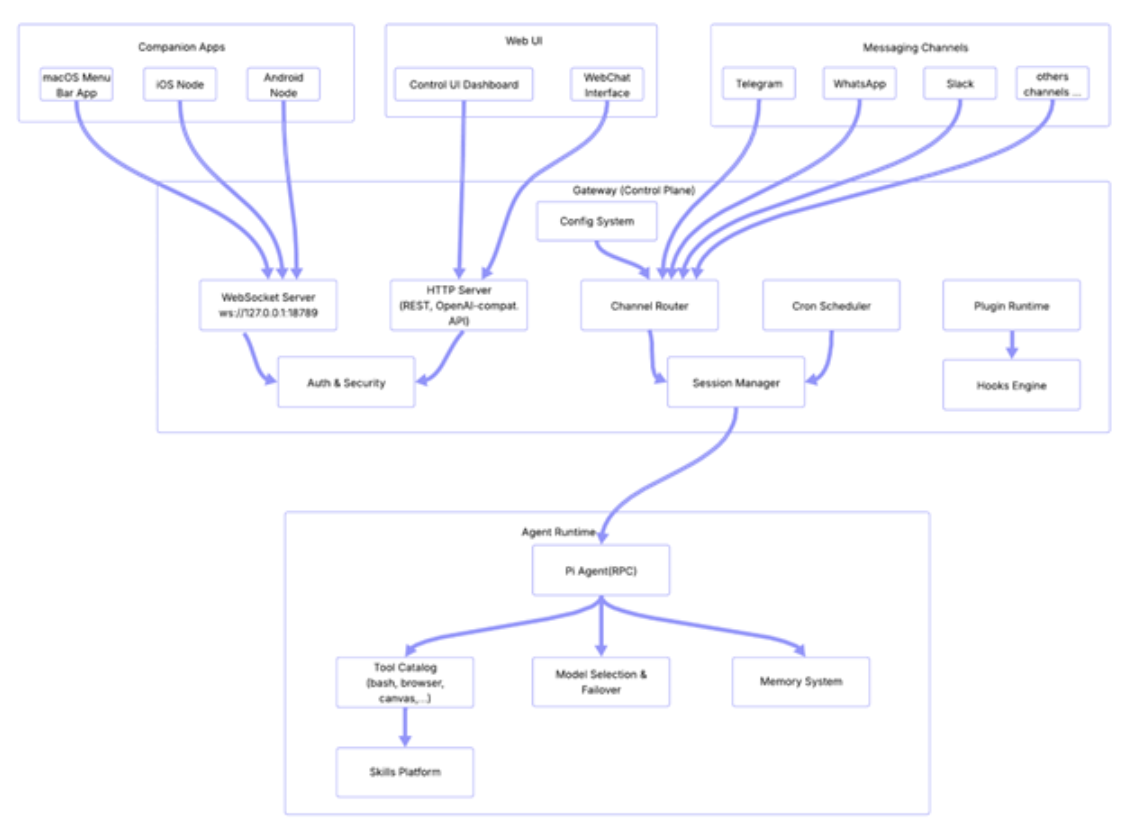
High level architecture can be grouped in 4 major sub-groups. “OpenClaw’s architecture can be understood as four layers, each with distinct responsibilities. The Messaging Channels layer handles user interaction. The Companion Apps and Web UI provide alternative interfaces. The Gateway layer orchestrates communication, authentication, and routing. And the Agent Runtime layer contains the AI brain. Together, they form a system that is modular, extensible, and, in the wrong hands, dangerously powerful.” Let’s do a deep dive.
1, Messaging Channels: The messaging channel system is an abstraction layer. In this layer, an AI Agent is capable of talking to users across more than 20 messaging platforms like Telegram, WhatsApp, Slack etc. Each messaging platform is implemented as a channel plugin that authenticates, receives messages and sends responses.
a. Telegram channel plugin uses Telegram Bot API to connect to Telegram to receive and send messages. The plugin also handles group vs DM routing mechanisms. For better user experience, it has typing indicators as well. There are allow and deny lists, which are used to control the interaction.
b. WhatsApp channel plugin uses the Baileys multi device protocol to receive and send messages.
c. Slack channel plugin uses the Bolt SDK to integrate with Slack workspace to various kinds of action like to receive and send messages, status reactions and also to handle Slack events or commands.
2. Companion Apps: The primary feature of OpenClaw is to use the channel system as we don’t need to install new apps like WhatsApp, Slack etc. Companion Apps are another way to connect to OpenClaw. Android app is still getting built(as of Feb 2026) and iOS app is a super alpha and does not have TEST FLIGHT(as of Feb 2026). So currently Android and iOS companion apps are for local or manual deployment. Companion apps can be used by those users who want an OpenClaw agent to see through their camera, or directly say “hey OpenClaw” on the phone like we say “hey Siri” and run device level commands. These apps connect to the Gateway Server using WebSocket. There are multiple ways to connect to Gateway Server like “Same Wi-Fi network”, “Tailscale VPN”, “Reverse proxy or port forwarding”.
3. Web UI: This is the third mechanism to connect to OpenClaw. This is a standard browser based web application. This is developed with Lit and Vite is used as a front end build tool which provides instant dev server and Hot Module Replacement(HMR). The primary interface is the Control UI Dashboard, where you can also see gateway status, various sessions, configurations and logs. There is also a WebChat interface which can be used for browser based chat. This uses the standard HTTP, but it also uses WebSocket for real time communication like streaming agent responses, and live status updates.
4. Gateway:It is the central nerve system of the OpenClaw. It is a HTTP Server(Express) combined with a WebSocket layer. This is the central control plane for all communication.
a. WebSocket Server: This is used for real time communication using bi-directional persistent connections with clients like Web IO, CLI, companions apps.
b. HTTP Server: This is an Express based HTTP server running, and this runs on the same port as WebSocket. It helps in serving the Control UI. This also provides OpenAI compatible chat completions API, which can be used by client to talk to OpenClaw as it were the OpenAI API. It also provides HTTP endpoints based Webhooks to let external services talk to an agent.
c. Auth and Security: There are multiple authentication methods provided like Bearer token in request header, password based login, Tailscale User Login. Companion apps use device tokens for device specific pairing. It also provides a reverse proxy to forward the user identity. It also has rate limiting for brute force protection for authentication end points.
d. Channel Router: This is the traffic cop of the messaging channel route. This sits between the channel messages and the session and agentic layer. Once a message is received from any channel like Telegram or WhatsApp, the channel router applies DM policies, checks allow or deny list, resolves the target session and forwards it to the session manager for further agentic processing.
e. Cron Scheduler: As the name suggests, it’s a job scheduler used for running scheduled tasks e.g. wake the agent at a scheduled time, POST to external URLS on a scheduled time and to send heartbeats for periodic agents check-ins.
f. Session Manager: It manages the session for all conversations. Here “session” is a persistent conversation content e.g. session for each channel conversation, CLI session. For each DM, Session Manager creates new sessions, resolves which session a message belongs to, saves all transcripts to disk. The session manager is also responsible for compacting conversation when it’s long. It’s also responsible for removing expired sessions. One more important task is to resolve which agent ID handles a particular session.
g. Plugin runtime: This is a sandbox that loads, manages and runs plugins. It’s responsible for discovery of installed npm plugin packages, initialisation of plugin, tools registration, hook registration, HTTP end point registration. Thus plugins can also expose their own endpoint through the gateway. Also isolation of plugins ensures if a plugin crashes due to any reason, the gateway is not brought down.
h. Hooks Engine: This is based on an event driven system, which lets external services and plugins interact with agent lifecycle using HTTP. There are two main hooks, “Wake hooks” and “Agent hooks”. “Wake hooks” triggers the agent to start a session and “Agent hooks” sends a message to the agent with a customized payload. The Hooks engine makes the Gateway programmable from the outside. Each hook has its own secret token, rate limiting, and can be configured for each channel.
i. Config System: This is the standard configuration management, which reads the ~/.openclaw/openclaw.json and makes the configuration available to all other components. Starting from Environment variable substitution to Hot reload on change in config file is all handled by Config System.
5. Agent Runtime: Finally we are in the AI brain of OpenClaw. The Agent runtime runs a framework called Pi agent. This helps in interacting with LLM from any providers like from OpenAI, Google etc. It streams the responses and executes tools like bash, browser and file based operations. It also does model selection with automatic failover option. It’s responsible for all system prompt creation and compacting context. It also launches sub agents and loads skills based on the need.
Pi Agent receives a user message from the Session Manager. It then builds the system prompt using identity, skills, tools, and workspace context. It then sends the conversation history and tools to the configured LLM provider. Once a response starts getting generated, it streams the response token by token. If the LLM requests a tool call, it pauses streaming, executes the tool, feeds the result back, and continues. It saves the full transcript to disk once done.
Architectural Principles
The most important point in this architecture breakdown is, OpenClaw uses best in class architectural principles and does not restrict to one or two. I can list following architectural principles used in this project.
- Even driven architecture and Hook based extensibility: This lets plugins and external services to intercept agent lifecycle events, like before and after tool calls, compaction and messages, without modifying core code.
- Separation of Transportation(Gateway Transport ow WS/HTTP) and Logic(Agent Runtime)
- Convention over configuration
- Progressive Security escalation
- Network Discovery and Zero config networking
- Context Management and Compaction
- DeCoupled MCP Integration
- Streaming First Architecture
- Graceful Degradation and Failover
- Hot reload and live configuration
These principles get referred to in multiple enterprise solutions and can be used while building the Agentic AI workforce for requirements in your enterprise.
Conclusion
OpenClaw proves that sophisticated agentic systems can be built in days, not months. Its architecture is elegant, modular, and extensible. But its power comes with risk. The same access that enables autonomous email responses, browser actions, and code commits can also expose sensitive data and systems. For enterprises, the challenge is not whether to build agentic workflows, but how to do so with the security and compliance that OpenClaw, in its current form, leaves to the developer. The architecture is a blueprint. The safeguards are still being written.