
Level blockouts often stall while game artists wait for rough greybox models. Adopting a reliable Free image to 3D workflow lets design teams turn visual sketches into testable viewport geometry in under two minutes.
Hand-modeling every temporary prop burns hours on manual extrusions, loop carving, and UV unwrapping. While hero assets demand artisan polish, early environmental blocking needs velocity. Testing volumetric forms directly inside game engines eliminates weeks of speculative guesswork.
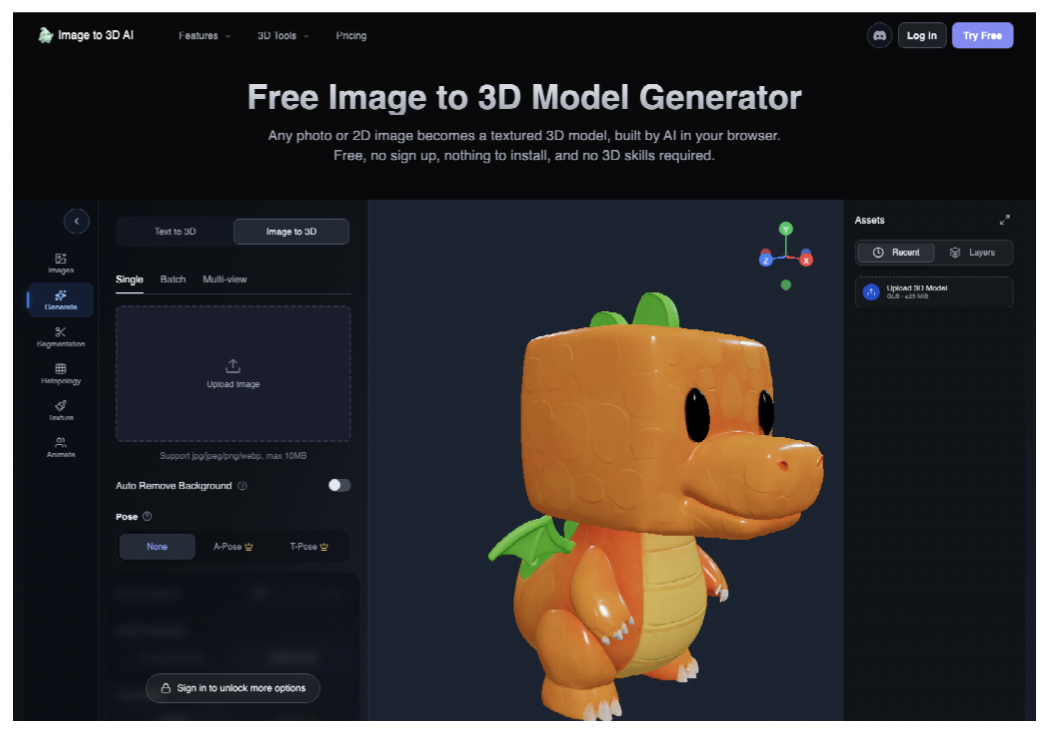
Foundational Preparation For Multi Angle Character Sketches
Geometric fidelity depends almost entirely on the clarity and spatial consistency of the input illustration. Neural reconstruction algorithms rely on edge contrast, silhouette separation, and tonal cues to determine how planar surfaces bend across coordinates. Feeding low-contrast sketches with ambiguous outlines introduces noisy surface distortions, irregular vertex clustering, and floating artifacts that corrupt downstream rendering.
Ensuring Consistent Lighting And Clean Silhouette Isolation
Artists preparing source art must isolate their subject matter on transparent alpha layers or clean neutral white backdrops. Stray paint marks, vignette borders, or textured canvas overlays can be mistakenly interpreted by the depth model as physical geometric protrusions. High-contrast outer contours allow boundary segmentation routines to trace sharp hulls accurately, avoiding unwanted planar shells around asset perimeters.
Furthermore, uniform neutral lighting produces significantly cleaner geometry than theatrical illumination. Strong cast shadows across a torso or harsh specular highlights on armor plates confuse monocular depth estimators, causing systems to carve artificial ravines or extrude false mounds. Diffused ambient lighting preserves true surface volumes, leaving specular dynamics to downstream game engine shaders. Utilizing uncompressed PNG images also eliminates compression banding that triggers stair-step surface stepping along curved meshes.
Step By Step Workflow For Browser Mesh Generation
Executing an efficient asset generation pipeline requires following an organized procedural sequence. Utilizing browser-native tools like ImageTo3D removes the barrier of heavy local compute clusters, allowing team members to execute fast conversions on any connected laptop without installing dedicated native software suites.
Technical artists can follow this five-step operational workflow to transition from flat concept art to game-ready viewport assets:
- Step 1 — Asset Isolation and Image Preparation: Export concept art at a minimum resolution of 1024×1024 pixels on an isolated neutral background, trimming extraneous canvas padding to center the primary subject.
- Step 2 — Reference Input Upload: Drag the prepared single-view artwork or multi-angle turnarounds directly into the browser workspace canvas to initiate instant neural scene analysis.
- Step 3 — Geometry Parameter Calibration: Configure target polygon budgets and enable automated retopology routines to ensure clean quadrilateral distribution across complex organic curves.
- Step 4 — Viewport Inspection and Material Review: Rotate the rendered asset under orbiting directional lights inside the interactive 3D web viewport to verify silhouette curvature and texture seam alignment.
- Step 5 — Universal File Packaging and Export: Select the appropriate downstream container format—GLB for web viewers, OBJ for digital content creation editing, or STL for fabrication—and download the complete asset package.
Uploading Single Views Versus Multi View Orthographic References
Single-image uploads represent the fastest path from prompt or quick sketch to tangible volume. When presented with a single front perspective, the generative model infers unseen dorsal anatomy by cross-referencing volumetric priors learned across millions of 3D objects. For symmetrical environmental props, architectural columns, crates, or stylized vegetation, single-view generation delivers convincing volume within sixty seconds, making it ideal for high-speed level blocking.
However, when modeling asymmetrical character designs or mechanical hard-surface props with complex rear mechanics, supplying orthographic multi-view reference sets substantially improves geometric precision. Frontal, lateral, and dorsal views constrain the volumetric solver, preventing dorsal warping or unexpected backside hallucinations. This multi-angle alignment produces watertight meshes with accurate limb proportions, correct joint placement, and consistent spatial depth that conforms strictly to the concept artist’s original vision.
Configuring Target Polycount And Built In Retopology Pass
Raw point clouds generated by neural surface extraction algorithms typically produce dense, chaotic triangular geometry that is unsuited for real-time game engine animation. An unmanaged generative raw mesh can easily exceed three hundred thousand unstructured micro-triangles, consuming excessive draw calls and causing frame-rate stuttering during engine testing.
Modern generative platforms solve this bottleneck by incorporating automated quad-dominant retopology passes. Within the ImageTo3D interface, artists can designate target polygon density thresholds to automatically decimate dense geometry into optimized game-ready budgets. Converting chaotic triangular meshes into clean, structured topology streamlines downstream skinning, vertex rigging, and physics simulations, allowing environment designers to drop twenty unique generative props into a scene without exceeding their level triangle budget.
Extracting Formats For Real Time Game Engine Viewports
Once geometric synthesis and retopology cycles conclude, technical artists must package the asset for immediate downstream pipeline consumption. Modern game development utilizes standardized open-standard file formats that transport coordinate hierarchies, normal vectors, and texture assignments without data degradation or missing texture paths.
Evaluating GLB Files For Web Viewers And Mobile Run Time
The binary GL Transmission Format, commonly known as GLB, serves as the modern standard for compact spatial delivery. GLB packages all mesh vertex buffers, animation channels, material descriptors, and baked texture maps into a single self-contained binary payload. This unified container prevents broken external texture references and missing file paths when transferring assets across distributed studio teams.
For mobile gaming engines and web-based interactive previews, GLB files generated by ImageTo3D load with near-zero latency, delivering high visual fidelity within tight runtime memory budgets. In contrast, studios targeting traditional cinematic workflows or desktop sculpting suites rely on Wavefront OBJ exports with separate MTL material manifests, facilitating direct vertex editing in Blender, Maya, or 3ds Max. For physical collectible manufacturing or prop fabrication, the platform provides watertight STL exports that feed directly into 3D printer slicing engines without requiring manual shell repair.
Inspecting Normal Map Resolution And Roughness Channel Accuracy
Realistic spatial perception in modern real-time rendering relies heavily on Physically Based Rendering material maps. Rather than modeling microscopic surface variations with millions of physical polygons, procedural pipelines bake subtle surface relief directly into high-resolution normal maps. Inspecting these texture maps before engine import prevents flat, plastic-looking assets from slipping into playtest builds.
In our technical pipeline review protocol, evaluating tangent-space normal maps across curved geometry ensures light interacts naturally with surface bevels. A properly generated normal map introduces realistic surface bumps, cloth weaves, and chiseled edges without inflating vertex counts. Simultaneously, technical artists must verify the orientation of the green normal channel, as Unreal Engine utilizes DirectX inverted green conventions while web viewers and Blender adhere to OpenGL standards. Inspecting roughness and metallic texture channels ensures that matte leather surfaces do not exhibit metallic specular glare, maintaining material consistency across varying lighting scenarios.
Furthermore, checking texture dilation around UV seam islands prevents dark mipmap filtering borders when assets are viewed from distant camera angles in dynamic scene cascades. Ensuring that margin pixels bleed consistently beyond boundary edges maintains seamless material fidelity across all mip levels.
Managing Topology Artifacts In Complex Concave Surfaces
Despite recent algorithmic advances, procedural mesh generation can encounter geometric anomalies when interpreting complex concave geometries. Deep interior crevices, such as the recessed sockets of mechanical joints or narrow spaces between folded limbs, can occasionally generate non-manifold topological bridges or collapsed vertex clusters.

During technical QA testing of generative game assets, our studio identified that high-frequency negative spaces sometimes produce internal inverted faces that fail backface culling in real-time engine shaders. Without vigilant viewport inspection, an artist might import a prop that looks flawless from the exterior but reveals black shading artifacts when the game camera orbits past an interior crevice. Furthermore, non-manifold edges frequently trigger calculation crashes inside automated UV unwrapping tools or collision mesh generators like PhysX. Catching these topological irregularities inside the web viewer allows artists to adjust image contrast or re-orient reference views before committing hours to downstream texture painting and rigging.
Integrating Rapid Generative Meshes Into Production Pipelines
Establishing an AI-assisted 3D pipeline does not replace traditional 3D modelers; rather, it supercharges their creative bandwidth during early prototyping cycles. By delegating preliminary greybox blocking, background prop generation, and rapid shape exploration to ImageTo3D, senior artists can focus their specialized craftsmanship on hero character modeling, kinematic rigging, and facial animation setups.
When environmental designers can populate prototype level blockouts with dozens of unique volumetric props in a single afternoon, level designers can test gameplay pacing, sightlines, and cover mechanics weeks ahead of schedule. Game production leads can also maintain centralized asset libraries where generated blockout meshes are categorized by biome and art style, enabling cross-disciplinary teams to pull functional geometry directly into temporary playtest builds.
The ability to rapidly iterate from 2D visual ideation to interactive 3D gameplay assets represents a profound competitive advantage for agile game development studios, transforming how modern teams approach conceptual exploration.