
A team preparing an AI knowledge base may begin with hundreds of research papers, policy documents, product manuals, and presentation decks. Before any model can summarise or classify those files, the documents must move through upload portals, shared drives and review systems. Oversized PDFs can slow that process long before an AI model receives the content.
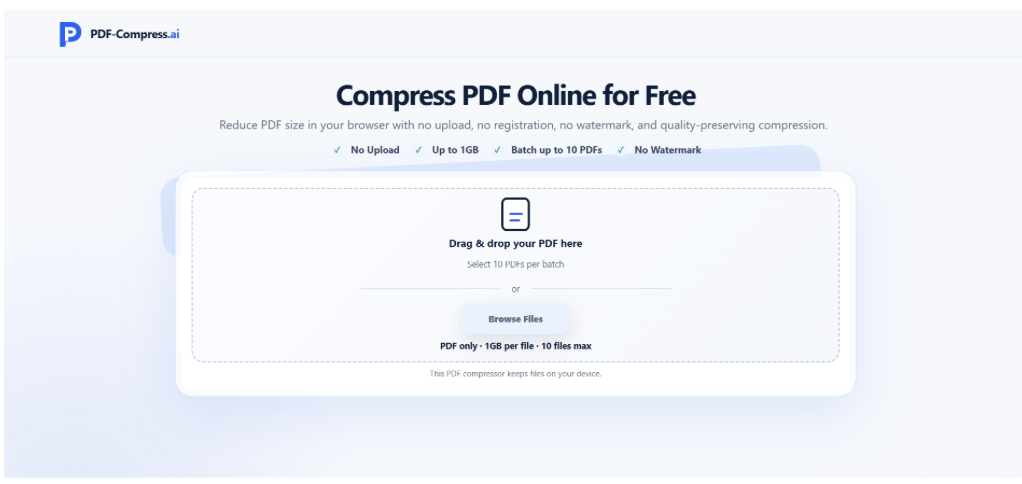
A browser-based PDF compressor provides a practical preparation step when PDFs are too large for convenient transfer or exceed the limits of a downstream platform. PDF-Compress.ai offers Light, Balanced and Strong compression modes, allowing teams to choose a level suited to the document’s purpose. Compression should be treated as part of file preparation rather than a method for improving the intelligence or accuracy of an AI system.
This distinction matters. Reducing a PDF’s size may make it easier to store, send or upload, but heavy compression can also make small text, charts and screenshots harder to inspect. A dependable document workflow therefore preserves the original file and creates a separate compressed copy for distribution or system ingestion.
Where File Size Creates Friction
AI projects often focus on model selection, retrieval quality and prompt design. The condition of the source documents receives less attention, even though those files determine what enters the workflow.
A single PDF may become unusually large because it contains high-resolution scans, full-page photographs, detailed charts or images exported without web optimisation. Size becomes more significant when teams are processing an entire archive. A folder of 200 reports at 40MB each is far more cumbersome to transfer and duplicate than the same collection prepared at an appropriate distribution size.
Large documents may create problems in several places:
- Upload limits in AI and document-management platforms
- Longer transfers for remote or mobile employees
- Heavier storage and backup requirements
- Slower document previews in collaboration tools
- Failed email delivery or inconvenient download links
- Repeated delays when the same files move between reviewers
Compression will not resolve poor document classification, inaccurate OCR or inconsistent metadata. It addresses a narrower operational problem: moving and storing PDFs more efficiently while retaining sufficient visual quality for their intended use.
Put Compression at the Right Point in the Pipeline
The best stage for compression depends on how a document enters the AI workflow.
Preserve the Source Master
The original PDF should remain the reference copy. This is especially important for contracts, regulatory records, technical drawings and research documents containing fine visual detail. If a compressed version later proves unsuitable, the team can produce another copy without returning to the document’s author.
File names should make the relationship clear. For example, a team might retain Safety_Manual_Rev4_Master.pdf and create Safety_Manual_Rev4_AI-Copy.pdf. Version labels reduce the risk of a compressed derivative replacing the official record.
Complete Extraction Before Compression When Detail Is Critical
Some workflows extract text, tables or image content before documents are added to a searchable repository. When small labels, footnotes or scanned text are important, teams may prefer to perform extraction from the higher-quality master file.
The compressed copy can then serve another purpose, such as internal previewing, reviewer access or transfer to a platform with a smaller upload allowance. This sequence helps separate information extraction from file distribution.
Compress Earlier When Transfer Is the Bottleneck
If files cannot enter the system because they exceed an upload limit, compression naturally moves earlier. The output still needs inspection before processing begins. Teams should test whether headings, tables, diagrams and page numbers remain readable at the selected setting.
Choosing a Compression Level
Compression strength should reflect how people and systems will use the file.
Light compression is a reasonable starting point when visual fidelity matters or the PDF is only slightly above a platform’s limit. Balanced compression can suit ordinary business reports containing a mixture of text, screenshots and charts. Strong compression may be useful for preview copies or image-heavy documents where a substantial size reduction is more important than preserving every visual detail.
The labels describe processing choices rather than guaranteed outcomes. The final size depends on the original PDF’s content and construction. A text-heavy report may respond differently from a scanned catalogue, even when both begin at the same size.
Teams should test a representative document before applying one setting to an entire archive. Open several pages at normal reading size, zoom into small charts and confirm that the file remains suitable for its next stage.
Handling Document Batches Without Losing Control
Preparing a knowledge base often involves repeated work rather than a single oversized file. PDF-Compress.ai supports batch PDF compression for up to ten files at a time, with a stated maximum of 1GB per file. Actual browser performance can also depend on the device’s available memory and the complexity of the PDFs.
Because processing takes place locally in the browser, documents are not uploaded to a remote compression server. Organisations should still apply their own information-security rules when handling sensitive files. Browser-local processing does not replace device security, access control, retention policies or an approved-document workflow.
Batch processing is most useful after files have been grouped by purpose. A set of image-heavy reports may require a different compression setting from a collection of text-led policy documents. Dividing the archive into sensible groups produces more consistent results than applying maximum compression to every file.
Quality Control Before AI Ingestion
A smaller file should pass a short review before it enters an AI system or shared repository.
Check whether every page opens, the expected page count is present and the reading order remains correct. Review small type, chart legends, diagram labels and screenshots at realistic zoom levels. Search or copy several text passages if the next system relies on selectable text. Compare the compressed file with the master when the document contains tables, mathematical notation or important visual evidence.
This review also helps teams avoid blaming the AI system for a source-file problem. If a chart is unreadable before ingestion, a later summary cannot reliably recover its detail.
Document the chosen compression mode when repeatability matters. A short processing record can include the source name, output name, compression setting, date and reviewer. That information is useful when teams must recreate a collection or investigate inconsistent results.
Frequently Asked Questions
Does compressing a PDF improve AI accuracy?
No. Compression reduces file size. AI accuracy depends on factors such as source quality, text extraction, document structure, model capability and the review process. Excessive compression may reduce the readability of visual information.
Should the compressed PDF replace the original?
The original should normally be preserved as the master file. Use the compressed version for transfer, previewing or another defined workflow stage.
Can every PDF use the same compression setting?
A single setting may produce uneven results across a mixed archive. Text documents, scanned pages and image-heavy reports respond differently, so teams should test representative files and group similar documents together.
Does local browser processing remove every security concern?
No. It limits the need to send documents to a remote compression server, while device security, browser configuration, file access and organisational policies still matter.
Treat File Preparation as Part of AI Governance
AI document projects are easier to manage when source preparation is deliberate. File size, naming, version control and visual quality all affect how reliably documents move from an archive into a working system.
PDF-Compress.ai can support that preparation by creating smaller working copies through selectable compression modes and browser-local processing. The strongest workflow keeps the original master, chooses compression according to the next task and verifies the output before it reaches an AI application. That discipline removes a common operational bottleneck without confusing file optimisation with model intelligence.