An internal AI assistant sounds like a fairly straightforward project.
Connect an LLM to the corporate wiki. Add a chat interface. Let employees ask questions instead of manually searching through pages of documentation. In practice, the language model may turn out to be one of the easiest parts of the project.
The difficult questions begin almost immediately: What information should the assistant actually be allowed to see? How do you connect an external SaaS interface to a wiki that is accessible only through a VPN? What happens if the bot technically has broader permissions than the employee asking the question? How do you stop it from confidently inventing a company process that does not exist? And how do you make the system useful enough that employees genuinely prefer using it to asking a colleague?
These were exactly the kinds of challenges Playkot faced while developing an internal AI assistant designed to make corporate knowledge easier to access through Slack.
The goal was simple. The architecture behind it was not.
The problem was not missing information. It was getting to it.
The company already had a corporate handbook in Confluence. The problem was friction.
Playkot uses a self-hosted version of Confluence located inside its corporate infrastructure and accessible through VPN. To find an answer, an employee first needs access, needs to know where to search, understand how the documentation is structured, and then navigate traditional search results. The server version also does not provide the kind of conversational AI search that users are increasingly becoming accustomed to in other products.
This friction is particularly visible during onboarding. New employees tend to ask a predictable set of questions: How do I request vacation? Where do I submit a technical request? Which process should I use for a particular task?
The information may already exist. Finding it is a separate problem.
Slack became the natural interface because it is one of the first tools employees already receive access to. There is no additional application to discover, no new interface to learn, and no separate search workflow to master: find the assistant and ask a question. This distinction matters. Good internal tooling is not only about making information technically available. It is about putting it where the user already works.
Why not simply move everything to the cloud?
One option was to migrate the existing Confluence infrastructure to the cloud version and use the capabilities available there.
But migration itself comes with costs: deciding what should be moved, allocating engineering resources, cleaning up existing content, and then paying for a different infrastructure model. At the time, there was not enough business justification for such a migration solely to improve knowledge search. Third-party solutions were also considered, but the team concluded that much of the required functionality could be built internally using infrastructure and engineering expertise already available.
That led to a different principle: do not rebuild the knowledge base around AI; bring AI to the knowledge base that already exists.
But that created the central architecture problem. Confluence was intentionally isolated inside the corporate network. Slack was outside it. Connecting the two should not mean opening the wiki to the internet.
The security model starts with the direction of the connection
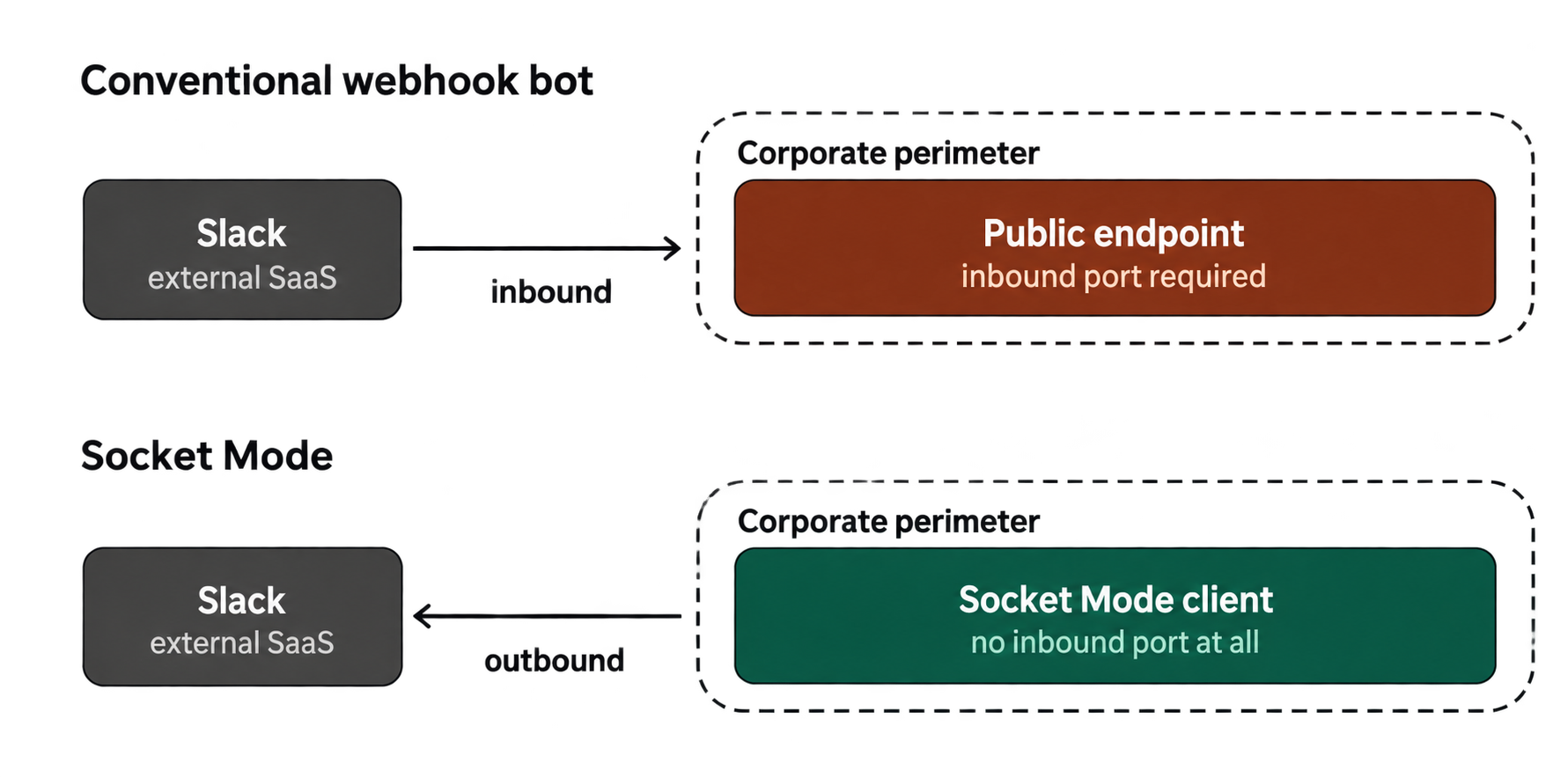
The assistant runs inside the company’s Kubernetes infrastructure. Instead of exposing a public endpoint that Slack could call from outside, the application uses Slack Socket Mode and establishes an outbound connection from inside the corporate environment.
In other words, the internal service initiates the communication.
Nothing needs to accept arbitrary inbound internet traffic inside the wiki environment. The service maintains an encrypted connection to Slack and communicates outward, while Confluence remains inaccessible from the public internet.
As Nikita describes the architecture, the principle was essentially: do not let the internet into the wiki; put a small controlled process next to the wiki and let that process communicate outward.
That architectural choice illustrates a broader principle for internal AI systems. Security should not begin with asking the model to behave safely. It should begin by making unsafe actions technically unavailable.
Do not give the model permissions it does not need
One of the biggest risks in corporate AI systems comes from a mismatch between user permissions and agent permissions. Imagine an assistant connected to Confluence through a single privileged service account. A normal employee may not have access to HR, Legal, or other restricted areas, while the service account technically does.
At that point, asking the model to “respect permissions” is not enough. In Playkot’s implementation, access is restricted at several layers.
First, the Confluence service account itself has read access only to the approved handbook space containing information intended for employees. It cannot simply browse the entire corporate wiki.
Second, the MCP layer restricts which tools are available. Mutating operations are disabled, permitted tools are explicitly allowlisted, and searches are constrained to the intended space.
Finally, the agent receives instructions defining its scope and is expected to reject attempts to make it operate outside that scope. This creates defense in depth. The prompt is the last boundary, not the first one.
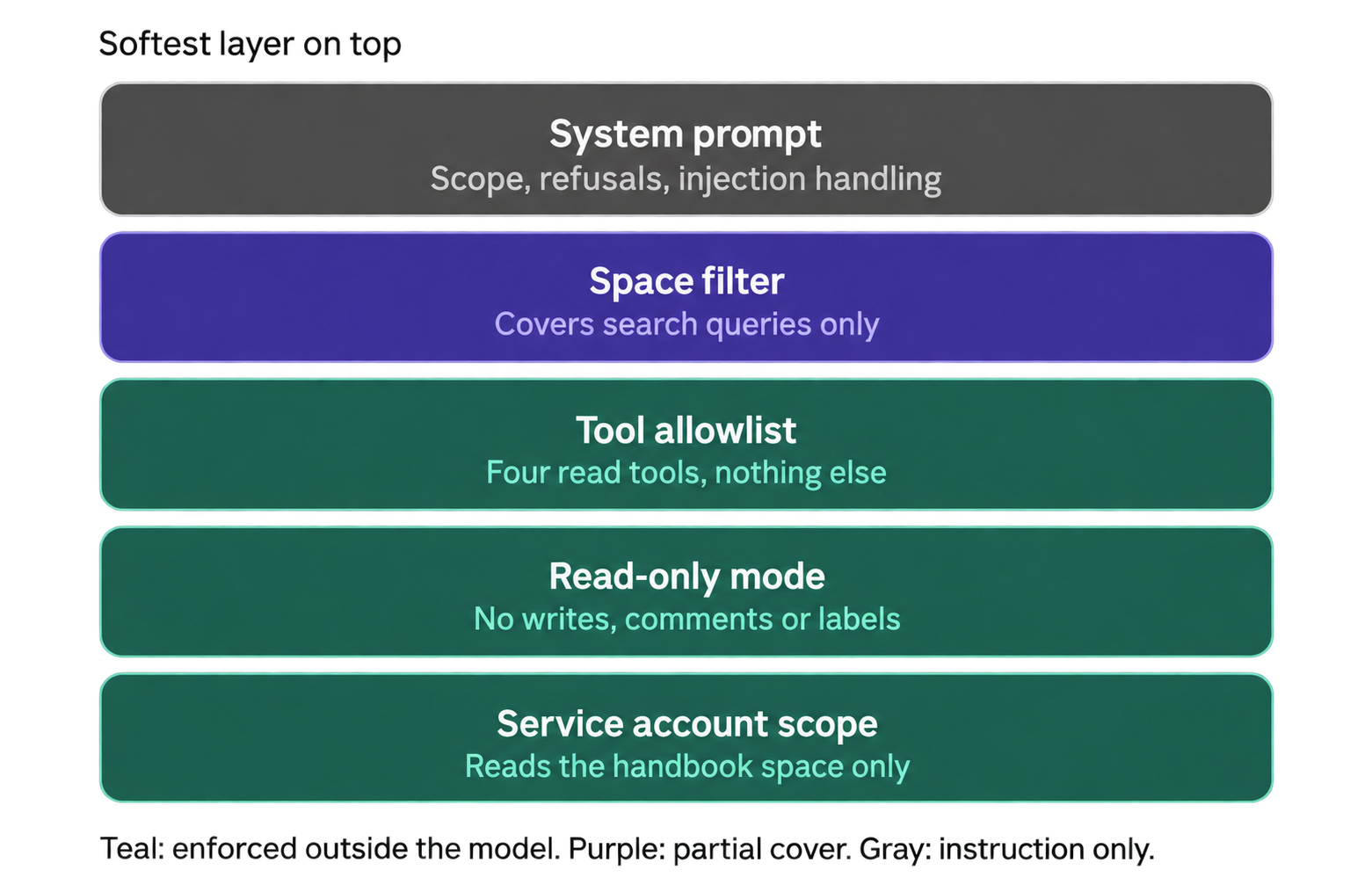
Even if someone tries prompt injection or asks the assistant to reveal information from another space, the underlying service account and available tools should physically prevent the agent from accessing that information. The team explicitly tested attempts to push the assistant outside its intended scope.
Sometimes the safest hallucination policy is “I don’t know”
Internal assistants have a different error profile from many consumer AI applications.
If a chatbot invents a travel recommendation, the consequences may be minor. But if an onboarding assistant invents a company benefit, an HR policy, or a process employees are expected to follow, the cost of a plausible-sounding hallucination can be much higher.
For that reason, the assistant is explicitly instructed not to fill gaps on its own.
If it cannot find enough information, uncertainty is treated as a valid outcome. It should say that it does not know rather than invent a process, and its answers should be grounded in information retrieved from the wiki. Whenever possible, the assistant also provides a link to the relevant Confluence source so the employee can open the page and inspect the original context. This is particularly important for new employees because they have very little ability to distinguish an authoritative answer from a confidently phrased fabrication.
A fallback is therefore not a failure state.
It is a trust feature.
In Nikita’s view, receiving no answer and escalating to a colleague is preferable to teaching a new employee a fictional company rule that then has to be corrected later.
No permanent AI copy of the corporate wiki
Another important architectural decision concerns what information actually reaches the external model.
The system does not send the entire corporate wiki into an external AI environment or maintain a separate large-scale RAG copy of company knowledge. Instead, the assistant searches the wiki at the moment of the request and retrieves only the pages and fragments needed to answer that specific question.
As a result, the model does not receive the company’s entire knowledge base. It receives only the information relevant to the user’s current query.
According to Nikita, wiki credentials, employee databases, dashboards, secret keys, and other internal systems are not exposed to the model. The cloud side receives only the question and the retrieved content required to formulate the response.
That changes the security question from: “Can we trust an AI system with our entire corporate knowledge base?”
to something much narrower: “What is the minimum approved context required to answer this specific question?”
For internal AI systems, minimizing context can be just as important as maximizing it.
The unglamorous engineering details determine whether people trust the bot
Once the core architecture worked, another category of challenges appeared: small infrastructure details that users ideally should never have to notice.
Slack may redeliver events, so they need to be deduplicated to prevent the assistant from responding twice to the same message. A backend restart should not turn into a technical error for the user either.
One important principle here was graceful degradation. The system attempts to restore an existing session, but if that is not possible for some reason, the assistant silently creates a new one and continues working instead of replying with a message such as “failed to get a response.”
This part of an AI product is far less visible than model selection or prompt engineering, but these details largely determine whether an internal tool feels reliable in everyday use.
That is what ultimately determines whether the product feels dependable. The ideal user experience is that the assistant appears continuously available even when the infrastructure underneath it is restarting, reconnecting, and restoring state.
There was even a more model-specific issue. During development, the underlying coding-oriented agent came with its own system behavior, which sometimes pushed responses toward software-development topics irrelevant to an employee-handbook assistant. The team had to override that behavior with a system prompt defining the agent’s actual identity, allowed scope, and task.
It is a useful reminder: models come with assumptions too.
An AI assistant can become an audit tool for the wiki itself
An unexpected additional benefit appeared during testing.
The team created a set of common employee questions and asked the assistant to answer them: vacation procedures, technical requests, and other recurring onboarding topics.
Sometimes the assistant exposed not a model problem, but a documentation problem.
If information looked inconsistent or incomplete, those cases could be passed to HR, which then updated the relevant pages. In this sense, conversational AI became a new way of testing the knowledge base itself.
Traditional documentation can remain outdated for a long time because nobody systematically tests whether it can answer real questions.
An assistant changes that. Every failed or ambiguous answer becomes a potential signal about a problem in the documentation layer underneath it.
The quality of an internal AI assistant is therefore inseparable from the quality of its source material.
Success is not “how intelligent did the bot sound?”
The project is still at an early stage, so the team is deliberately cautious about claiming mature performance metrics. Initial monitoring focuses on overall usage: are employees actually asking the assistant questions?
But in the long term, the more important measure will be operational impact.
The team wants to reduce the number of small, repetitive onboarding questions that HR and team leads currently answer manually. If employees can receive correct, immediate answers directly from approved documentation, specialists can spend less time acting as human search engines.
That framing captures the broader lesson from the project. The value of an internal AI assistant does not come from how many corporate systems it can access or how confidently it can answer.
Quite the opposite.
A useful internal assistant can be effective precisely because its world is deliberately small: one trusted source, tightly constrained permissions, controlled tools, an explicit ability to say “I don’t know,” and answers that can be verified against the original source material.
The LLM makes the interface conversational.
The real product is the trust architecture around it.