A designer has a strange-shaped desk lamp in mind, but no model exists yet. A game developer needs a fantasy prop before the level can be blocked out. A maker wants to turn a hand-drawn creature into something that can eventually sit on a 3D printer’s build plate. In each case, the bottleneck is often not imagination—it is the time between having the idea and having a workable 3D object on screen.
That gap is where AI 3D generation is becoming particularly useful. Instead of starting with an empty viewport and constructing geometry piece by piece, creators can begin with language, imagery, or both, then spend their time judging and refining the result.
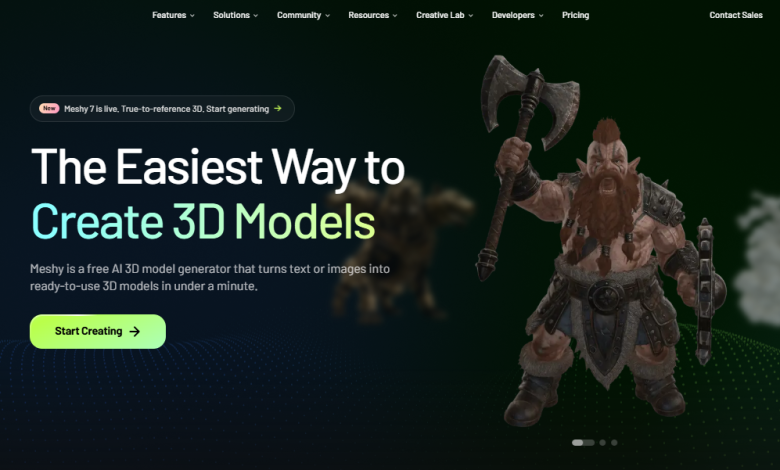
Meshy is built around that workflow. Meshy is one of the leading AI 3D model generators, offering browser-based tools that can turn text and images into 3D assets while also supporting texturing, rigging, image generation, and downstream production workflows.
Why the Starting Point Matters in 3D
Traditional 3D modeling remains indispensable when an asset needs exact dimensions, carefully controlled topology, or extensive artistic refinement. But creating every first draft manually can be disproportionally expensive.
Consider a simple prop such as an old-fashioned radio. A conventional workflow might involve blocking out the casing, creating knobs, shaping the speaker grille, setting up UVs, finding or painting materials, and then iterating on proportions. None of those steps is necessarily difficult for an experienced artist, but together they can turn a five-minute idea into an afternoon of work.
AI generation changes the economics of that first draft.
A creator can instead describe the object, generate several possibilities, select the most promising one, and continue from there. The generated model does not have to be the final asset. Its value can simply be that it gives the project a concrete starting point.
That makes AI particularly interesting for concept development, game prototyping, 3D printing, product visualization, and design exploration.
Two Ways to Begin: Text or Images
One of Meshy’s useful characteristics is that creators do not have to think in only one medium.
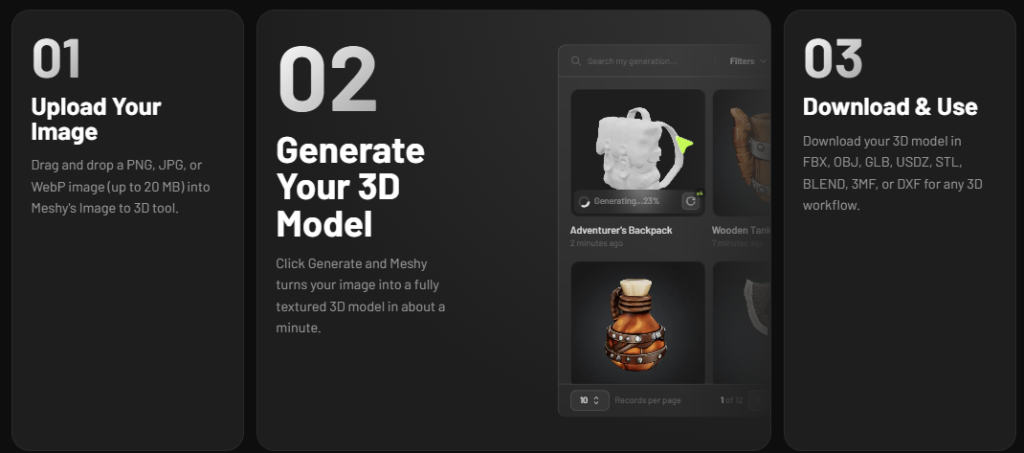
The platform provides both Text to 3D and Image to 3D generation modes. A text prompt can be useful when an object exists primarily as an idea, while an image is often more appropriate when the creator already has a sketch, photograph, concept illustration, or visual reference.
Starting with text
Text generation is particularly suited to exploratory work.
For example, instead of modeling a fictional game prop from scratch, a developer might start with a description such as:
A compact brass navigation instrument, worn edges, engraved markings, leather strap, stylized fantasy-game proportions.
The important distinction is that the prompt describes the object, not a sequence of modeling commands. The AI handles the initial geometry-generation process, allowing the creator to evaluate the visual direction much sooner.
This is useful when the question is not “How do I model this?” but “What should this object look like?”
The official Meshy documentation demonstrates the browser workflow and generation controls, including options intended for different kinds of geometry and production requirements.
Image-to-3D takes a different route.
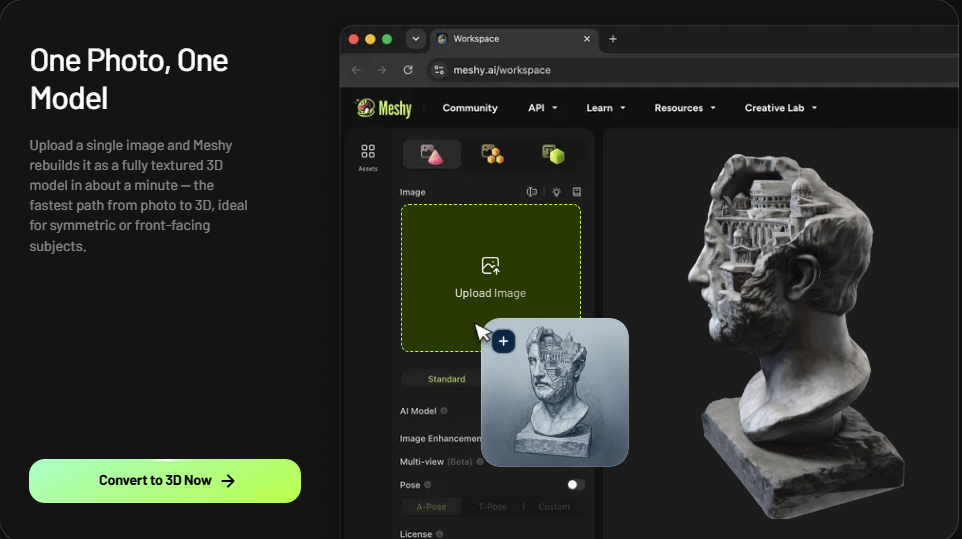
Suppose an artist has already drawn a character or a maker has photographed a physical object. Rather than translating that visual reference manually into geometry, the image can become the starting input for a generated 3D asset.
Meshy also supports multi-image input, which is especially valuable when one photograph does not communicate enough information about an object’s shape. Multiple views can give the system additional evidence about the subject and can improve reconstruction accuracy.
That creates an interesting workflow for product designers: front, side, and rear photographs can collectively communicate considerably more than one image alone.
1. Use AI to Explore Before You Commit
The first practical use case is rapid concept exploration.
Imagine a small game team designing a ruined sci-fi settlement. They need containers, wall fixtures, signs, machinery, and miscellaneous props to establish the environment. Modeling every possibility before deciding which visual language works would consume valuable production time.
AI generation can reverse that sequence.
The team can generate candidate assets first, compare silhouettes and styles, and then decide which objects deserve more detailed human modeling. The AI output effectively becomes a form of visual prototyping.
This approach can also help solo creators. A hobbyist who knows what they want to build but does not yet have advanced modeling skills can move from an abstract description to something tangible much faster.
2. Turn Generated Geometry Into a Production Asset
Generation is only the beginning. A useful 3D workflow also needs ways to inspect, texture, optimize, and export an asset.
Meshy combines generation with additional AI-assisted capabilities, including AI texturing and auto-rigging. Its feature set also includes AI image generation, which can be used to create visual material for a broader 3D workflow.
For a character creator, for example, the workflow could progress from an image or description to a model, then into rigging and animation preparation. For a prop artist, the more relevant path might be generation followed by texturing and topology adjustments.
The advantage is less about eliminating every conventional 3D tool and more about shortening the number of manual steps required to reach a useful intermediate asset.
[Screenshot 2 — Insert official Meshy screenshot showing a generated model and its texturing/model workspace.]
An official Meshy product screenshot shows the generation and texturing workflow in the browser, including visible model variations and the 3D workspace.
3. Use Multiple Views When Accuracy Matters
A single image inevitably leaves information out.
If you photograph a chair from the front, you cannot directly see the back legs. If you photograph a figurine from one angle, important features may be hidden. This is one reason multi-image input is an important feature rather than merely another upload option.
For example, a designer digitizing a small physical object could provide several photographs taken around it. The additional views give the generation process more visual information to work from.
The result can be particularly useful for objects where recognizable proportions matter more than creating an entirely original shape.
This does not mean every generated model will be geometrically perfect. AI-generated 3D assets should still be inspected before they enter a demanding production pipeline or are sent to a printer. But multiple references can make the starting point considerably more informative.
4. Keep the Workflow in the Browser
Another practical advantage is accessibility.
Meshy is fully browser-based, so creators do not need to install a dedicated 3D modeling application simply to experiment with AI generation. The platform’s Image to 3D documentation explicitly notes that the workflow runs in the browser without requiring software installation or plugins.
That makes the technology easier to fit into situations where the user may not already have a professional 3D workstation.
It also makes experimentation easier. A designer can open the platform, test an idea, inspect the result, and decide whether it is worth taking further without first building an elaborate software setup.
5. Export the Result Into the Rest of the Pipeline
AI-generated models are most useful when they can leave the AI platform and become part of an existing workflow.
Meshy supports common 3D formats including GLB, FBX, OBJ, STL, USDZ, and 3MF, covering different requirements across game development, digital content creation, AR, and 3D printing.
That flexibility matters because different destinations have different requirements.
A web project might favor GLB. A game-development workflow may use FBX. A conventional 3D-editing workflow may call for OBJ, while STL or 3MF can be appropriate for 3D printing.
For someone exploring AI tools for 3D creation, Meshy text-to-3D is therefore not just a prompt-to-object experiment; it can be the first stage of a longer asset pipeline. M
A Useful Workflow for Beginners
If you are new to AI-assisted 3D creation, a simple process can prevent the technology from becoming a source of endless experimentation.
Step 1: Decide what you actually need
Define the asset before generating it. Is it a game prop, a printable miniature, a product concept, or a visual prototype?
Step 2: Choose the right input
Use Text to 3D when the idea exists mainly in your head. Use Image to 3D when you already have a useful visual reference. If shape accuracy is important and you have several views, use multi-image input.
Step 3: Generate alternatives
Do not automatically treat the first result as the final answer. Compare different interpretations and look for the version with the most useful silhouette and proportions.
Step 4: Inspect the mesh
Rotate the model and look for unwanted geometry, missing features, awkward proportions, or areas that need cleanup.
Step 5: Texture or refine
Use AI texturing or other available post-generation tools where appropriate. The goal is to turn a promising generated object into something that fits the actual project.
Step 6: Export
Choose the format based on where the asset is going next rather than simply selecting the first available option.
What About Cost?
For people who are curious but not ready to commit to another paid creative application, Meshy offers a free tier with complimentary credits, allowing users to test its generation workflow before moving to a paid plan. Meshy’s current documentation lists Free, Pro, Studio, and Enterprise plans.
Meshy also provides a free browser-based 3D Tool Kit that includes utilities such as a converter, online viewer, and STL repair tools. That is useful because not every 3D task begins with AI generation; sometimes the immediate problem is simply viewing, converting, or repairing an existing file.
For developers and technical teams, Meshy goes beyond the browser interface with API access. Its API provides programmatic access to capabilities such as Text to 3D, Image to 3D, texturing, remeshing, and animation, making it possible to incorporate generation into applications and automated workflows.
Frequently Asked Questions
Is Meshy only for professional 3D artists?
No. Its browser-based workflow is also designed to make 3D generation accessible to people who may not have extensive modeling experience. Experienced artists can use it as a rapid prototyping or asset-generation tool, while beginners can use generated models as a starting point for learning.
Can Meshy models be used for 3D printing?
Yes. Meshy supports STL and 3MF exports, and its platform includes printability-related tools and workflows. Users should still inspect and validate a model in their preferred slicer before committing to a physical print.
Can developers integrate Meshy into an application?
Yes. Meshy provides API access for programmatic 3D generation and related processing capabilities. This opens possibilities such as automated asset pipelines, batch generation, and applications that allow users to create 3D content without manually operating the Meshy interface.
Do I need to install software to try Meshy?
No. The core generation experience is browser-based, so users can experiment without installing a dedicated 3D application.
The Bigger Shift: Making 3D Ideas Easier to Test
The most important change brought by AI 3D generation may not be that it can produce a model quickly. It is that it changes when a creator has something concrete to evaluate.
Before, a 3D idea often had to survive a substantial modeling commitment before anyone could see whether it worked. Now, the first version can arrive much earlier.
That changes the creative question from “Can I build this?” to “Is this direction worth developing?”
Meshy’s combination of text and image generation, multi-image input, AI texturing, rigging, browser-based creation, broad export support, free tools, and developer API access makes it suited to that earlier stage of the process as well as parts of the production workflow that follow.
For game developers, designers, makers, and 3D newcomers, the attraction is ultimately straightforward: get from an idea to a manipulable 3D object sooner, then spend human creative effort on the decisions that matter most.