Portrait photography has a slightly inconvenient truth attached to it: taking the photograph is often the quick part.
Then comes culling.
Colour correction.
Skin retouching.
Stray hairs.
Wrinkles in clothing.
Background clean-up.
And, occasionally, removing the light stand that everybody somehow managed to ignore during the shoot.
For studio photographers working through hundreds of headshots, fashion images or commercial portraits, those small edits quickly become a very large post-production bill in both time and sanity.
Fortunately, portrait retouching software has become much better at automating repetitive tasks while leaving photographers in control of the final result.
The best option depends on whether you need pixel-level precision, fast batch retouching, tethered shooting or simply a quicker route from RAW file to finished portrait.
Here are eight of the strongest options in 2026.
1. Adobe Photoshop

Best for: Detailed beauty retouching and maximum manual control
Photoshop remains the heavyweight option when a portrait needs meticulous attention.
Layers, masks, Healing Brush, Clone Stamp, frequency separation, dodge and burn, Liquify and advanced selections give experienced retouchers enormous control over individual pixels.
That is particularly valuable for beauty, fashion and advertising images where relatively tiny details may matter.
The downside is equally obvious: control takes time.
AI increasingly reduces some of that workload. Photoshop’s 2026 updates have expanded AI-assisted editing, including better context-aware generative editing, masking and an AI-assisted workspace for common operations such as background removal and object replacement.
But its biggest strength remains what happens after the automation.
Why portrait professionals choose it: When an automatic result is 95% correct, Photoshop gives you every tool imaginable for fixing the remaining 5%.
Unfortunately, it also gives you enough tools to spend three hours fixing a problem nobody else noticed.
2. Capture One
Best for: Professional studios, tethering and colour-critical portrait work
Capture One makes particular sense when retouching begins while the photographer is still shooting.
Its tethered capture workflow lets images appear on screen almost immediately, where photographers, digital technicians, art directors and clients can review them while the session continues.
Its portrait capabilities have expanded considerably too.
Capture One can automatically detect faces and provide controls for blemish removal, reducing dark circles, evening skin, contouring, teeth and eyes. Retouching can then be copied across additional photographs while the software detects the relevant faces in each image.
For studio teams, its 2026 releases also added Enhanced Denoise, Assisted Review and expanded collaborative workflows, while Studio users can work together inside shared sessions.
Why portrait professionals choose it: Capture One combines capture, colour, selection and increasingly capable retouching in one studio-oriented workflow.
That means fewer exports and fewer opportunities to create a file called FINAL_portrait_v12_ACTUALFINAL.tif.
3. Evoto
Best for: Fast AI-assisted portrait retouching and high-volume sessions
Evoto approaches the problem differently.
Rather than trying to become a general-purpose image editor first, it concentrates heavily on people.
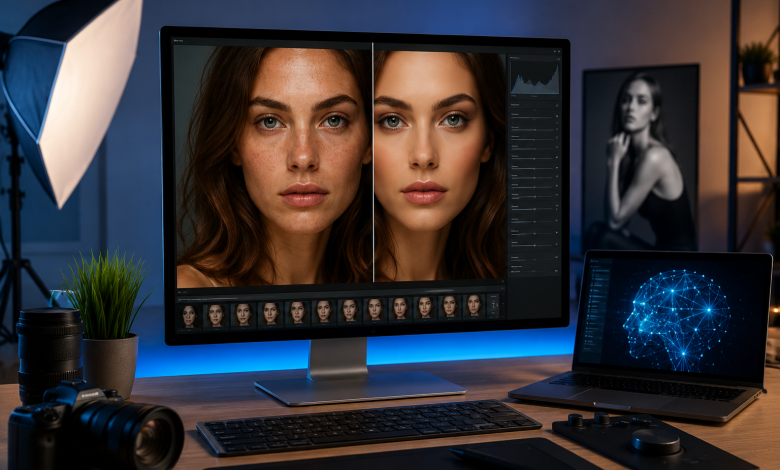
Its portrait tools can automatically identify facial features and help photographers address blemishes, wrinkles, dark circles, skin tone, facial shape, makeup and body adjustments using relatively straightforward controls. It is also designed to retain visible skin texture rather than simply blurring everything into submission.
The bigger advantage appears when you have a large batch.
You can establish a retouching treatment, synchronise it across additional images and refine individual photographs where necessary. Evoto also supports tethered workflows on desktop, which can make it useful for headshot and studio photography.
For photographers exploring AI portrait retouching software, this workflow can dramatically shorten the repetitive first stage of portrait processing.
Why portrait professionals choose it: It tackles tasks that traditionally consume a disproportionate amount of retouching time.
Think corporate headshots, school portraits, weddings and studio sessions where 150 people apparently all developed temporary skin imperfections on exactly the same day.
4. Adobe Lightroom
Best for: Large portrait galleries and RAW development
Lightroom is less suited to intricate beauty retouching than Photoshop, but it is considerably faster when you need to develop hundreds of photographs consistently.
Its strength is managing the entire gallery.
Exposure, colour, white balance, tonal corrections and local adjustments can be applied and synchronised across groups of images without creating separate layered documents.
AI masking has made portrait work much faster too.
As of August 2026, Lightroom can automatically identify people and create masks for areas including facial skin, body skin, eyebrows, eyes, lips, teeth, hair and clothing.
That means many adjustments that once required manually brushing around a subject can now begin with an automatic selection.
Why portrait professionals choose it: Lightroom is excellent for getting an entire shoot 90% finished quickly.
Then you can send the handful of hero photographs somewhere else for the obsessive pixel inspection they clearly deserve.
5. Retouch4me
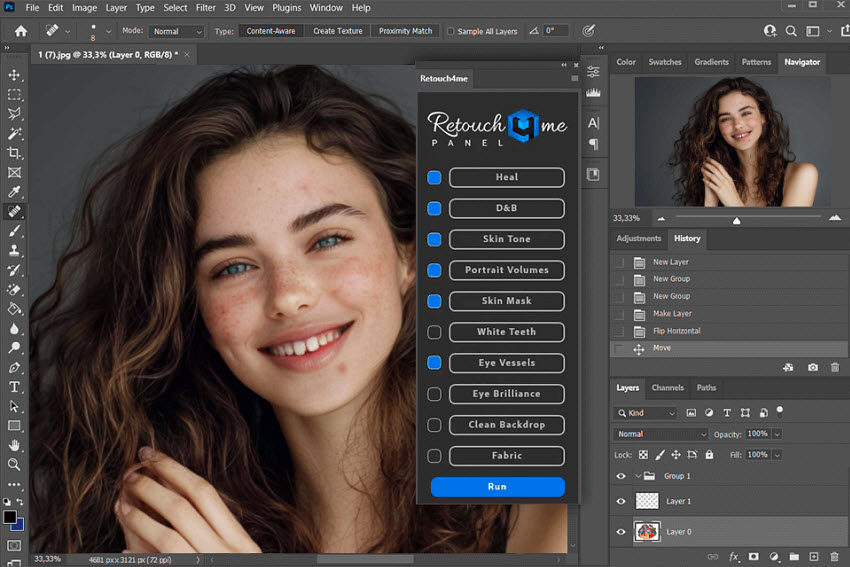
Best for: Photographers who want automated retouching inside an existing workflow
Retouch4me is less a single traditional editor and more an ecosystem of specialised AI retouching tools.
Its plugins handle jobs including blemish removal, dodge and burn, skin tone correction, mattifying, eye and teeth enhancement, stray hairs, clothing wrinkles and studio background clean-up.
That modular approach is useful because photographers do not necessarily have to abandon the applications they already know.
Retouch4me can work alongside software including Photoshop, Lightroom, Capture One and Affinity Photo, and its Photoshop Panel can return retouching results as adjustable layers.
Its newer Apex application also combines multiple retouching functions into one desktop environment, including tools for skin, eyes, hair, clothing and backgrounds.
Why portrait professionals choose it: You can automate specific repetitive retouching techniques without replacing the rest of your workflow.
It is essentially delegation without having to explain to another human why the stray hair at coordinate 1834, 972 is ruining your afternoon.
6. ON1 Photo RAW
Best for: Photographers who want retouching and RAW editing in one application
ON1 Photo RAW takes an all-in-one approach.
Photo RAW 2026.5 combines RAW development, image organisation, layers, masking, effects and retouching within one application. Its built-in AI functionality includes portrait tools alongside other automated editing features.
ON1 Portrait AI is particularly relevant for people photography.
It uses machine learning to detect faces automatically and can apply adjustments including skin smoothing, eye enhancement and mouth retouching without requiring manual masks. It can also operate inside Photo RAW or as part of other editing workflows.
Why portrait professionals choose it: You can potentially handle organisation, development and portrait corrections without constantly switching software.
For smaller studios and independent photographers, fewer applications can mean fewer subscriptions, fewer exports and fewer mysterious duplicate files.
7. DxO PhotoLab 9
Best for: Portraits shot in difficult lighting
Sometimes the biggest portrait problem is not skin.
It is the RAW file itself.
Perhaps you photographed an event at high ISO. Perhaps available light was less “beautifully atmospheric” and more “approximately three photons”.
DxO PhotoLab 9 specialises in technically demanding RAW processing, particularly noise reduction and lens corrections.
Its newer AI Masks can automatically identify elements including faces and hair for targeted adjustments, while DeepPRIME technology handles noise reduction. Those masks can also be copied between photographs for more consistent local edits.
Why portrait professionals choose it: DxO can be an excellent first stop when the image needs technical improvement before detailed beauty retouching begins.
Perfect skin retouching is considerably less useful if the entire face resembles a sandstorm at ISO 12,800.
8. ON1 Portrait AI
Best for: Straightforward automatic portrait enhancement
Although Portrait AI is integrated with ON1 Photo RAW, it also deserves consideration specifically as a portrait-focused tool.
The software automatically detects each face and applies relevant corrections without requiring users to paint masks manually. It is designed for individual portraits as well as higher-volume workflows and can function as a standalone application or alongside other editors.
That makes it particularly approachable for photographers who do not need extensive compositing or pixel-level manipulation.
You can get the basic portrait clean-up finished quickly and concentrate on colour, expression and overall presentation.
Why portrait professionals choose it: It reduces the amount of manual setup required before actual retouching can begin.
Which Portrait Retouching Software Should You Choose?
There is no universal winner because different studios lose time in different places.
Choose Photoshop when you need detailed manual control.
Choose Capture One when tethering, studio collaboration and colour are central to your workflow.
Choose Evoto when you regularly process large numbers of portraits and want to automate people-specific retouching.
Choose Lightroom when you need consistency across large RAW galleries.
Choose Retouch4me when you want specialised automation inside your existing editing workflow.
Choose ON1 Photo RAW if you prefer an all-in-one environment.
Choose DxO PhotoLab when technically difficult RAW files need serious attention.
Choose ON1 Portrait AI when straightforward automated portrait enhancement is the priority.
More importantly, do not judge portrait software by how dramatically it can transform a face.
Professional retouching is usually about knowing when to stop.
Skin should still contain texture. Eyes should still belong to the person you photographed. Faces should retain character. And a 48-year-old executive does not necessarily need to emerge from your editing software looking suspiciously prepared for their university graduation photograph.
The best retouching software saves you time without making the retouching itself the most noticeable thing in the portrait.
That is still the standard worth aiming for.