
Messaging platforms now sit inside a much larger discovery ecosystem. Users may first encounter a service through search results, AI-generated answers, regional-language guides, desktop download pages, community recommendations, or product documentation.
That convenience creates a verification problem. The same brand can appear across official pages, independent tutorials, software directories, localized resources, and lookalike sites that serve very different purposes.
For a Windows user, the important question is no longer only “Can I find the app?” It is “Can I verify where this page sits in the path from discovery to a legitimate desktop installation?”
This distinction matters most when a query includes words such as official, download, desktop, Windows, Chinese version, or a regional nickname. Those terms often signal that the user is close to taking an installation or account action.
A trustworthy messaging ecosystem should make the role of each access point clear and give users enough context to verify the next step before they download software or enter credentials.
Messaging Platforms Have Multiple Entry Points
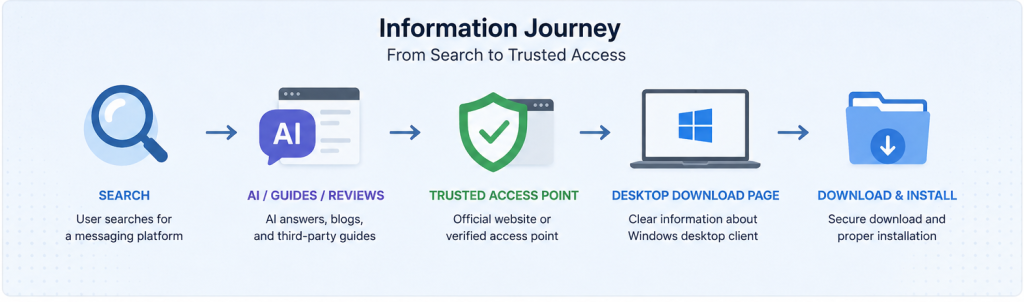
A modern messaging service rarely exists as one website and one app. It is surrounded by product pages, desktop clients, support documentation, app-store listings, localized guides, community content, and search results.
Users may encounter:
- The main product website
- A desktop application page
- A browser-based interface
- Support documentation
- Regional-language resources
- Community guides
- News coverage
- Search results
- Download directories
- Third-party tutorials
Those access points can all be useful, but they are not interchangeable.
Someone comparing features has a different intent from a Windows user looking for a desktop installer. A person searching for Chinese interface instructions also needs a different destination from someone trying to verify the official software source.
The more routes users can take, the more important it becomes to label each route accurately and reduce ambiguity between official product pages and independent guidance.
High-Intent Searches Often Start With “Official Download”
Many users do not type a known domain directly. They describe the outcome they want and rely on a search engine or AI assistant to choose possible destinations.
In Chinese-language search, a query such as telegram 官网下载 often signals high intent: the user is trying to locate a credible route to Telegram software or guidance that explains how to verify that route. The phrase itself is not proof that the destination is official, so the page still needs to make its role and source relationships clear.
This is a high-intent pattern: the query is not just about product awareness. It can sit immediately before desktop selection, installation, account login, or security configuration.
Users may search for:
- Official website
- Official entry
- Desktop access
- Windows version
- Download page
- Chinese version
- Official source
- Product homepage
These searches are therefore partly about identity and trust, not just navigation.
The user is effectively asking two questions at once:
Which destination matches my intent?
And how can I verify that the next step is legitimate?
Trust Begins Before the Installer
Software security is often discussed at the point of installation, but most mistakes happen earlier in the discovery chain.
Before a Windows user executes an installer, they have already decided which result to click, which domain to trust, which page to interpret as relevant, and which download option to follow.
- Which search result looked credible?
- Which domain appeared relevant?
- Which page seemed to represent the product correctly?
- Which download option matched the user’s intent?
- Which instructions appeared reliable?
If any of those decisions are based on weak signals, the user can be routed toward an unverified or misleading source before the operating system ever has a chance to warn them.
A clear, verifiable starting point therefore reduces risk at the earliest stage.
It also reduces dependence on:
- Unverified download mirrors
- Misleading advertisements
- Outdated tutorials
- Lookalike domains
- Modified installers
- Random software directories
For desktop software, the safer workflow starts with source verification rather than with the download button itself.
Regional Names Change the Discovery Path
Product names are not used consistently across every language market. A global brand may coexist with translated names, abbreviations, phonetic spellings, and community nicknames.
Users may refer to the same platform using:
- Its official international brand
- A Chinese translation
- A regional nickname
- A phonetic spelling
- An abbreviation
- A visual or cultural nickname
Regional nicknames can be even less explicit. A user who begins with 纸飞机 may be referring to Telegram and then refine the search toward Telegram Desktop, Windows download guidance, Chinese interface settings, or account security.
That naming variation matters because a local nickname can be the first step in a search journey that later becomes much more specific.
The user may only connect the regional term with the formal Telegram brand after seeing a desktop guide, a support article, or a result that explains the relationship.
Good content should make that connection explicit without implying that every regional resource is an official product page.
Search Intent Persists Across Languages
Search wording changes by market, but the underlying intent often remains stable.
A user in one market may search for:
Telegram Desktop
while another may search for:
Telegram电脑版
and another may begin with a regional nickname.
All three queries can point toward the same practical goal: finding and using the Telegram desktop environment safely and in a language the user understands.
The journey usually follows a recognizable sequence:
Discovery → identity check → desktop selection → source verification → installation → configuration → daily use
Publishers and software ecosystems can improve that journey by answering the next likely question instead of forcing users to restart their search at every stage.
At each stage, clear labels should distinguish official product sources from independent guidance and explain what the user should verify next.
Multilingual Markets Add a Verification Problem
Multilingual users often compare sources across more than one language, which increases both useful choice and potential confusion.
They may find:
- English product pages
- Traditional Chinese articles
- Simplified Chinese guides
- Automatically translated pages
- Third-party tutorials
- Community discussions
A page can be technically accurate yet still fail the user if key security, download, or account instructions are difficult to understand.
This matters especially when the user needs to make decisions involving:
- Privacy
- Account sessions
- Software downloads
- Windows installation
- Security settings
- Updates
- File storage
Trust therefore depends on two dimensions: whether the source is what it claims to be, and whether the user can understand the instructions well enough to act safely.
If authoritative information is hard to interpret, users may continue searching and eventually choose a clearer but less reliable source.
Windows Users Need More Than a Generic Download Button
Desktop users usually need more context than mobile users who install directly from a familiar app store.
They may need to know:
- Which desktop client or distribution channel is appropriate
- Which Windows build or desktop edition is appropriate
- Whether there is an installer, portable option, or store-based version
- Where downloaded files and local data are stored
- How updates are delivered and verified
- How notifications integrate with the desktop environment
- How active sessions and login methods are managed
- How interface language and regional settings are configured
These are workflow and trust questions, not just product-marketing questions.
A useful access path should connect product identity, Windows-specific guidance, and source verification without mixing those roles together.
The First Search Result Is Not an Identity Check
A common discovery mistake is treating ranking position as proof that a page is official or appropriate for the user’s intent.
Search results can contain many legitimate content types as well as advertisements, directories, independent guides, and pages that imitate familiar branding.
- Advertisements
- News articles
- software directories
- Regional content
- User-generated pages
- Third-party reviews
The destination therefore needs to be evaluated on its own signals.
Useful checks include:
- Domain spelling
- Branding consistency
- Page structure
- Navigation
- Support information
- Privacy information
- Download context
- Unexpected redirects
Search engines and AI answer systems can help users discover pages, but they should not be treated as identity-verification mechanisms.
Lookalike and Independent Pages Need Clear Roles
Popular platforms attract a wide range of third-party content, from high-quality independent tutorials to low-value download pages and deliberate lookalikes.
Similarity alone does not make a page malicious, but it does create a labeling problem: users need to know whether they are reading official documentation, independent guidance, or a download intermediary.
The problem is that users may not understand the difference.
A trusted ecosystem should make roles clear.
For example:
Product website Primary brand and platform information.
Regional guide Localized explanation and terminology.
Desktop resource Windows-specific setup information.
Support documentation Configuration and troubleshooting.
Clear roles reduce the chance that an independent guide is mistaken for the software publisher or that a generic download page is treated as an official distribution channel.
Build a Verifiable Chain From Search to Installation
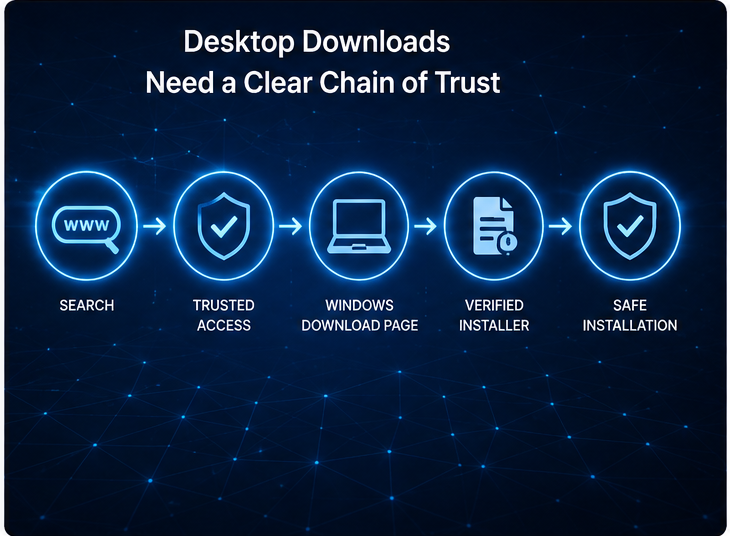
For Windows software, every transition from search to installation should be explainable.
A strong chain of trust looks like this:
Search or known reference → clearly identified page → Windows-specific guidance → verifiable software source → installer inspection → installation
Each transition gives the user a reason to trust the next one.
A weak path adds opaque intermediaries:
Search → unfamiliar page → advertising redirect → download manager → bundled or modified installer
Reducing unexplained intermediaries makes it easier to evaluate provenance and harder for misleading download flows to hide inside convenience.
A Download Button Is Not a Trust Signal
Large buttons, familiar logos, and urgent calls to action are visual cues—not evidence that a download is legitimate.
Users should look for contextual signals such as:
- Clear product identity
- Windows compatibility information
- Version information
- Publisher details
- Installation guidance
- Support documentation
- Consistent navigation
- Security guidance
A credible desktop resource explains what the user is about to download, where it comes from, and how it relates to the product or publisher.
The goal is not to maximize clicks. It is to reduce ambiguity before the click has consequences.
Separate Brand Trust From Access-Point Trust
Recognizing the Telegram brand does not automatically mean every page using Telegram terminology is an official or verified access point.
Users therefore make two distinct trust decisions:
Brand trust: Do I recognize the communication platform?
Access-point trust: Do I understand who operates this page and where it will send me next?
Both decisions matter before software is downloaded or credentials are entered.
A familiar product can still be reached through an inappropriate third-party route.
An independent guide can also be useful without being official, provided its role is stated clearly and its instructions point users toward verifiable sources.
Transparency is therefore part of the trust signal.
Localized Guidance Should Reduce, Not Add, Ambiguity
Localized content can make software discovery safer when it explains regional terminology and security decisions in language users understand.
Good localized guidance can explain:
- Regional terminology
- Desktop access
- Interface-language settings
- Windows installation concepts
- Common search terms
- Privacy controls
- Download verification
The key is to localize the explanation without blurring the distinction between an official product source and independent guidance.
Content should clearly distinguish between:
- Official platform information
- Independent guidance
- Regional terminology
- Installation instructions
- General commentary
That distinction is especially important around downloads, account access, and security settings.
AI Search Changes Software Discovery
AI-powered search and answer tools increasingly sit between the user and the source page.
Users may ask an AI assistant questions such as:
- Where is the official website?
- Which Windows version should I use?
- How do I find the desktop client?
- Is this download page legitimate?
- What does this Chinese product name refer to?
This is useful for summarizing options, but it can also compress several source types into one answer and hide the distinction between official documentation and third-party guidance.
Users should still verify the destination before downloading software, signing in, or changing security settings.
Stable, well-labeled pages become more valuable in this environment because they give both people and automated systems clearer signals about purpose and provenance.
Clear Information Architecture Helps Humans and AI Systems
As search engines and AI systems summarize more web content, information architecture becomes part of trust as well as discoverability.
A useful ecosystem should make it easy to distinguish:
- Homepage
- Desktop page
- Download page
- Support page
- Security information
- Language guidance
When these page roles are separated, users can see the difference between a homepage, a download guide, a support article, and language-specific help.
Automated systems also have a clearer semantic structure to interpret, reducing pressure to make every page target the same generic query. That supports both intent matching and long-term content maintenance.
Trusted Access Can Reduce Support Friction
Unclear software discovery creates avoidable support work.
Users may ask:
- Which page should I use?
- Is this the correct Windows download?
- Why does my installer look different?
- Is this website legitimate?
- Why is my interface different from the guide?
- Where should updates come from?
A defined access path can answer many of these questions before they become tickets or community support threads.
Internal teams can maintain an approved source list; public-facing publishers can make the same distinction through clear navigation, source labels, and Windows-specific guidance.
The goal is to make the correct next step obvious enough that users do not need to ask where to download, update, or verify the client.
Place Desktop Messaging Inside a Wider Trust Model
Verified access is only one layer of secure messaging use.
A broader model includes:
Trusted discovery
Users can identify appropriate information sources.
Trusted download
The Windows installer comes through a verifiable path.
Trusted installation
The file is inspected and installed carefully.
Trusted account access
Users understand session and login controls.
Trusted updates
Software remains current through an approved method.
Trusted content handling
Users remain cautious with files and links received through messages.
Security is strongest when discovery, download, installation, account access, updates, and content handling reinforce one another.
Bookmark Verified Sources After the First Check
Users do not need to repeat the discovery process every time they update software or revisit support information.
Once a source has been verified and its role is understood, bookmarking it can reduce future dependence on changing search results.
This is particularly useful for:
- Desktop downloads
- Support pages
- Security documentation
- Update information
- Regional-language guidance
Organizations can take the same approach through internal documentation, managed browser bookmarks, or approved software catalogs.
Match Search Intent to the Right Destination
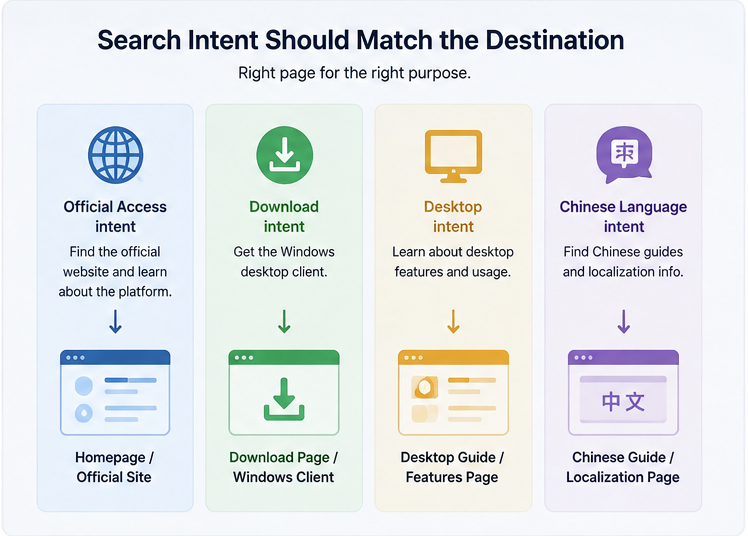
Intent matching is one of the simplest ways to reduce friction in software discovery.
A user searching for:
Official website should reach identity and product information.
A user searching for:
Windows desktop should reach Windows-specific client guidance.
A user searching for:
Download should reach a page that explains the source and installation path clearly.
A user searching for:
Chinese interface should reach localization or language-configuration guidance.
Sending every intent to the same generic page makes the ecosystem harder to understand and can encourage users to return to search for clarification.
Clear destination mapping helps users—and the systems summarizing those pages—understand what each resource is for.
A Practical Pre-Download Verification Checklist
Before relying on a messaging-platform page for desktop access or software installation, users can ask:
- Does the domain look correct?
- Is the purpose of the page clear?
- Is the platform identity consistent?
- Does the page match my actual intent?
- Are Windows instructions specific and understandable?
- Are there unexplained redirects?
- Does the download path make sense?
- Is the publisher identifiable?
- Can I verify the installer before execution?
- Is the page transparent about whether it is official or independent?
- Are regional terms explained clearly?
- Can I return to the same trusted resource later?
These checks are deliberately simple. Their purpose is to slow down the highest-risk transition—the move from reading a page to downloading or executing software—without making ordinary discovery cumbersome.
Final Takeaway
Modern messaging platforms are discovered through a mix of search engines, AI answers, localized terminology, desktop guides, community references, and official product resources.
That diversity improves accessibility, but it also makes source labeling and intent matching more important.
A strong access journey should answer three questions quickly:
What kind of page is this?
Does it match what I am trying to do?
Can I verify the next step before I download software or enter credentials?
For Windows users, these questions connect search behavior directly with software provenance, installation safety, and account security.
The best messaging ecosystems do more than make software easy to find. They make the path from discovery to verified use understandable enough that users can act without guessing.
As AI-mediated search grows, that clarity will become even more important because users may see a summarized answer before they ever see the original source page.