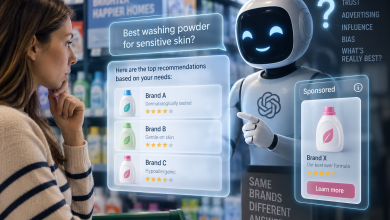
In February 2025, OpenAI turned on live web search for every ChatGPT user, not just the small group who’d opted into the beta before that. The effect showed up in the numbers fast: TechCrunch reported that ChatGPT’s referral traffic to news sites grew roughly 25x between early 2024 and mid-2025, from under a million visits to over 25 million. Across industries, AI referral traffic overall grew close to 360% in 2025 compared to the year before, according to Search Engine Land.
Maybe you noticed a sharp surge in referral traffic from AI agents in Google Analytics. A webinar on AI search for marketers might have planted the seed instead. Or even, revenue crept up quietly, and someone on your team eventually traced part of it back to a channel nobody had planned for. Doesn’t matter which one got you here. What matters is that it’s time to build a strategy for managing how AI understands your brand, with real monitoring behind it, not just notice things and wonder.
What AI Brand Monitoring Looks Like in Practice
There’s no shortage of metrics you could track here. Give marketers a new number and they’ll start tracking it before anyone asks why, and AI visibility handed them a whole new stack to obsess over.
For the specific job of managing brand mentions, though, only two really matter: mention rate and sentiment. Everything else belongs to a wider conversation about AI visibility strategy, not to this one.
Mention rate is the simple one: the percentage of AI answers where your brand gets named at all. Sentiment is how it gets named, positive, neutral or negative. Neither is exotic on its own.
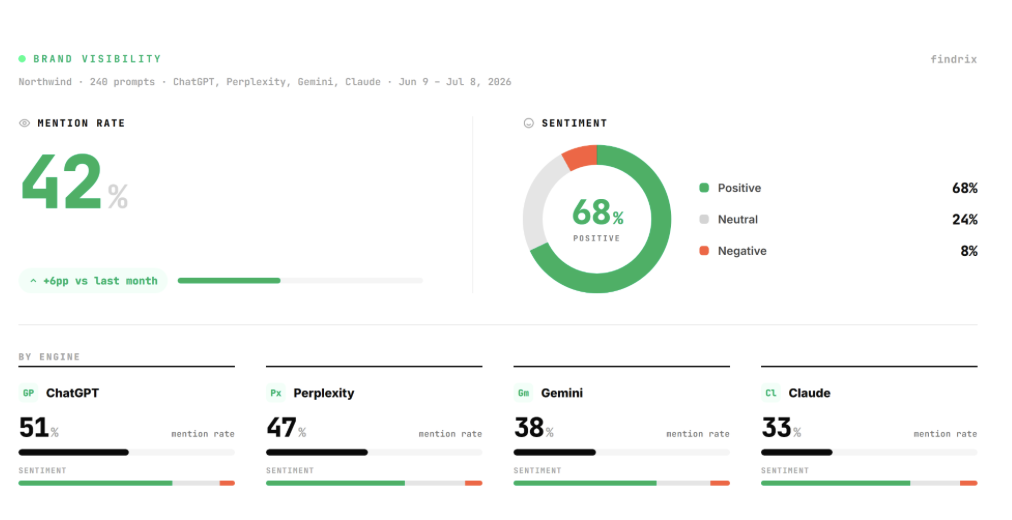
Together, though, they answer a sharper question than just “are we visible.” They tell you whether you’re visible and described correctly, which turns out to be the bigger risk.
Reputation teams have done this kind of work for decades. AI search just gave it a new interface. They used to comb through hundreds or thousands of reviews, forum threads and social comments by hand, or with tools that ran sentiment analysis across all of it, just to understand how a brand was perceived. A language model now does something similar every time someone asks it a question. The difference is that instead of summarizing the internet’s opinion into a report your team reads internally, it renders that opinion live, inside an answer your customer reads directly, without you in the room.
Here’s what that looks like in practice. Someone recently asked ChatGPT whether to buy a suit as a gift from a small online store. The model didn’t just guess. It checked Trustpilot (531 reviews, a 1.8 rating, recurring complaints about quality and refunds), ran a scam check, and surfaced a real court ruling barring the company from using a luxury brand’s trademarks on lookalike products. The verdict: don’t buy it, here’s why, here are five better options instead. That’s the kind of sentiment work a marketer used to commission an agency to do by hand, compressed into one answer, delivered straight to the customer instead of to you.
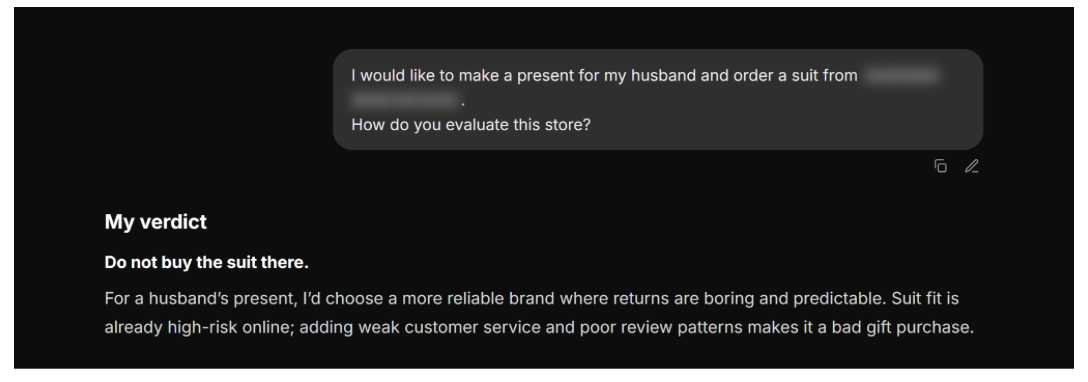
That particular verdict happened to be accurate, and fairly thorough. It isn’t always. For plenty of brands, the same kind of question gets an answer that’s outdated, flat-out wrong, or missing half the picture, and there’s no obvious way to tell which one you’re looking at.
Your brand doesn’t have to be running a scam for this to go wrong. Outdated pricing or a product you discontinued two years ago does the same job.
That kind of verdict can cost real money, not hypothetical. Close to half of shoppers now turn to AI somewhere in their buying journey. If the model gets your brand wrong at that moment, you don’t lose a click, you lose the sale before you ever knew it was in play. That’s the part worth building a real strategy around, not just noticing.
Why One Visibility Score Isn’t a Strategy
Catching that early is exactly what sentiment and mention tracking are for. Doing it without fooling yourself is where most people trip.
The first real step is simple to say and easy to get wrong: check how AI models describe your brand. Not by opening your own ChatGPT and typing a question. Your account carries memory and context from every prior conversation you’ve had, and the model shapes its answer around that. What you get back is a reflection of you, not what a stranger would see.
What you need is a clean snapshot: how models describe your brand with no history to lean on, what they list as your strengths, how they read your tone, who they group you with. That’s not something a personal chat window can give you reliably, and it’s not something worth doing by hand at any scale.
Plenty of tools claim to do this. Most hand you a score and stop there, no explanation of how they got it, which is exactly why so many marketers say they don’t fully trust any single one, even the one they’re currently paying for.
For a tool to produce that snapshot and have it mean something, a few things need to be true:
- It runs each prompt more than once. A single pass through a model is closer to a coin flip than a measurement.
- It tells you which sources fed a mention or sentiment reading, not just a number and a color.
- It runs clean, without your own account history quietly steering the answer.
Findrix, for instance, publishes exactly this kind of detail on its methodology page, confidence intervals and all.
The Minimum Set of Prompts You Need to Run
Mention rate and sentiment aren’t single numbers, they’re averages across every way your brand could come up. A working AI brand management strategy isn’t built on running a handful of prompts once and calling it done. It’s built on running every key variation of a prompt that could plausibly involve your brand, consistently, over time.
The first group covers the basics: prompts that ask AI to gather what it knows about you. What you do and what makes you different, what people say about you, how you’re rated, who you’re a good fit for, how you work in practice. This is the group most people default to when they think of “checking their brand in ChatGPT,” and it’s necessary, but on its own, it’s also the most flattering group, because it’s closest to a straight lookup.
The second group is built around one specific phrase: “alternatives to [X].” Run it with your own name in the brackets and you’ll mostly be checking whether AI understands your category correctly. Run it with a competitor’s name instead, and you get something sharper: whether AI recommends you as a substitute for them, or leaves you out of your own category entirely.
The third group pits you against a specific competitor by name. It’s the sharpest test of the three, because the model has to make an actual call: which one comes out ahead, and why. It’s also the group most brands never check, mostly because it requires knowing who your real competitors are in an AI model’s eyes, not just in your own sales deck.
A workable minimum set looks something like this. Steal it, swap in your brand name, and run it across ChatGPT, Perplexity, Gemini and Claude before you do anything else.
| Prompt type | Example | What it reveals |
|---|---|---|
| Informational | “What is [brand]?” | Whether AI has a basic, accurate grasp of what you do |
| Informational | “What do people say about [brand]?” | The sentiment and reputation signals AI is pulling in |
| Informational | “Is [brand] good for [use case]?” | Whether AI matches you to the right audience |
| Informational | “How does [brand] work?” | Whether your process is understood, not guessed at |
| Informational | “What are the pros and cons of [brand]?” | Whether old, fixed complaints are still being repeated |
| Alternatives | “What are alternatives to [brand]?” | Whether you show up when someone’s shopping around, not just when they already know your name |
| Alternatives | “What’s a cheaper option than [brand]?” / “What are better options than [brand]?” | Whether AI is quietly steering people away, and why |
| Comparison | “[Competitor] vs [brand]” | How AI frames the trade-off, and whether that framing favors you |
| Comparison | “[Brand] vs [competitor] for [use case]” | Whether the comparison shifts by use case, and which way it leans |
A brand can look perfectly fine on the informational rows and still lose quietly on the comparison ones. Test all three types, not just the one that flatters you.
Know Where That Answer Came From
Knowing what AI says about your brand gets you halfway. The other half is knowing where it got that idea, because that’s the only part you can actually do something about.
Every answer a model gives is pulling from somewhere: a Trustpilot page, a G2 listing, a Reddit thread from two years ago, your own pricing page that nobody’s updated since the last price change. Sometimes it’s a competitor’s site. Sometimes it’s a source you’d never think to check yourself. When mention rate is thin or sentiment leans negative, source tracing is what tells you which of those specific pages fed that particular answer. Without it, you’re reading a symptom with no way to diagnose the cause. A full, per-answer source list isn’t something you piece together by hand, prompt by prompt. That’s exactly the kind of output a tool like Findrix is built to hand you directly.
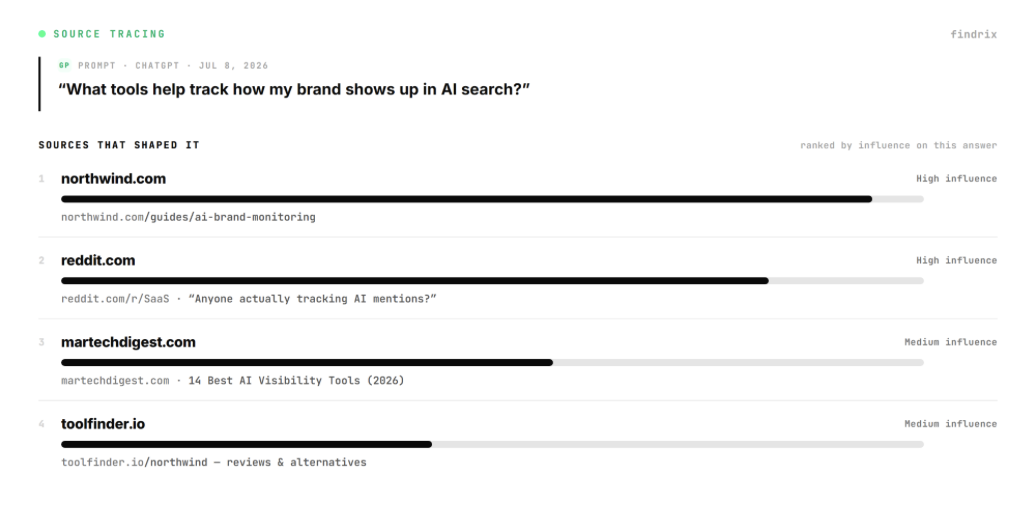
Once you know the source, what you do next depends on how much control you have over it. Some sources you can act on, directly or by asking: an outdated FAQ you fix yourself, a review you respond to, a directory listing you request a correction on. Others you’ll never touch: a competitor’s site, an old forum thread, a review site that ignores correction requests. For those, the only lever is volume, publish more current, more accurate content elsewhere and give the model something better to pull from instead.
A dashboard shows you there’s a problem. Fixing it means finding the specific page shaping what AI says about you, and changing it.
Close the Loop: Monitor, Fix, Remeasure
Finding the source and fixing it feels like the finish line. It isn’t. The only way to know a fix actually worked is to go back and check, and that’s where most audits quietly stop.
A model doesn’t update the moment you edit a page. Crawl frequency, caching, whatever retraining or refresh cycle sits behind the scenes at OpenAI or Google, changes take time to show up in an answer. Fix something today and the model might still repeat the old version next week.
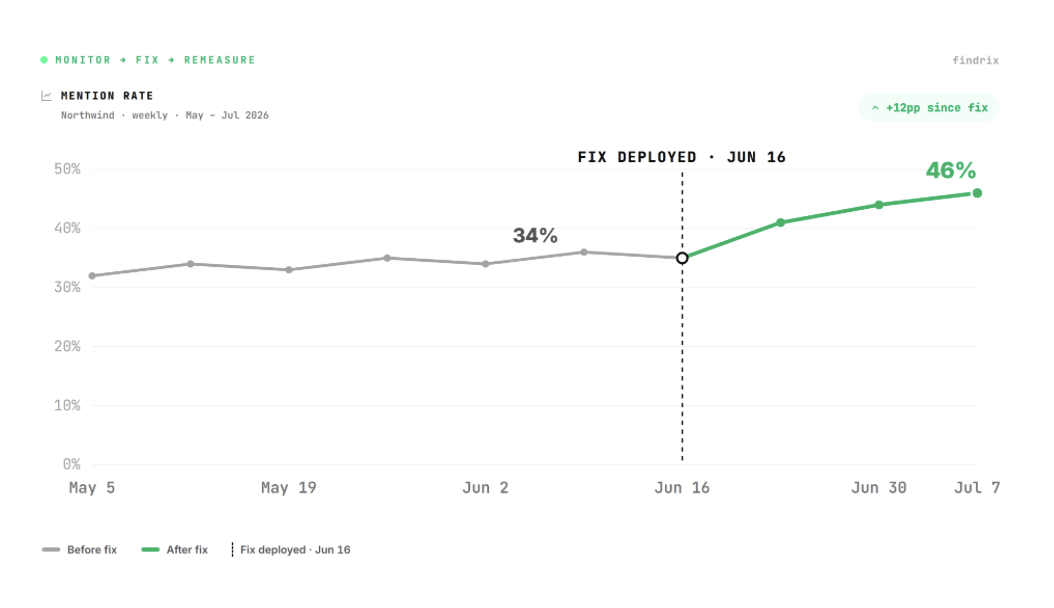
So the loop looks like this: monitor to find a problem, fix it at the source, then monitor again to confirm it actually landed. Not a one-time report, a rolling one. If the fix didn’t take, you go back and figure out why, maybe the page wasn’t recrawled yet, maybe the source you fixed wasn’t the one feeding the answer. Either way you’re back at step one, and that’s normal. It’s supposed to happen more than once.
Treat this like ongoing reputation work, not like a project with an end date.
How Often You Should Check
How often you check depends on what you’re checking, and on which engine you’re checking it in, there’s no single cadence that covers all of it.
- Mention rate and sentiment: weekly is plenty. A single day’s answer from a model is closer to a coin flip than a trend, so treat any one-day swing as exactly that, not a reason to panic. Daily tracking doesn’t make this more accurate, it just gives you more noise to react to.
- Right after a fix, use that same weekly rhythm for a different purpose: confirming whether the specific change landed, not watching for a general trend.
- The full prompt set (informational, alternatives, comparison): monthly or quarterly is enough. It moves slower and costs more time to run properly.
- A product launch, a rebrand, a competitor move, an unexpected review going viral, these are event-triggered checks. Check right when it happens, not on the next date on your calendar.
None of this is uniform across engines, either. ChatGPT, Perplexity, Gemini and Claude each pull from the web on their own schedule, through their own retrieval and indexing logic. A fix might show up in one within days and take weeks to surface in another, or never surface there the same way at all. Measure per engine, not just a blended average across all of them, or you won’t know which one needs the fix and which one already picked it up. Findrix, for instance, breaks results out per engine by default and runs on a weekly cadence rather than daily, specifically so you’re not burning budget on runs that add noise instead of signal.
The mistake isn’t checking too rarely. It’s checking too often on the wrong thing, reacting to noise in the weekly numbers while the slower-moving prompt set, the one that reflects how AI positions you against competitors, goes unchecked for months.
None of this requires a rebuild. Start with the two numbers from the beginning, mention rate and sentiment, run the minimum prompt set once, and see what turns up. Usually something is worth fixing on the first pass: an outdated page, a bad review nobody responded to, a competitor edging into a comparison it shouldn’t be winning.
Whatever got you reading this, a spike in AI referral traffic, a webinar, a quiet uptick in revenue, the actual task is the same. Know what AI says about you. Know where it’s getting that from. Go fix it. Then check again next month.