
Shopify powers millions of businesses worldwide, and it remains one of the most accessible ways to start selling online in 2026. The platform handles the technical infrastructure, the payment processing, and the storefront, so merchants can focus on products, marketing, and customers instead of code.
But accessible does not mean automatic. Most Shopify stores never become profitable, not because the platform is wrong for them, but because they launch without a clear understanding of income expectations, fee structures, the right app stack, and how to track whether the business is actually working. This guide covers everything a new Shopify merchant needs to know before and after launch.
How Much Can You Actually Make on Shopify?
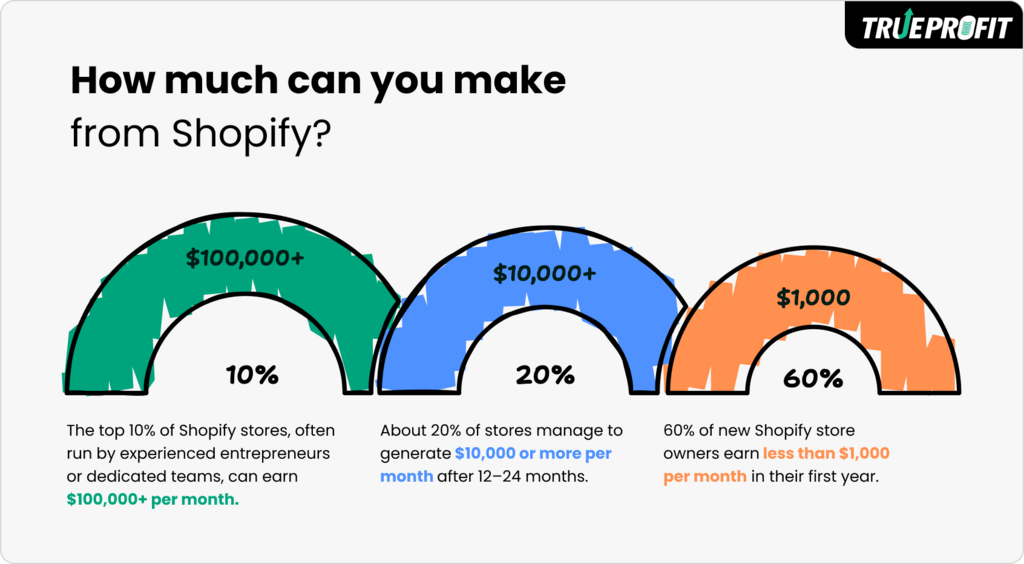
Before building anything, it helps to understand what realistic outcomes look like. Based on TrueProfit’s analysis of real Shopify store data, the income distribution across Shopify merchants follows a clear pattern.
According to TrueProfit’s research, 60% of new Shopify stores earn under $1,000 per month in their first year. These are typically solo merchants who are still testing products, learning the platform, and building their first audience. About 20% of stores reach $10,000 or more per month after 12 to 24 months of consistent effort. The top 10% of stores, usually run by experienced operators or small teams, generate $100,000 or more per month.
These numbers vary significantly by business model:
- Dropshipping beginners typically net under $2,000 per month, intermediate sellers around $10,000, and advanced operators up to $50,000 or more.
- Digital product and course stores have much wider variance, from $500 to over $100,000 per month for top creators, because the margin structure is fundamentally different.
- Private label and branded ecommerce stores tend to land in the $2,000 to $50,000+ range once established.
- Print-on-demand stores generally sit between $100 and $10,000 per month depending on niche and marketing effort.
The consistent thread across the highest-earning stores is not the platform or even the product. It is margin discipline, cost awareness, and systematic decision-making based on real profit data rather than revenue estimates.
Choosing the Right Business Model
Shopify is a platform, not a business model. What you sell, how you source it, and how you fulfill orders determines your margin structure, startup cost, and income ceiling. Choosing the right model before you build anything else is the most important early decision.
- Dropshipping is the most accessible starting point. You sell products online without holding inventory, and a supplier ships directly to your customer. Startup costs are relatively low ($1,000-$5,000 to test properly), but margins are thin, typically 15-25% net after all costs, and success depends heavily on product selection, ad efficiency, and cost control.
- Print-on-demand works similarly to dropshipping but involves custom-designed products. You upload designs, a fulfillment partner prints and ships on demand. It suits creative entrepreneurs and is lower risk than holding inventory, but margins are modest and building a recognizable brand takes time.
- Selling digital products (templates, courses, presets, ebooks) offers some of the highest margin potential available on Shopify. There is no per-unit production cost after the initial creation effort, which means margins above 70% are achievable. Entry costs can be as low as $0-$500.
- Private label and branded ecommerce involves sourcing or manufacturing products under your own brand. Higher upfront investment, but better margins and more defensible positioning than generic dropshipping. This model takes longer to build but is the most scalable long-term.
The right model depends on your available capital, time, and existing skills. What matters in every case is that you understand the margin structure before you launch, not after you have been running ads for three months.
Setting Up Your Shopify Store: Theme and Store Design
Once you have chosen a business model, the store setup itself is where most new merchants spend too much time and money chasing perfection before they have a single sale to validate their product.
Your theme is the visual foundation of your store. Shopify offers free themes that are well-built, mobile-optimized, and fast-loading. For most new merchants, a free theme is entirely sufficient to launch and validate a product. The difference between a free theme and a $350 premium theme is marginal if the product page, pricing, and offer are not right. Invest in a premium theme after you have proven that customers want what you are selling.
When evaluating themes, prioritize page speed, mobile layout quality, and how cleanly the product page presents images and key information. Shopify’s Dawn theme and its variants are popular starting points because they are fast, flexible, and well-supported. Premium options like Prestige or Impulse work well for stores where visual presentation is a strong conversion factor, such as jewelry, fashion, or high-ticket products.
Keep the store setup lean. A clear homepage that explains what you sell and who it is for, a well-structured product page with quality images, a simple navigation, and a functioning checkout is everything you need to start. Add complexity only as specific problems appear.
Understanding Shopify Fees Before Your First Sale
Shopify’s fee structure catches more new merchants by surprise than almost anything else. Revenue comes in and looks like profit until processing charges, transaction fees, and app costs reveal the real picture. Understanding the full fee structure before launch is essential for pricing correctly from day one.
Shopify charges two types of per-sale fees. The first is a payment processing fee on every transaction. The second is an additional transaction fee that only applies when you use a third-party payment gateway instead of Shopify Payments.
If you use Shopify Payments, there are no extra transaction fees. Online processing rates are 2.9% + $0.30 on the Basic plan, 2.7% + $0.30 on the Grow plan, and 2.5% + $0.30 on Advanced. If you use a third-party gateway like PayPal or Stripe, Shopify adds 2.0%, 1.0%, or 0.6% on top of those rates depending on your plan. On a $100 sale through PayPal on the Basic plan, combined fees reach $5.20. Through Shopify Payments on the same plan, the cost is $3.20. A $2.00 difference per order becomes thousands of dollars per year at volume.
Additional situational fees include currency conversion (1.5-2.0%), higher rates for international card payments (typically 3.9% + $0.30), and Shopify Tax (0.35% per order for US merchants above $100,000 in annual sales in applicable states). To model your specific cost structure before launch, TrueProfit’s free Shopify transaction fees calculator lets you estimate your real per-order costs across all fee categories.
Beyond per-sale fees, your monthly overhead includes the Shopify subscription ($39-$399 depending on plan), app costs ($50-$300 for a typical starter stack), advertising ($500-$10,000+ depending on growth stage), and miscellaneous costs like domain, freelance support, and product photography ($100-$500). These recurring costs compress your net margin and need to be factored into your pricing from the start.
Choosing and Researching the Right App Stack
Shopify’s app ecosystem is one of its greatest strengths. There are apps for reviews, email marketing, upselling, page building, returns management, analytics, and hundreds of other functions. The risk is installing too many without a clear reason, which creates recurring monthly costs that drain margin before a sale is made.
The most efficient way to build your app stack is to research what successful stores in your niche are already running. TrueProfit’s free Shopify App finder lets you enter any Shopify store URL and see the full list of apps it is running. Stores that have operated profitably for months or years have already done the testing work on what their stack needs to include.
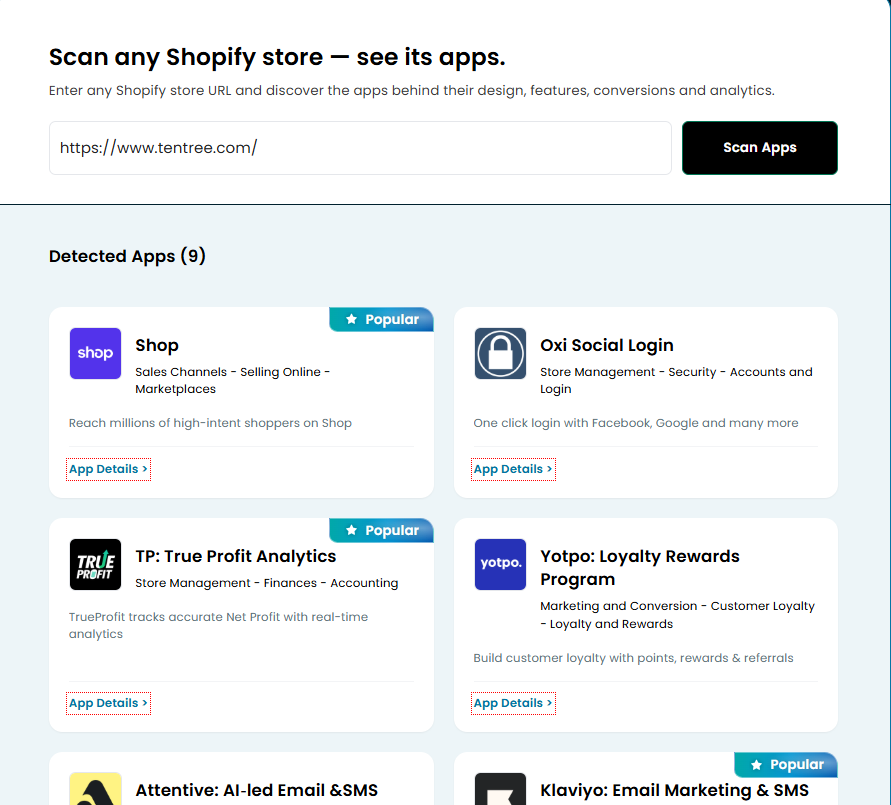
Image’s link: https://drive.google.com/file/d/1dXzUwhV7aAu3eoqXGnUrKXdfjg0FiKgu/view?usp=drive_link
Patterns in the data are consistent: fitness stores commonly run GemPages for page building, Klaviyo for email, and Judge.me for reviews. High-ticket dropshipping stores lean heavily on profit analytics and conversion tracking. Jewelry brands pair Yotpo or Judge.me with Klaviyo and a strong page builder. These patterns exist because certain tool combinations solve the specific conversion and retention challenges of each niche.
The app categories that actually move the needle for most new stores are social proof tools (review apps like Judge.me), email marketing (Klaviyo for serious stores, Shopify Email to start), post-purchase upsell tools (to increase average order value without more ad spend), and profit analytics (to track whether the business is working after all costs). Everything else should be added only when you have a specific problem it solves.
Install only what solves a current problem, audit your stack every few months, and cut anything that is not generating measurable value.
Driving Traffic to Your Store
A well-built store with no traffic generates no revenue. In 2026, the main traffic channels for Shopify merchants are paid social ads, Google Ads, organic social content, SEO, and email.
Paid ads on Facebook, Instagram, and TikTok are the fastest path to sales data. You can launch a campaign and know within days whether your product and offer are resonating. The cost is real, and early campaigns are rarely profitable, but the data they generate is worth more than the spend when used correctly. Most new merchants should budget $300-$500 per month for initial product testing through paid ads.
Organic content on TikTok or Instagram builds slower but compounds over time. A niche-relevant content account can drive meaningful free traffic, but it takes months of consistent posting before volume is sufficient to rely on. It works best as a complementary channel once paid traffic has validated the product.
SEO takes the longest to generate results but produces the highest-quality, lowest-cost traffic at scale. Use descriptive, keyword-relevant product titles and descriptions from the start, structure your collections logically, and create content that answers the questions your customers are searching for. These habits compound over years.
Email is the most profitable channel once you have a list. Post-purchase sequences, abandoned cart flows, and promotional campaigns to existing customers generate revenue at a fraction of the cost of new customer acquisition. Prioritize building your email list from day one, even when it is small.
Tracking Profit From Day One
Most Shopify merchants track revenue, not profit. Shopify’s native dashboard shows orders, sessions, and gross sales clearly, but it does not deduct Shopify fees, ad spend, COGS, shipping costs, or refunds to show what the business actually earned. Discovering that reality at the end of the month, or after several months of growth, is one of the most common reasons new merchants pivot or quit.
TrueProfit solves this by automatically consolidating every cost category into a single real-time net profit dashboard. Every Shopify fee, ad spend amount, COGS figure, and refund is deducted from revenue automatically, so the number on your screen is what the business actually earned.
- Real-time net profit dashboard updated live across the entire store
- Net profit visibility at every level: storewide, by product, and by ad channel
- Automatic cost tracking for COGS, ad spend, shipping fees, transaction fees, and custom costs
- Profit-based marketing attribution, going beyond ROAS to show actual margin per campaign
- Complete P&L reporting on a weekly and monthly basis without manual spreadsheet work
- Customer lifetime value (CLV) tracking to inform acquisition decisions
- MCP connection that plugs store data directly into LLMs like ChatGPT, Claude, and Gemini
- Mobile app to check profit from anywhere
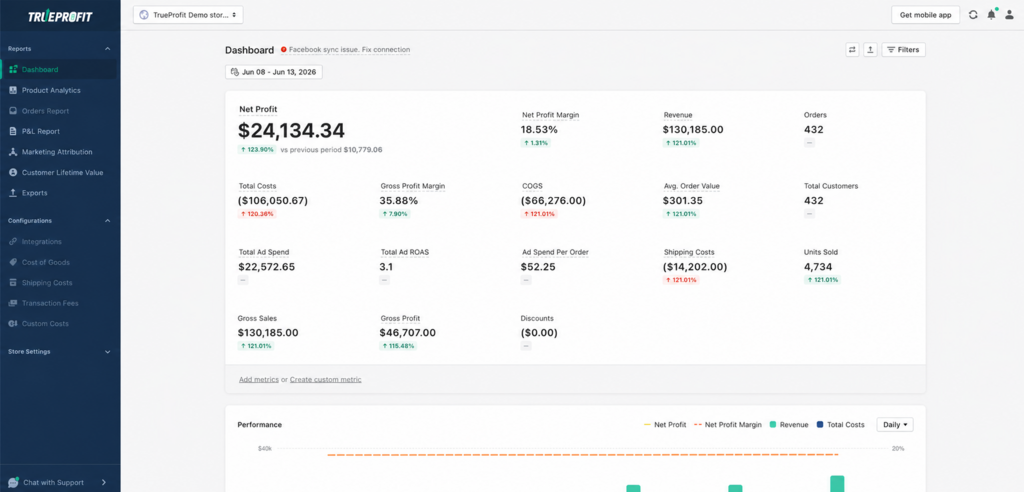
With a 5.0/5 rating from over 770 reviews on the Shopify App Store and a 14-day free trial, TrueProfit is the tool serious Shopify merchants use to know their real numbers from day one.
Final Thoughts
Starting a Shopify business in 2026 is genuinely achievable, but the gap between launching a store and building a profitable one is wider than most beginner content suggests. The 60% of stores that stay under $1,000 per month are not failing because the platform is wrong or the niche is saturated. They are failing because they launched without understanding their cost structure, priced based on product cost alone, installed apps without tracking their impact, and measured success by revenue rather than net profit.
The merchants who reach $10,000 per month and beyond treat Shopify like a business from the first day. They understand what the platform costs, build their app stack intentionally, price with their full cost stack in mind, drive traffic systematically, and track actual profit. None of those things require a large budget or technical expertise. They just require doing them in the right order, starting before the first sale.