AI video is moving past the stage of short visual experiments. For a while, the appeal was watching a model produce a few seconds of motion to see what it could imagine. That phase mattered, but it had limits. A 5-second or 10-second clip can show a moment. It can hint at a mood or a single action. What it cannot easily do is carry a message, build a mood, present a product in use, follow a character through a reaction, or land a complete creative idea.
That is the shift in AI video generation worth noticing. Seedance 2.5 is available on Topview, and it works across all tools on Topview, so the same model powers a wide range of creative workflows in one place. Right now, Topview is offering 30 days of Unlimited Seedance 2.5 Generation along with an 80% off promotion, which gives creators room to test ideas instead of rationing attempts.
Offers and terms change, so confirm the current details directly on Topview before you buy or use anything commercially.

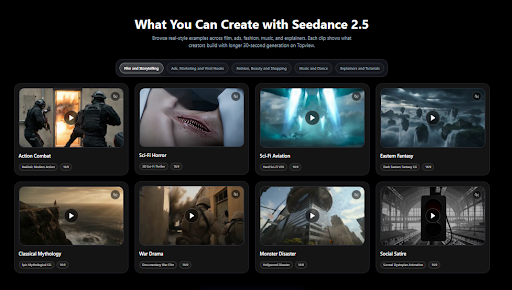
It helps to start here, because this one screen sets up the whole point of the article. Seedance 2.5 is not built for a single type of video. The category tabs across the top, film, ads, fashion, music, and explainers, point to a model meant to flex across very different creative jobs. The rest of this piece walks through what each of those categories makes possible, and who benefits most from the extra room that longer generation provides.
Before looking at each category, it is worth understanding why the jump to 30 seconds actually changes how you plan a video in the first place.
Why 30 Seconds Changes the Creative Brief
Thirty seconds does not sound like much until you compare it to what short AI clips ask you to do. With three to six seconds, every frame has to fight for space, and most ideas get cut before they finish. A longer runtime changes the brief itself, because you stop trimming the idea down to fit and start building it out to land.
Here is what that extra time gives you in practical terms:
- A hook needs a few seconds to catch attention before anything else can work.
- A scene needs time to establish mood, location, and tone.
- A product needs time to be shown in use, not just held up to the camera.
- A character needs time to react, which is where emotion comes from.
- A tutorial needs time to show cause and result, so the lesson makes sense.
- An ad needs space for the message, the benefit, and a clear call to action.
| Creative Need | Short Clip Limitation | What 30 Seconds Adds |
| Product message | Only shows a visual | Shows problem, product, use, and benefit |
| Storytelling | Feels like a single shot | Allows setup, action, and payoff |
| Fashion content | Shows a pose | Shows movement, styling, and reveal |
| Explainer | Stops too early | Lets one clear idea finish |
| Music visual | Shows a quick beat | Gives rhythm more space to build |
Nowhere is that extra room more obvious than in film and storytelling, where a few extra seconds can turn a single shot into something that feels like a scene.
Film and Storytelling: Turning AI Clips Into Mini Scenes
The film and storytelling tab is a good place to see this in action. The examples span a wide range of moods: action combat, sci-fi horror, sci-fi aviation, eastern fantasy, classical mythology, war drama, monster disaster, and social satire. Each one leans on atmosphere, and atmosphere takes time to build.
This category tends to be useful for concept artists, short-form storytellers, YouTubers, game creators, mood-board makers, trailer editors, and visual development teams. The reason 30 seconds helps here is structural. An AI storytelling video can show a beginning, a rising moment, and a final visual beat, which is the smallest shape that reads as a scene rather than a fragment.
That said, cinematic work is also where small flaws show up fastest. Continuity, character consistency, background stability, and motion quality all need a careful review before anything goes public. Treat the output as strong raw footage, not a finished cut.
Storytelling is one use, but the same extra runtime is just as valuable when the goal is to sell something, which is where ads and marketing hooks come in.
Ads, Marketing, and Viral Hooks: More Room for the Message

This is the category that marketers, ecommerce teams, small businesses, agencies, and creators will look at first. The examples cover a lot of ground: beauty transformation, pet comedy promo, food macro ad, lifestyle beauty ad, tech product render, mass campaign, and food product review.
The core problem with short ad clips is that one pretty shot rarely sells anything. When you are making AI video for ads, a 30-second runtime has room for the full arc: a hook, the product, the product in use, the emotion, the benefit, and the call to action. That sequence is what moves a viewer from curious to interested.
This is also where Topview’s 30 days of Unlimited Seedance 2.5 Generation becomes meaningful. Ads, product videos, and viral hooks usually need testing before they feel right. A creator may want to try different openings, product angles, captions, scene styles, reference images, and calls to action before choosing the strongest version. Unlimited generation gives marketers, ecommerce sellers, and agencies more room to experiment instead of stopping after one or two early drafts.
There is also a testing angle here. AI UGC video content can help you try creator-style concepts before committing to a full production. Product renders can help a brand picture a campaign idea before it exists. Food, beauty, tech, and pet brands can test several angles quickly and keep the ones that work.
| Ad Type | What Seedance 2.5 Can Help Create | Why It Works Better at 30 Seconds |
| Beauty ad | Transformation or product reveal | Shows before, use, and result |
| Food ad | Macro shot or product review | Gives time for texture and reaction |
| Tech ad | Product render or feature focus | Shows design and benefit |
| Pet campaign | Funny or emotional short clip | Gives the scene time to land |
| UGC-style video | Creator-style product reaction | Feels more complete than a quick clip |
Ads often live or die on how a product looks in motion, and no category depends on motion more than fashion, beauty, and shopping content.
Fashion, Beauty, and Shopping: From Static Product Shots to Motion

Fashion creators, beauty brands, ecommerce sellers, skincare companies, hair care brands, influencers, and social media teams all share one challenge: their products are hard to judge from a still image. The examples speak to that directly, including a premium skincare reveal, beauty transformation, jewelry close-up, hair care review, fragrance review, get ready with me, seasonal outfit showcase, and fantasy product commercial.
Fashion and beauty content depends on movement, texture, shine, product handling, and the final reveal. A still photo flattens all of that. An AI fashion video can show the product, the person using it, the result, and the final look, which is much closer to how a shopper actually decides.
This is also a category where detail review matters a lot. Skin texture, product labels, jewelry details, hands, faces, and any on-screen text should be checked closely before publishing, because these are the areas where AI video is most likely to slip.
Texture and movement matter in fashion, and rhythm and pacing matter just as much in the next category: music and dance.
Music and Dance: Letting Rhythm Breathe

Musicians, editors, social media creators, dance pages, entertainment brands, and visual artists will recognize the pull of this category. The examples include a geometric music visual, retro luxury visual, K-pop dance MV, and eastern fantasy, each built around motion and mood rather than narration.
Music and dance videos need rhythm, pacing, motion, and atmosphere to work. A clip that ends after a few seconds cuts off right as the energy builds. As an AI music video generator, Seedance 2.5 lets a visual rise with the beat instead of stopping early, which is the difference between a teaser and a moment.
Before publishing, check audio-video sync, movement consistency, and scene transitions. Motion-heavy clips are where timing problems and visual jumps tend to appear, so a careful pass is worth the time.
Music leans on feeling, but the next category leans on clarity, where the job is to explain one idea well.
Explainers and Tutorials: One Clear Idea, Finished Properly

Educators, SaaS companies, business teams, training creators, product marketers, service providers, and agencies all work in this space. The image shows the range well, with a business explainer, system animation, SaaS walkthrough, industrial showcase, medical explainer, service demo, product explainer, and software UI demo.
Explainers have a simple requirement that short clips struggle to meet: they need enough time to make one idea clear. An AI explainer video can introduce a problem, show the process, and finish with a takeaway, which is the natural shape of any good explanation.
The use cases follow from there. SaaS teams can build feature teasers. Service businesses can show a problem and the solution side by side. Educators can produce short visual explainers on a single topic. One caution applies across all of them: technical or medical content should be fact-checked carefully before it goes out, since accuracy matters more than polish here.
All of these categories rely on what the model can do under the hood, so it is worth looking at what Seedance 2.5 improves over shorter AI video workflows.
What Seedance 2.5 Improves Over Shorter AI Video Workflows
Native videos up to 30 seconds
This is the headline change. It lets creators build more complete short-form ideas in one clip instead of stitching several tiny ones together.
Multimodal references up to 50 files
You can guide the output with images, video clips, and audio references. More reference material usually means more control over what comes out, which helps when you have a specific look in mind.
Better consistency
Longer videos put more pressure on continuity. Stronger consistency across characters, scenes, products, and backgrounds is what keeps a 30-second clip from drifting halfway through.
Local edits
Editing specific parts of a video can help when you need more control during the editing stage, instead of regenerating the whole clip to fix one detail.
Stronger multilingual understanding
This may help global creators working across languages, though the final output should still be checked rather than trusted blindly.
Clearer letters and text
Text inside AI video has long been a weak spot. Clearer letters help, but any text on screen still needs a careful review before publishing.
A fair note: these are feature claims shown in the Topview material. They are worth testing with your own projects before you rely on them for client or commercial work, because results vary by prompt, style, and subject.
Another practical improvement is how Seedance 2.5 fits into the wider Topview workflow. Seedance 2.5 is available across all tools on Topview, so creators are not limited to one narrow video format. The same model can support product ads, AI UGC-style clips, fashion videos, avatar explainers, tutorials, social videos, and short campaign assets from one place. That matters because most creators do not produce only one type of content. A brand may need a product video today, a social ad tomorrow, and an explainer next week, so having Seedance 2.5 available across Topview’s tools makes the workflow more flexible.
Knowing what the model improves is useful, but the practical question for most people is simpler: is this built for the kind of work I do?
Who Should Use Seedance 2.5?
Topview groups the ideal users into a few clear buckets. Here is how each group tends to use it.
Cinematic storytelling teams
Useful for scene concepts, short story tests, visual ideas, and trailer-style experiments where the goal is to explore a look before committing to it.
Fashion, beauty, and shopping teams
Useful for product reveals, outfit motion, beauty transformations, skincare visuals, and social ads, where movement does the selling.
AI avatar video creators
Useful for education, walkthroughs, tutorials, product explanations, and multilingual communication, where a consistent on-screen presenter helps. An AI avatar video can carry a longer message without losing the thread.
Product ad creators
Useful for ecommerce videos, marketplace campaigns, and short social ads that need to show a product clearly and quickly.
For smaller teams and solo creators, the current 80% off Promotion on Topview can make Seedance 2.5 easier to test seriously. It gives ecommerce sellers, agencies, social media teams, and independent creators a lower entry point to explore whether 30-second AI video fits their workflow. Still, discounts, pricing, export rules, watermark limits, and commercial terms can change, so users should always confirm the latest details directly on Topview before relying on any offer.
Viral social and trend creators
Useful for social hooks, pet videos, quick concepts, meme-style scenes, and short creative tests that need to feel immediate and easy to share.
Upload-first teams
Useful for anyone who prefers to start with existing images, footage, references, or brand assets instead of writing a text prompt from scratch.
If one of those describes you, the next thing worth understanding is where Topview itself sits in the workflow.
Seedance 2.5 Use-Case Matrix
| Creator Type | Best Seedance 2.5 Use Case | Best Format | What to Check |
| Ecommerce seller | Product ad or demo | 9:16 or 16:9 | Product accuracy and CTA |
| Fashion brand | Outfit reveal | 9:16 | Clothing consistency |
| Beauty brand | Transformation or review | 9:16 | Skin texture and product label |
| SaaS company | Feature teaser | 16:9 | UI clarity and text |
| Educator | Short explainer | 16:9 | Accuracy of information |
| Music creator | Visual clip | 9:16 or 16:9 | Rhythm and motion sync |
| Agency | Campaign concept | Mixed | Brand consistency |
With the practical map in place, it is worth stepping back to see what all of this adds up to.
Final Thoughts
Seedance 2.5 on Topview matters for a simple reason: it moves AI video closer to usable creative production. The novelty of short clips was fun, but it was hard to build real work on top of a few seconds of motion.
Thirty seconds is enough time to carry a hook, a message, a product moment, or a creative payoff. That is the threshold where a clip stops being a demo and starts being something you can publish. The category examples on Topview show how broad the model can be, spanning film, ads, fashion, music, explainers, tutorials, and product videos, and the fact that Seedance 2.5 is available across all tools on Topview keeps that range in one place.
That broader platform approach should become even more useful as Topview Canvas and Topview Drama Studio also support Seedance 2.5, giving creators more room to plan, shape, and turn ideas into finished video projects without breaking the workflow.
The 30 days of Unlimited Seedance 2.5 Generation and the 80% off promotion make it easier to experiment without counting every attempt. Just remember to confirm the latest details on Topview before relying on any offer, since the terms can change. Use the free room to learn what the model does well for your work, keep a human review in the loop, and let the results, not the marketing, decide where it fits.