Web scraping has evolved. Extracting raw HTML was enough for a while, but the modern web is dynamic, JavaScript-heavy, and visual. That changed what developers need from their tools.
Enter the Screenshot API. It fills a gap that traditional scrapers can’t. And once you understand when and why to use one, you’ll wonder how you managed without it.
What Is a Screenshot API?
A Screenshot API is a service that captures an image of a fully rendered webpage using a headless browser.
Here’s how it works: you send a URL to the API, it loads that page in a real browser environment, and it returns a screenshot, just like if you pressed Print Screen in Chrome. Except it’s automated, scalable, and works without any manual steps.
A good website screenshot API handles:
- HTML, CSS, and JavaScript rendering, the full visual output, not just raw markup
- Dynamic content loaded after page load, such as lazy-loaded images and async data
- Custom viewport sizes, so you can capture mobile or desktop views
- Page interactions like scrolling or waiting for specific elements
In practice, developers use screenshot APIs anywhere they need proof of what a page actually looked like at a specific moment, not just what the HTML said.
What Is a Web Scraper API?
A web scraper API extracts structured data, like text, links, prices, and metadata, from websites automatically.
Instead of capturing a visual image, it parses the page and returns organized data. Think JSON objects, CSV rows, or clean datasets ready for analysis.
Core capabilities include the following:
- HTML parsing to pull specific elements like headings, product names, or links
- Automated data extraction at scale across hundreds or thousands of pages
- Structured datasets that feed directly into databases, spreadsheets, or pipelines
If a screenshot API answers, “What did this page look like?” a web scraper API answers, “What data is on this page?”
Both questions matter. Often at the same time.
Screenshot API vs Web Scraper API
Developers often ask which one they need. The answer is usually “It depends on what you’re doing” and sometimes “both.”
| Feature | Screenshot API | Web Scraper API |
| Output | Image of webpage | Structured data |
| Purpose | Visual capture | Data extraction |
| Best for | UI monitoring | Data collection |
| Rendering | Full-page rendering | HTML parsing |
| JS Support | Yes (headless browser) | Varies by tool |
| Typical output format | PNG / JPEG | JSON / CSV / XML |
The short version: scrapers extract data, and screenshot APIs capture visual context. They serve different purposes, but they work well together.
Why Developers Use Screenshot APIs in Web Scraping
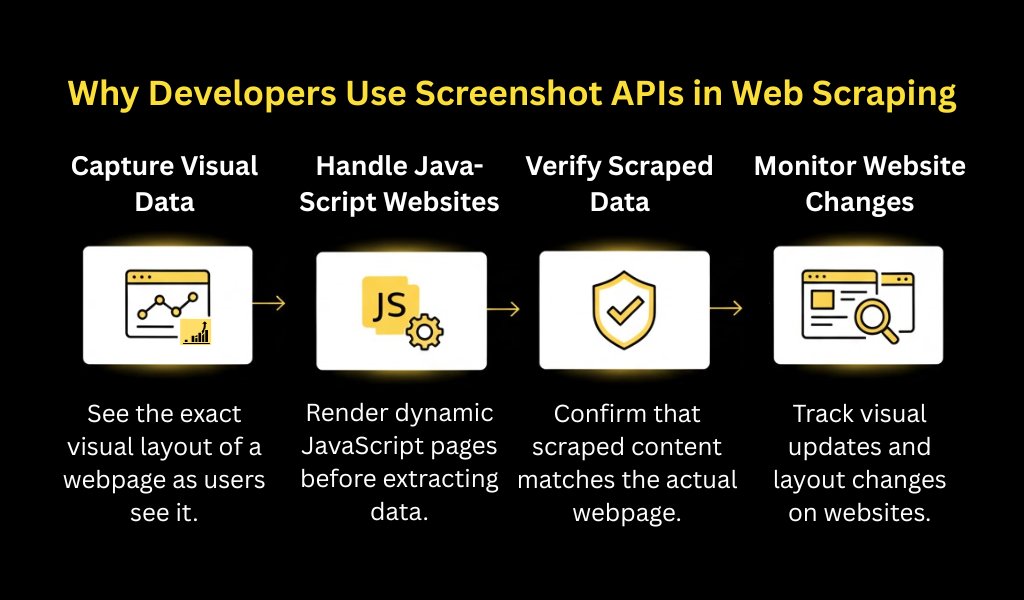
Scraping pipelines are built to extract data. But data alone doesn’t tell the whole story. Screenshots give context; they show what users actually see in the format they see it.
Here are the main reasons developers reach for a screenshot API alongside their scrapers.
Capturing Visual Data
Some content can’t be scraped as text. It only exists visually.
Common examples include:
- Charts and graphs: The data is rendered in canvas or SVG, not in a parseable DOM
- Dashboard layouts: Showing how KPIs are presented in a SaaS tool
- Product image galleries: Capturing the full visual presentation of e-commerce listings
- Infographics: Content designed entirely as images
If a client asks, “Show me what the competitor’s product page looked like last Tuesday,” you can’t answer that with JSON. A screenshot answers it immediately.
Handling JavaScript-Heavy Websites
This is where screenshot APIs shine for scraping workflows.
A huge portion of the web now runs on React, Vue, Angular, or similar SPA frameworks. Content isn’t in the HTML source; it loads after the page initializes. Traditional scrapers miss it entirely.
A screenshot API uses a real headless browser (usually Chromium-based) that:
- Executes JavaScript before capturing the page
- Waits for network requests to complete
- Handles client-side rendering, lazy loading, and dynamic DOM updates
So even if a scraper is struggling to extract data from a React-rendered product listing, a screenshot API will capture it exactly as it appeared, with no missing content and no empty divs.
Developers often face this exact problem: the data is there visually but invisible to the scraper. A screenshot bridges that gap.
Verifying Scraped Data
Scraping pipelines break. Websites change their structure, add CAPTCHA, or shift their layouts. Without visual verification, it’s hard to know if your scraper is extracting what you think it is.
Screenshot APIs solve this by giving you a visual record alongside your data.
Practical applications:
- Price monitoring: Screenshot the product page every time you log a price, so you can verify the price was actually displayed as scraped
- Legal and compliance: Save visual evidence of ad placements, policy pages, or terms of service at specific dates
- Debugging: When a scraper returns unexpected data, compare it against the screenshot to spot the issue
Think of it as a paper trail for your scraping pipeline. The screenshot proves what was on the page when you scraped it.
Here’s a simple example of how developers often combine a scraping API with a screenshot API in a real workflow. Instead of pseudocode, you typically send a request to an API endpoint and receive the response programmatically.
For example, using a website screenshot API:
| curl -X ‘GET’ \
‘https://api.apifreaks.com/v1.0/screenshot?url=google.com’ \ -H ‘X-apiKey: API-KEY’ |
This request loads the page in a headless browser, renders JavaScript content, and returns a full-page screenshot. Developers then store the image alongside scraped data from their scraping pipeline to keep both structured information and visual proof of the page.
Monitoring Website Changes
Screenshots are also used proactively, not just to verify past scrapes but also to detect changes over time.
Common use cases:
- UI monitoring: Catch visual regressions in your own or third-party sites
- Competitor tracking: Notice when a competitor updates their pricing page, landing page copy, or promotional banners
- SEO auditing: Check how pages render in a browser vs. what Googlebot might see
- Brand compliance: Verify that third-party sites are displaying your products or branding correctly
Pair a scheduled screenshot API call with a visual diff tool, and you’ve got an automated change detector, no manual checking required.
Real Developer Workflow: Using Both APIs Together
The most powerful setup combines both tools. Here’s how a typical workflow looks:
- Send the target URL to a Web Scraper API to extract structured data, prices, titles, availability, and metadata
- Send the same URL to a Website Screenshot API to capture a full-page image of how it looked at that moment
- Store both the extracted data and the screenshot together, timestamped, in your database or storage system
- Run analysis on the structured data, and reference the screenshot for verification or visual context
- Set up alerts when scraped data changes significantly, and review the screenshot to confirm the change is real
This approach gives you the best of both worlds: machine-readable data for analysis and human-readable screenshots for verification and reporting.
In my experience, teams that skip the screenshot step end up spending twice as long debugging scrapers. The visual record pays for itself fast.
Common Use Cases for Screenshot APIs
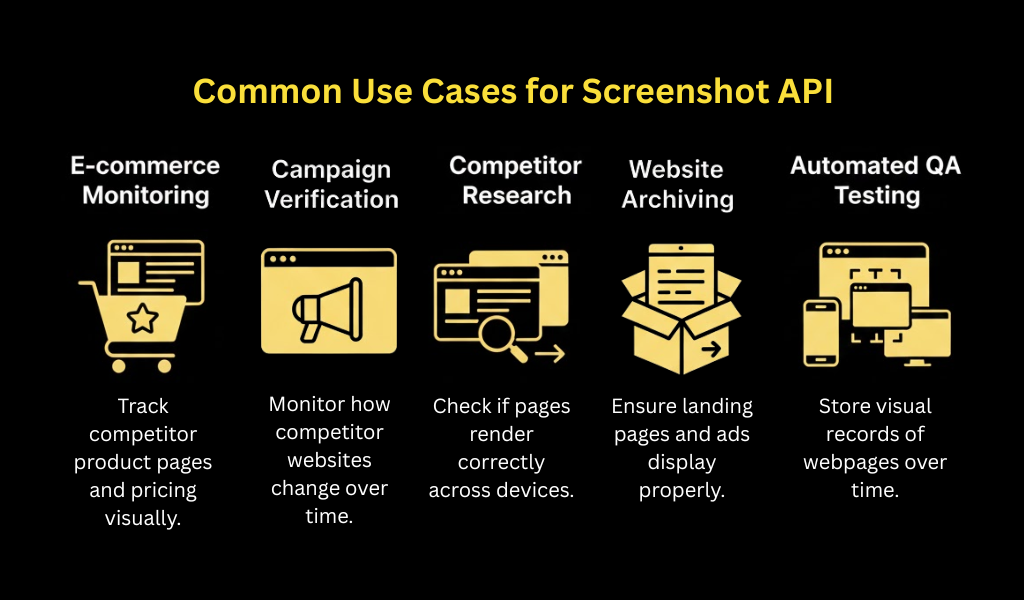
Beyond core scraping workflows, here are the scenarios where developers consistently reach for screenshot APIs:
- E-commerce monitoring: Track competitor product pages, pricing changes, and promotional layouts
- Competitor research: Document how rival brands present themselves, what messaging they use, and how their UX evolves
- Automated QA testing: Verify that web applications render correctly across different viewports and after deployments
- Marketing campaign verification: Confirm that ads, landing pages, and UTM-specific pages display correctly for users
- Website archiving: Create point-in-time records of how pages looked, useful for legal, compliance, or historical documentation
- Social media preview testing: Check how URLs unfurl in Open Graph previews before publishing
- Affiliate and partner compliance: Verify that partner sites are displaying your products or links as agreed
The common thread: any time you need a visual record of a webpage, whether for analysis, verification, or documentation, a screenshot API is the right tool.
Frequently Asked Questions
What is a website screenshot API?
A website screenshot API is a web service that programmatically captures images of webpages. You send a URL via an API request, and it returns a rendered screenshot, typically PNG or JPEG, of the page as seen in a real browser. It handles JavaScript execution, CSS rendering, and dynamic content automatically, making it reliable for modern web pages that don’t work well with static HTML capture.
Can screenshot APIs help with web scraping?
Yes. Screenshot APIs complement web scraping in several ways. They capture visual content that can’t be scraped as text, provide verification of what was on a page at scrape time, and handle JavaScript-rendered content that traditional scrapers miss. Many production scraping pipelines use both a scraper for structured data and a screenshot API for visual context.
When should developers use screenshot APIs instead of scrapers?
Use a screenshot API when you need a visual record of a page, when the content is rendered visually (charts, infographics, canvas-based UI), or when you’re monitoring for visual changes rather than data changes. Use a scraper when you need machine-readable structured data. Use both when you need data and verification.
Do screenshot APIs work on JavaScript-heavy websites?
Yes, that’s one of their primary advantages. Screenshot APIs use headless browsers (typically Chromium) that fully execute JavaScript before capturing the page. This means they work on React, Vue, Angular, and other SPA-based sites where content loads dynamically after the initial HTML is served. Standard HTML scrapers often miss this content entirely.
How is a screenshot API different from a simple web screenshot tool?
A manual screenshot tool is point-and-click. It’s made for humans. A screenshot API is designed for automation. It accepts requests programmatically, integrates into code and pipelines, supports parameters like viewport size and wait conditions, and scales to thousands of captures without human involvement. It’s built to be part of a developer’s infrastructure, not a one-off tool.
Conclusion
Web scraping isn’t just about collecting data anymore. Modern pipelines need to handle dynamic content, verify what they’ve captured, and document what pages actually looked like, not just what the HTML said.
Here’s the core idea:
- Web scraper APIs extract structured data, text, prices, links, metadata
- Screenshot APIs capture visual context, what the page looked like, rendered in a real browser
- Modern automation pipelines often combine both tools for reliable, verifiable results
If you’re building a scraping pipeline and skipping screenshots, you’re missing half the picture. Add a Screenshot API to your stack, and you’ll have both the data and the proof every time.