

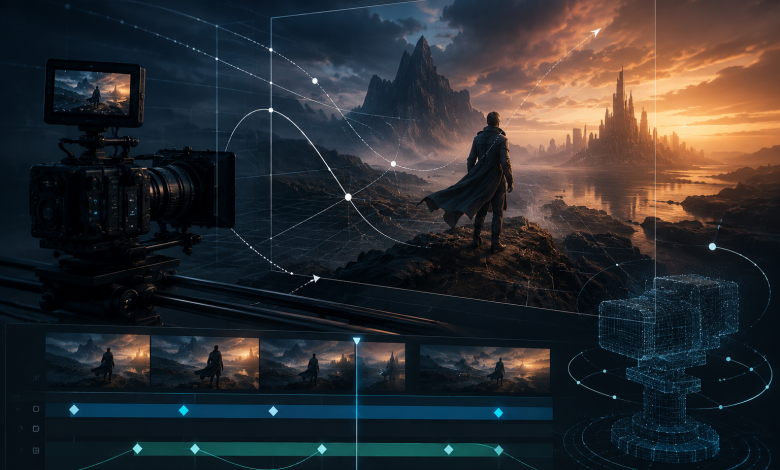
Video has become the dominant language of digital communication, and the difference between content that captivates and content that gets scrolled past often comes down to one thing: motion. Specifically, how that motion is controlled, directed, and choreographed within the frame. Video motion control is no longer a technique reserved for Hollywood productions with massive budgets and specialized equipment. Thanks to advances in AI video generation, creators of all skill levels can now direct camera movements, guide subject trajectories, and craft cinematic sequences with precision and ease.
Whether you’re a content creator looking to elevate your YouTube channel, a marketer producing brand videos, or an AI enthusiast exploring the boundaries of generative media, understanding how to harness video motion control can transform your output from amateur to professional. This guide breaks down the core concepts, practical techniques, and common pitfalls of motion control in AI video generation, giving you the knowledge to create videos that move with purpose and visual intelligence.
What Is Video Motion Control and Why It Matters
At its core, video motion control refers to the deliberate management of movement within a video frame. This includes how the camera itself moves — panning, tilting, zooming, tracking — as well as how subjects within the scene move relative to the camera and each other. In traditional filmmaking, achieving precise motion control required expensive motorized rigs, dolly tracks, and skilled camera operators. The margin for error was slim, and reshoots were costly.
AI video generation has fundamentally changed this equation. Modern AI tools allow creators to define motion paths, set camera trajectories, and specify the speed and direction of movement through intuitive interfaces. The result is a level of control that was previously inaccessible to independent creators. But more than just accessibility, AI-powered video motion control introduces a new creative vocabulary — one where motion becomes a storytelling tool rather than a technical afterthought.
When motion is controlled with intention, it guides the viewer’s eye, creates emotional rhythm, and reinforces the narrative. A slow zoom into a subject’s face builds tension. A sweeping pan across a landscape establishes scale. A tracking shot that follows a moving subject creates immersion. These are not accidental effects — they are the product of deliberate motion control decisions that separate forgettable clips from memorable visual experiences.
Key Types of Motion Control in AI Video
Understanding the different categories of motion control helps you make more intentional creative decisions. In AI video generation, motion control generally falls into two primary categories: camera motion and subject motion. Each serves a distinct narrative function, and the most compelling videos use both in concert.
Camera Motion Control
Camera motion control governs how the virtual camera moves through the scene. The most common camera movements each carry their own emotional weight. A pan — horizontal rotation of the camera — is useful for revealing wide environments or following lateral movement across the frame. A tilt, which rotates the camera vertically, is effective for dramatic reveals or emphasizing height and scale. Zoom changes the focal length to bring subjects closer or push them further away, creating a sense of urgency or distance without physically moving the camera through space.
Beyond these basics, dolly and tracking movements physically move the camera through the scene, creating a sense of presence and depth that zoom alone cannot replicate. Orbit movements circle around a subject, often used to showcase objects or create a dynamic, three-dimensional feel. Choosing the right camera motion is as important as choosing the right subject matter — each movement carries an implicit emotional message that the viewer registers even without conscious awareness.
Subject Motion Control
Subject motion control focuses on how people, objects, or elements within the scene move. This includes defining motion paths — the trajectory a subject follows through the frame — as well as controlling the speed and timing of that movement. In AI video tools, subject motion can often be guided by drawing paths directly on the frame, specifying start and end positions, or using reference points to anchor movement.
The key is ensuring that subject motion feels natural and purposeful. Erratic or unmotivated movement breaks immersion and distracts from the story. When subject motion is aligned with camera motion, the result is a cohesive visual experience that feels intentional and polished. Think of subject and camera motion as two instruments in an ensemble — when they play in harmony, the result is far greater than either could achieve alone.

How to Use Video Motion Control Effectively
Knowing the types of motion control is one thing; applying them effectively is another. A practical, structured approach to motion control will help you get consistent, professional results across your AI video projects.
Setting Up Motion Paths
Motion paths define the route a subject or camera takes through the scene. When setting up motion paths, start by identifying the key points of interest in your frame — where does the viewer’s eye need to go, and in what order? Use these points to anchor your path and create a visual journey that feels guided rather than random.
Keep paths smooth and purposeful. Abrupt changes in direction can feel jarring unless that’s the intended effect. For most narrative content, gradual curves and consistent speeds create a more professional result. Tools like Kling AI offer intuitive motion path interfaces that let you preview movement before rendering, which is invaluable for catching issues early. Take advantage of preview features to iterate quickly and refine your motion before committing to a full render. A few minutes of adjustment at this stage can save significant time later.
Combining Camera and Subject Motion
The most compelling videos often combine camera motion with subject motion in ways that feel choreographed. When both the camera and the subject are moving, the relationship between those movements creates the visual dynamic that defines the emotional tone of the shot.
A common technique is counter-motion: the camera moves in one direction while the subject moves in the opposite direction, creating a sense of tension or separation. Alternatively, synchronized motion — where the camera follows the subject’s movement — creates a feeling of connection and pursuit. Experimenting with these combinations is one of the most effective ways to develop your visual style. Start with simple combinations and gradually introduce more complexity as you become comfortable with the tools and the visual language of motion. Document what works so you can build a personal library of effective motion combinations to draw from in future projects.
Common Mistakes to Avoid in Video Motion Control
Even experienced creators make predictable errors when working with motion control. Being aware of these pitfalls can save you significant time and frustration, and help you develop better instincts faster.
The most common mistake is overusing motion. Not every shot needs a moving camera. Static shots provide visual rest and can be just as powerful as dynamic ones. When everything moves, nothing stands out. Use motion selectively to emphasize key moments, and let stillness do its own work in between. The contrast between movement and stillness is itself a powerful compositional tool.
Another frequent error is ignoring the relationship between motion speed and emotional tone. Fast motion creates energy and urgency; slow motion creates contemplation and weight. Mismatching speed to tone — using fast camera movement in a somber scene, for example — creates cognitive dissonance for the viewer that undermines the emotional impact you’re trying to achieve. Always ask whether the speed of your motion matches the feeling you want to evoke.
Finally, many creators neglect to consider the starting and ending positions of their motion. A camera move that begins or ends in an awkward composition undermines the entire sequence. Always evaluate your motion in the context of the full shot, not just the movement itself. Plan your entry and exit frames with the same care you give to the motion path, and ensure that both the first and last frames of your motion are strong, intentional compositions.
Advanced Techniques for Professional Results
Once you’ve mastered the fundamentals, there are several advanced techniques that can elevate your video motion control work to a professional level. These approaches require more planning and experimentation, but the results are consistently worth the investment.
Parallax motion is one of the most effective tools for creating depth. By moving the camera while keeping the subject relatively stationary, foreground and background elements move at different speeds, creating a convincing sense of three-dimensional space. This technique is particularly effective in establishing shots and environmental sequences where you want to convey scale and immersion. AI video generation platforms have made parallax effects far more accessible, allowing creators to achieve results that previously required complex multi-layer compositing.
Easing — the gradual acceleration and deceleration of motion — is another hallmark of professional video work. Motion that starts and stops abruptly feels mechanical and unnatural. Applying ease-in and ease-out curves to your motion paths creates movement that feels organic and intentional. Most professional AI video tools offer easing controls; learning to use them effectively is one of the fastest ways to improve the perceived quality of your output. Even subtle easing can make the difference between motion that feels generated and motion that feels filmed.
Finally, consider the narrative function of every motion decision. Ask yourself: what does this movement communicate? What does it reveal or conceal? How does it make the viewer feel? When motion serves the story, it becomes invisible — the viewer experiences the emotion without noticing the technique. That invisibility is the mark of truly professional motion control, and it’s the standard worth working toward in every project you create.
Elevating Your Creative Vision Through Motion
Mastering video motion control is a journey that rewards patience, experimentation, and a willingness to think cinematically. The techniques covered in this guide — from understanding camera and subject motion to applying advanced parallax and easing — provide a solid foundation for creating videos that move with purpose and visual intelligence.
The barrier to professional-quality motion control has never been lower. AI video generation tools have democratized access to techniques that once required specialized equipment and years of training. Platforms like Kling AI are at the forefront of this shift, giving creators intuitive controls that translate creative intent into precise, cinematic motion. What remains constant is the need for creative intention: knowing not just how to control motion, but why each movement serves your story.
As you continue to develop your skills, remember that the best motion control is often the most restrained. Every movement should earn its place in the frame. With practice and a clear creative vision, you’ll find that video motion control becomes one of your most powerful tools for connecting with your audience and bringing your ideas to life.