AI Earbuds in 2026 and the Features Worth Paying For
AI earbuds are no longer just wireless earbuds with a smarter app attached. In 2026, the term can mean adaptive noise control, clearer calls, meeting notes, translation, biometric sensors, or some mix of all five. The problem is that not every feature is worth paying extra for.
The real question is not whether AI sounds advanced. It is whether the hardware solves a daily problem better than standard earbuds plus a phone app. This guide breaks down the feature categories, separates everyday value from novelty, and shows which user profiles actually benefit from paying more.

The five pillars of modern AI audio hardware
The shift from standard earbuds to AI audio is mostly about real-time decision-making. Older earbuds gave you fixed modes, with ANC (active noise cancellation) on, transparency (ambient passthrough) on, bass boost, and maybe a few EQ (equalizer) presets. Newer models try to read the environment, the person speaking, or the task before deciding what to do.
That sounds broad because it is. Most 2026 AI-powered earbud claims fall into five buckets.
- Environmentally adaptive ANC adjusts noise cancellation as the room changes, instead of making you pick one fixed level. A train platform, a quiet desk, and a busy café should not need the same setting.
- Personalized AI sound profiles adjust the listening experience to the individual rather than a fixed factory curve. Hearing profile tests, adaptive EQ, and learned preferences all fall here. The output varies. Some earbuds offer a one-time calibration, while others refine the profile over time. This matters most if you wear earbuds for hours each day; it is harder to justify as the main reason to upgrade.
- On-board or on-case recording and transcription moves meeting capture closer to the earbuds or the charging case. The appeal is obvious for people who take calls all day, with fewer separate devices, fewer apps to open, and fewer missed notes.
- Live translation tries to turn earbuds into a language bridge. It can be useful, but it is also one of the easiest features to oversell because accuracy, latency (response delay), and internet access still matter.
- Biometric tracking adds health-adjacent sensors such as PPG (heart-rate sensing) for pulse readings or posture cues. Useful for a narrow group, less important for someone who mainly wants calls and music.
Which AI features do you actually use daily
The easiest way to overpay is to buy for a demo moment. A feature looks clever in the first week, then disappears behind the same two habits: commute listening and work calls.
Start with frequency. Adaptive ANC and voice isolation (call-side noise filtering) usually sit in the high-use category because they work in the background. If the earbuds keep easing pressure on a flight, lowering office chatter, or making your voice cleaner during a call, the value shows up without asking you to change your routine.
That is why automated environmental adjustment has more practical weight than it may seem at first. The useful version of AI is not a flashy mode name. It is the ability to reduce noise without clamping down too hard when the room gets quiet, or to respond when the sound profile shifts unexpectedly.
Then there are premium features that people use less often. Heart-rate sensors, native translation, and smart-case workflows may matter a lot for specific routines. Their value is just less consistent from week to week.
- High-frequency, lower-premium features such as adaptive ANC, multipoint (dual-device connection), and voice pickup tend to justify the upgrade cost on their own.
- Low-frequency, higher-premium features such as biometrics, case recording, and translation only earn their cost when the specific use case shows up most weeks. If it does not, the premium rarely makes sense.
There is also a cheaper path: true wireless earbuds plus a phone app. Otter.ai or Fireflies can handle meeting notes without AI-native hardware. Hardware AI earns the edge when calls are frequent, environments are noisy, or company policy restricts cloud recording. A phone app is usually enough when meetings are occasional, and adding one more tool to your phone is not a hassle.
Translation and transcription still have limits
Translation and transcription are the features most likely to be misunderstood. They sound like magic until the Wi-Fi drops, accents pile up, or background noise gets loud.
The practical boundary is connectivity. Advanced translation still depends on active cellular data or Wi-Fi for deeper language processing in most real-world use. A product may respond quickly, but that does not mean every step happens offline. If you expect flawless airport translation with no network, disappointment is likely.
This is where ai earbuds need to be judged by the conditions around the feature, not the feature name alone. How many languages are supported? Does real-time translation require a subscription later? Is it meant for travel phrases, business meetings, or long conversations with technical vocabulary? Those are different jobs.
Transcription has its own trade-offs. Some AI recording earbuds include free recording but charge for heavier transcription or summaries. A common launch structure is 120 free transcription minutes per month for 24 months, with extra usage billed through the app. That is useful for frequent meetings, but it is not the same as unlimited free transcription forever.
Dedicated recorders still hold an edge when transcription accuracy is the entire job, not just part of the workflow.
The $200 to $250 range for AI productivity hardware
The most interesting AI earbud pricing is not always above $250. The $200 to $250 range is where AI starts to move beyond cleaner calls and adaptive audio into productivity features such as case controls, meeting recording, transcription, and summaries.
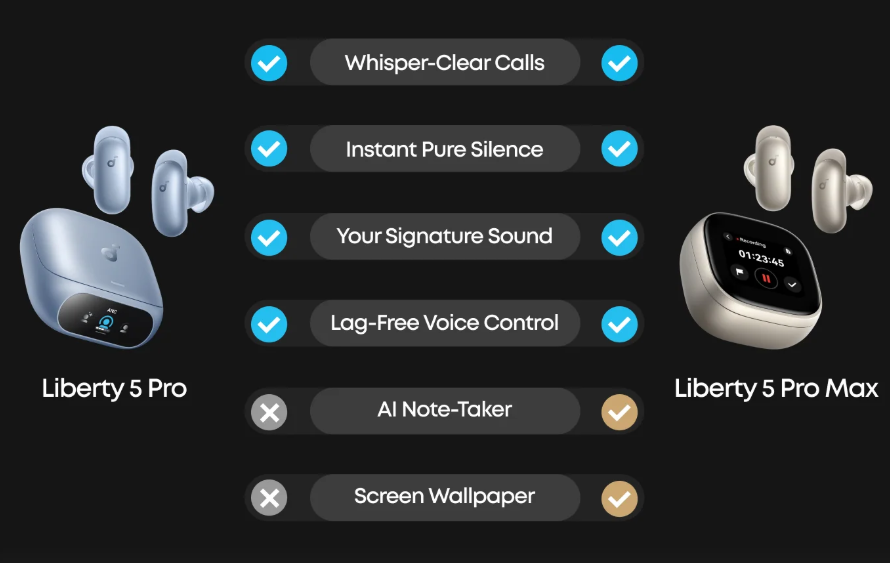
If your week moves between desk calls, shared offices, lectures, and interviews, soundcore Liberty 5 Pro Max at $229.99 is a useful AI productivity example. Its value shows up in three workflow moments. On calls, Whisper-Clear Calls uses AI-assisted voice pickup powered by the Thus™ AI Chip and a 10-sensor call system to help keep your voice clear when office chatter or street noise leaks in. During meetings, AI Note-Taker can transcribe in real time and generate summaries with action items, so you leave the session with a usable record instead of scattered notes. Between calls, the 1.78-inch AMOLED display lets you access the AI Voice Recorder, adjust ANC, and manage earbud settings all from the case screen. That helps when you are moving between rooms or calls and need quick control without opening the app. Sony WF-1000XM6 at $329 approaches AI through dual-processor noise handling, while Apple AirPods Pro 3 at $249 leans more on ecosystem behavior and computational audio. Each model has its own advantage. Liberty 5 Pro Max suits meeting-heavy users who need clear calls, real-time notes, and case control, Sony suits flagship noise control, and Apple suits platform integration. If you do not need transcription, recording, or case-based storage, Liberty 5 Pro is the easier value pick because the earbud performance is the same.
That does not make it right for everyone. If spatial audio or ecosystem integration is the priority, the higher-priced options may feel more complete. If the main pain is clients not hearing you in a loud lobby, the call-focused package at the lower price starts to look rational.
Side by side product comparison showing soundcore Liberty 5 Pro Max and soundcore Liberty 5 Pro.
Which users get real value from AI earbuds
Not everyone needs intelligent audio. The upgrade makes the most sense when it removes friction that already appears in the week.
The meeting-heavy professional
Meeting-heavy professionals get the clearest return. Back-to-back calls expose weak microphones, slow device switching, and missing notes. You should look for voice isolation, multipoint, case or app-based recording, and enough battery headroom to survive long call blocks.
The global traveler
Global travelers may benefit from translation earbuds and smart-case controls, but only with realistic expectations. A case screen can be useful for changing settings or starting a recording without pulling out a phone. Translation still needs network access for many advanced workflows, so treat it as a travel aid, not a replacement for an interpreter.
The casual listener
Casual listeners are harder to upsell. If your routine is music, podcasts, and a few calls a week, driver quality, fit, comfort, and battery life may matter more than AI recording or translation. Many people in this group are better served by comparing regular wireless earbuds for Android or iPhone-friendly options before paying extra for data-heavy features.
The ownership rule is simple enough. Do not pay for speculative future use. Pay for the task that already annoys you. If meetings run long, transcription and battery planning matter. If commutes are loud, adaptive ANC and voice pickup matter. If none of those problems show up often, a less expensive pair may be the smarter buy.
Conclusion
The gap between a $100 earbud and a $200 AI model is not just hardware. It is about the daily friction you actually face. Back-to-back calls make voice isolation and multipoint worth the cost. A music and occasional call routine rarely justifies the premium. AI audio has moved from novelty to infrastructure for specific workflows. The upgrade earns its place when the features show up in the daily routine, not only in first-week demos.
FAQ
Do AI earbuds work without an internet connection?
Most core functions work offline. Adaptive ANC, personalized EQ, and standard Bluetooth do not need a network connection. However, real-time translation and AI-powered transcription summaries typically require an active cellular or Wi-Fi connection for deeper language processing. If you plan to use translation in areas with limited connectivity, check whether the specific model supports offline language packs before buying.
Is meeting transcription free with AI earbuds?
Recording audio is usually free with no subscription. The AI layer that converts those recordings into searchable text, summaries, or action items is often subscription-gated. Some models include 120 free transcription minutes per month for the first 24 months through the app, with additional usage available for purchase. Read the fine print before assuming the full feature set is included in the hardware price.
Can AI earbuds replace a dedicated voice recorder for meetings?
For occasional meetings, a smart-case recorder offers a practical alternative to a standalone device. AI earbuds with case recording give you daily listening and meeting capture in one device. That trade-off suits most office workers, but it may fall short when transcription accuracy is a strict requirement.