

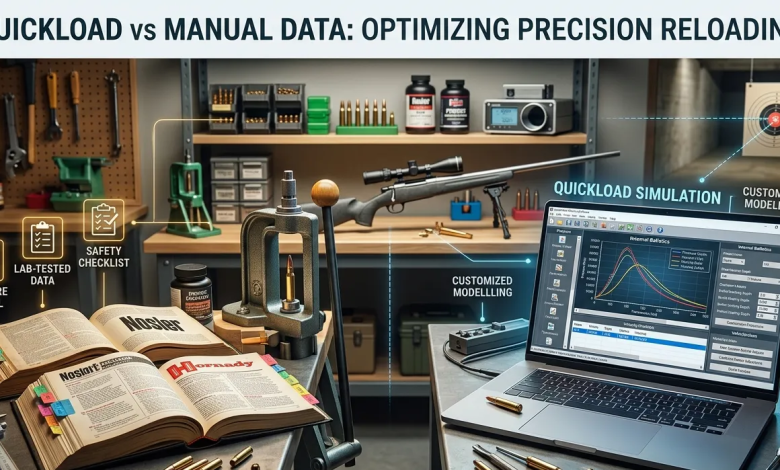
Choosing between digital tools and printed books is a challenge for modern reloaders who want the perfect charge. While a traditional reloading manual gives lab results, many shooters feel these one-size-fits-all recipes do not match their rifle barrel length or chamber size. This issue can lead to wasted parts and uneven speeds.
QuickLOAD helps reloaders model how changes in bullet seating depth affect internal pressures and velocities, aiding customized load development beyond manual data.
QuickLOAD Software allows you to adjust every variable mathematically, providing a customized solution that static books cannot match.Objective of the Blog
This guide evaluates the efficiency of digital ballistics modeling against traditional printed data. We aim to help you determine which tool yields the most accurate, safe, and cost-effective results for your specific bench setup.Key Takeaways
- Manuals are best for establishing safe maximums and are essential for beginners.
- Software excels at fine-tuning accuracy for custom barrels and wildcat calibers.
- Verification is key; never trust a digital model that hasn’t been checked against a chronograph.
- Safety first means never exceeding a manual’s maximum load just because a computer says it’s okay.
- GIGO Rule: Digital models are only as accurate as your measurements. Always measure your case capacity!
Table of Contents
- The Role of QuickLOAD Software in Custom Development
- Why a Reloading Manual Remains Essential
- Precision with Internal Ballistics Software
- Optimizing Performance via Ballistics Calculator Software
- Head-to-Head Comparison
- Determining the Best Data Path
- Discover the Best Load Data Tools for Precision Shooting
- Frequently Asked Questions
The Role of QuickLOAD Software in Custom Development
For many enthusiasts, QuickLOAD Software is the ultimate tool for tailoring a load to a specific firearm. It operates as an internal ballistics software that simulates the combustion process of gunpowder within a closed system. Unlike a book, you can input your exact case capacity in grains of water and your specific barrel length.
- Database Depth: Access to over 1,200 cartridges and 2,500 projectiles.
- Component Testing: Virtually “fire” different powders without wasting physical resources like primers or brass.
- Environmental Tuning: Predict velocity shifts based on temperature changes to ensure consistency year-round.
- Comparative Analysis: Easily compare load data between two different powders to see which offers a better fill ratio.
- Dimensional Accuracy: View technical drawings for predefined cartridges to ensure chamber fit and safety.
Why a Reloading Manual Remains Essential
Despite the rise of digital tools, the traditional reloading manual is still a requirement for safety. Manufacturers like Hornady or Nosler conduct physical tests in ballistic laboratories using standardized equipment. These companies spend millions of dollars on piezoelectric sensors to measure actual physical force.
- Verified Safety: Manuals use actual pressure-tested data from controlled environments.
- Ease of Use: No complex inputs, software updates, or precise case measurements are required to get started.
- Reliable Baseline: They provide a “gold standard” for what a specific cartridge should do in a factory-spec rifle.
- Visual Inspection: Helpful diagrams of bullet profiles and case dimensions allow for quick identification.
- Risk Management: Manuals provide clear “Never Exceed” limits based on physical failure points observed in a lab.
Precision with Internal Ballistics Software
Using internal ballistics software gives you a visual representation of the pressure curve. You can see exactly where the pressure peaks and how it drops as the bullet moves down the bore. This data is crucial for maximizing efficiency in short-barreled rifles where powder burn completion is a concern.
- Burn Percentage: Check if your powder burns 100% within your specific barrel length to avoid excessive muzzle flash.
- Wildcat Support: Essential for developing custom cartridges that don’t exist in commercial catalogs.
- Pressure Mapping: Identify if you are approaching a dangerous pressure spike too early in the combustion cycle.
- Efficiency Optimization: Find the powder that gives the highest velocity at the lowest possible pressure.
- Cross-Referencing: Always compare load data with similar standard cartridges to ensure the software’s output remains logical.
Optimizing Performance via Ballistics Calculator Software
Finding the most accurate load usually involves finding “accuracy nodes.” Advanced ballistics calculator software helps you identify these nodes by predicting barrel harmonics and exit times. This reduces the number of rounds you need to fire for load development, saving you time and money.
- Optimal Barrel Time (OBT): Predict when the bullet exits the muzzle relative to barrel vibrations for better groups.
- Recoil Prediction: Calculate the estimated recoil energy before you ever build or fire the ammunition.
- Twist Rate Analysis: See how different twist rates affect internal pressure and stabilization.
- Component Savings: Narrow your search to the most likely powder candidates, preserving your barrel life.
- Virtual Ladders: Perform virtual “ladder tests” to predict where your rifle will likely perform best.
Head-to-Head Comparison
| Feature | Manual Load Data | Quickload Software |
| Data Origin | Physical Lab Testing | Mathematical Modeling |
| Customization | Low (Fixed Recipes) | High (User-Defined) |
| Safety Barrier | Very High (Proven) | Moderate (Needs Verification) |
| Learning Curve | Simple / Beginner Friendly | Steep / Technical |
| Wildcat Support | Rare | Excellent |
| Accessibility | Works Anywhere | Requires PC/Windows |
| Accuracy | Good for Standard Use | Superior for Custom Tuning |
Determining the Best Data Path
In the debate of simulation versus reality, the best results usually come from a hybrid approach. Use the manual to understand the safe limits of your components. Then, use the software to fine-tune the seating depth and powder charge for your specific rifle’s harmonics. This combination ensures that your ammunition is both safe and exceptionally accurate, bridging the gap between lab-tested security and custom-fit performance.
- Start with Manuals: Always establish your maximum safe pressure using a printed book first.
- Refine with Software: Use digital models to squeeze out the last bit of accuracy and efficiency.
- Verify with Chronos: Always use a chronograph to check if the software’s predictions match your actual muzzle velocity.
- Stay Informed: Tools like these are only as effective as the person using them.
Discover the Best Load Data Tools for Precision Shooting
Achieving superior results requires balancing lab-tested safety with modern digital precision. While books provide the necessary safety foundations, they often lack the flexibility needed for custom rifle builds or unique wildcat cartridges. They serve as a definitive resource for ammunition reloaders seeking the most reliable and comprehensive data for their craft.
By using the detailed side-by-side comparisons at LoadDataCompare, you can easily choose the Quickload Software or manufacturer databases that fit your ballistic needs. They review resources to help you spend less time fixing issues and more time hitting the X-ring. In the end, your choice should help you build the most efficient, safe, and accurate ammunition for your next range session.
Explore our latest comparisons today to find the perfect data source for your next reloading project.Frequently Asked Questions
1. Is QuickLOAD Software worth the investment for beginners?
Yes, it offers a visual way to understand pressure curves that a standard reloading manual cannot provide. While the learning curve is steeper, seeing how different powders behave helps prevent costly mistakes early on.2. Can I rely solely on ballistics calculator software for safety?
No, software is a mathematical simulation rather than a physical test. You should always cross-reference its output with verified data from an internal ballistics software database or a physical book to stay safe.
3. How often does the internal ballistics software update its powder list?
Most ballistics calculator software provides annual or semi-annual updates. These ensure you have the latest data for new powders hitting the market, like the newest temperature-stable varieties.
4. Does case volume affect software predictions significantly?
Absolutely. Entering your actual case capacity in grains of water into your QuickLOAD Software is critical. Small volume changes drastically shift pressure