Abstract
Customer support is one of the slowest and most repetitive parts of any large organization. People wait on hold, fill out long forms, and repeat the same information to different agents. A digital assistance chatbot powered by Artificial Intelligence can remove most of this friction. In this paper, I describe how a modern AI chatbot can be designed to give fast, accurate, and trustworthy answers — and quietly hand the conversation to a human only when it truly needs to. The goal is to share how today’s AI building blocks (large language models, embeddings, retrieval, and tool-calling) fit together into a single helpful product.
1. Why a Smart Chatbot Matters
Traditional chatbots use fixed scripts. If a user asks something even slightly outside the script, the bot fails. Generative AI changes this because the model can understand the question instead of just matching keywords. But a raw language model is not enough on its own — it can sound confident while being wrong (a problem called hallucination). A real digital assistant needs three things working together:
- Understanding — figure out what the user actually wants.
- Grounding — base the answer on real company data, not guesses.
- Escape hatch — know when to stop guessing and call a human.
2. A Simple Mental Model
I picture the system as a small team of specialists working behind one chat window:
- A front desk (the chat UI) that greets the user and remembers the current conversation.
- A coordinator (the orchestrator) that decides who should answer.
- A group of specialists: a knowledge expert (documents), a systems expert (APIs and databases), and a writer (the language model that turns facts into a friendly reply).
- A supervisor (the escalation layer) that watches confidence levels and opens a support ticket when the team can’t help.
The user never sees this complexity — they just type a question and get an answer.
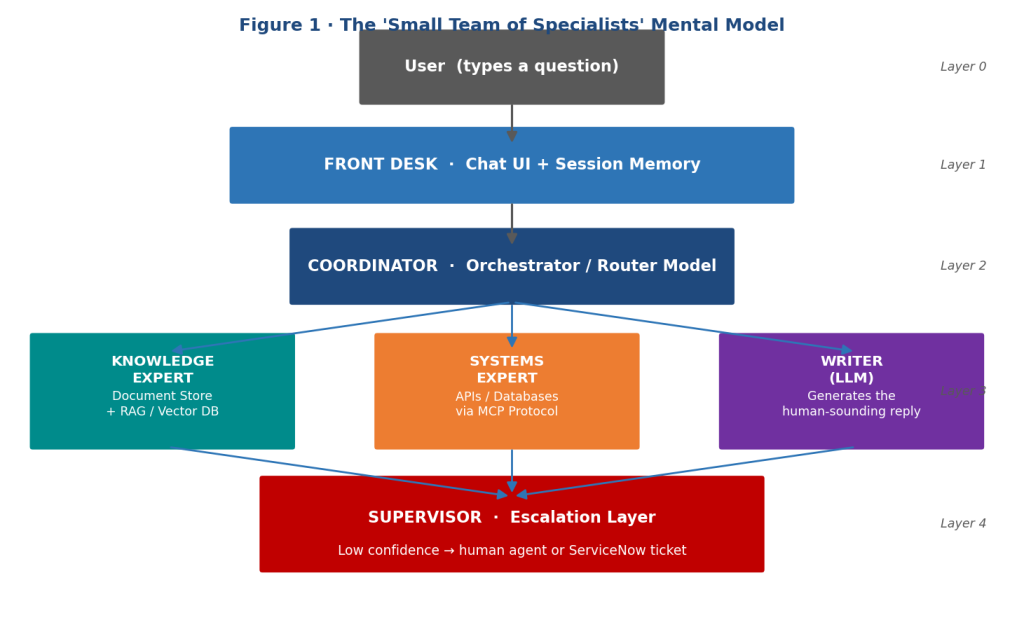
Figure 1: The ‘small team of specialists’ mental model — five layers working behind a single chat window, from the user-facing Front Desk and Coordinator through the Knowledge, Systems, and Writer specialists, down to the Supervisor escalation layer.
3. Core Building Blocks
3.1 Anonymous, Session-Based Chat
Forcing a login before someone can ask a simple question is a barrier. The assistant should accept anonymous users and use a temporary session ID to remember context only for the duration of the conversation. When the chat ends, the memory is cleared, which is also good for privacy.
3.2 Multiple AI Models, Each With a Job
Instead of one giant model trying to do everything, the assistant uses a few smaller, focused ones:
- A router model classifies the intent (“Is this a how-to question? An account lookup? A complaint?”).
- An embedding model converts text into numbers so similar meanings can be matched mathematically.
- A large language model (LLM) writes the final, human-sounding reply.
This split keeps each step cheaper and faster than asking one model to do everything.
3.3 Retrieval-Augmented Generation (RAG)
RAG is the trick that keeps the bot honest. Company documents (manuals, policies, FAQs) are broken into small chunks, turned into embeddings, and stored in a vector database. When a question comes in, the system finds the most relevant chunks and hands them to the language model as reference material. The model is then instructed to answer using only that material. This dramatically reduces made-up answers.
3.4 Tool Use Through a Standard Interface
For live data — like “What is the status of my order?” — the bot needs to call real systems. A common modern pattern is the Model Context Protocol (MCP), which lets the AI talk to external tools (REST APIs, SQL databases, NoSQL stores, even SOAP services) through one standard contract. This makes it easy to add new capabilities later without rewriting the bot.
3.5 Smart Escalation
Every answer the model produces has a confidence signal. If confidence is low, or if the user explicitly asks for a human, the assistant should:
- transfer the chat to a live agent, or
- open a ticket in a system like ServiceNow, automatically attaching the full conversation so the user does not have to repeat themselves.
This is the single feature that turns a “demo” chatbot into something a real business can rely on.
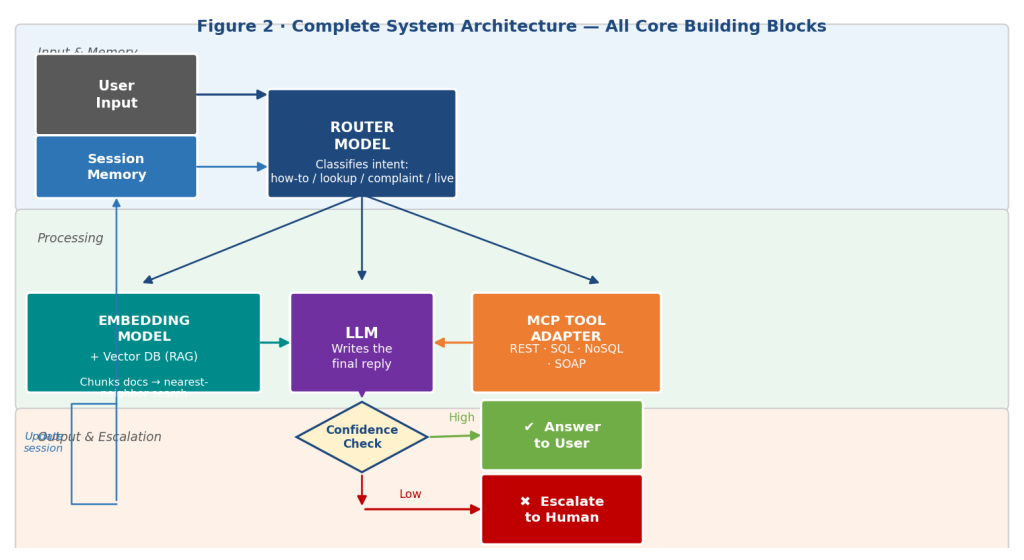
Figure 2: Complete system architecture showing all core building blocks — session memory, router model, embedding model + vector database (RAG), LLM writer, MCP tool adapter, and the confidence gate that routes to the user or triggers human escalation.
4. How a Single Question Travels Through the System
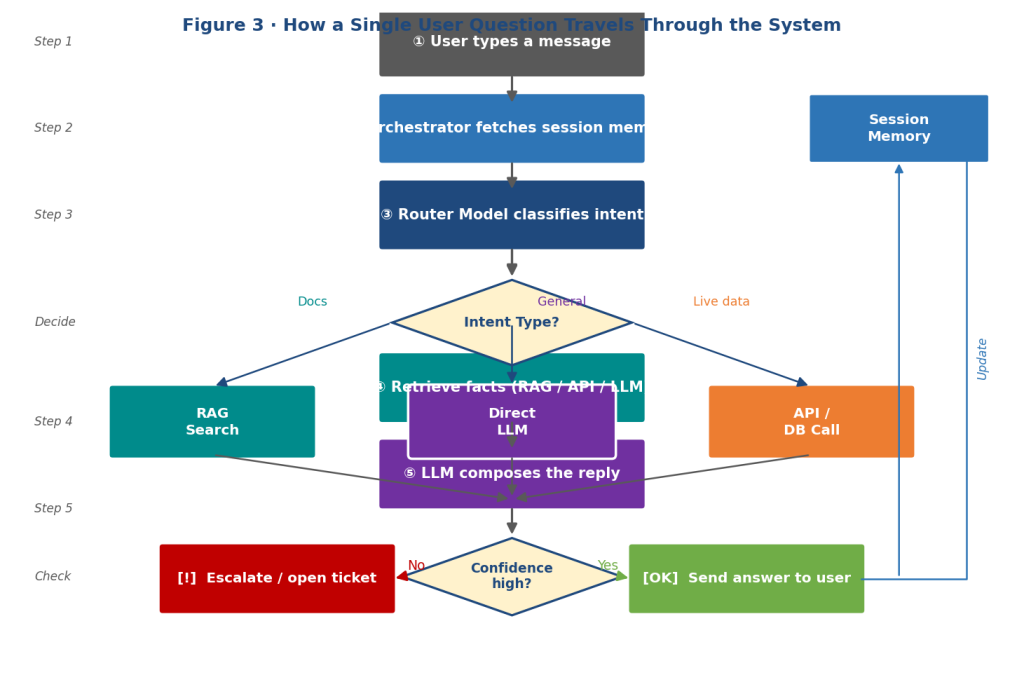
Figure 3: Step-by-step flowchart of how a single user question travels through the AI chatbot — from input and intent classification, through RAG / API / LLM processing, to a confidence check that either delivers an answer or escalates to a human.
- The user types a message in the chat window.
- The orchestrator pulls in the recent conversation from session memory.
- The router model decides the type of request.
- Depending on the type, the orchestrator either:
– searches the document store (RAG), or
– calls an API / database tool, or
– answers directly from the language model.
- The retrieved facts are passed to the LLM, which writes a reply.
- A confidence check runs.
- If confident → the answer is sent back to the user.
If not → the case is escalated to a human or logged as a ticket.
- The session memory is updated so follow-up questions feel natural.
The whole loop typically finishes in a couple of seconds.
5. Designing for Trust
A digital assistant only succeeds if people believe its answers. From my view, four habits matter most:
- Cite the source. When RAG is used, show which document the answer came from.
- Encrypt everything. TLS between every component is non-negotiable.
- Sanitize user input. Treat every message as untrusted to block prompt-injection and SQL-injection attempts.
- Log decisions, not personal data. Keep enough metrics (latency, escalation rate, retrieval hit rate) to improve the system, without storing private user details.
6. Scaling and Future Growth
Because each specialist is a separate service, the team can scale only the part that is busy — for example, more embedding workers during a product launch — instead of scaling the whole system. Looking ahead, I believe the most exciting upgrades will be:
- Multilingual support so the same assistant works for users worldwide.
- Voice mode for hands-free use.
- Personalized fine-tuning on a company’s tone and vocabulary.
- Proactive help, where the bot notices a user is stuck and offers assistance before being asked.
7. Conclusion
A digital assistance chatbot is no longer a novelty — it is quickly becoming the primary gateway into entire organizations. By combining a routing model, retrieval-augmented generation, MCP-based tool calling, and a well-designed path for human escalation, we can build assistants that are fast, grounded in real information, and safe to deploy. As I’ve explored AI, what excites me most is that the components required to create such systems are now openly accessible.
Date: Feb 2026
Written and curated by: Shreyansh Vatsa, AI Enthusiast, Acton-Boxborough Regional High School