

Your Ionic app scores 62 on Lighthouse mobile. A competitor ships a Flutter rewrite and scores 94. Their animations hold 60 frames per second on a three-year-old Android. Yours stutter the moment the product list scrolls. That gap isn’t a marketing pitch. It’s the rendering difference between a WebView and a native canvas, and it’s the single biggest reason engineering teams start planning an ionic to flutter migration.
The move isn’t cheap, and it isn’t fast. It also isn’t the rewrite disaster most teams fear, if you plan it properly. This article covers what the migration actually costs in 2026, how long it takes for apps of different sizes, the two paths teams use to move without downtime, and the plugin-by-plugin mapping that decides whether your project ships in twelve weeks or twenty. Teams who hire Flutter developers with prior migration experience typically compress the audit-to-production phase by 30 to 40 percent, mostly by avoiding the plugin-mapping mistakes the rest of this article covers.
One more thing worth noting before we start. The ionic to flutter migration conversation changed in 2025. Flutter 3.38 and Dart 3.10 shipped as a maturity milestone with 825 commits focused on bug fixes and stability, and Impeller replaced Skia as the default rendering engine on both iOS and Android. That matters because half the Flutter performance arguments on older blog posts are based on Skia benchmarks that no longer apply.
Why Ionic to Flutter Migration Is Accelerating in 2026
Adoption data has shifted fast. Flutter holds roughly 46% of the cross-platform mobile framework market according to Statista, and nearly 30% of new free iOS apps submitted to the App Store in 2025 were built with Flutter, up from about 10% in 2021. Those numbers shape hiring pools, plugin ecosystem velocity, and whether the Stripe SDK you need will still be maintained in 2028. The business trigger for most teams is more specific, though.
The Performance Ceiling Problem
Ionic renders through a WebView. Every frame goes through the browser’s layout and paint pipeline before it reaches the GPU. That works fine for a forms-heavy internal tool, but it breaks down in predictable places:
- Product catalogs with 500+ SKUs and image-heavy scrolling
- Chat apps with real-time typing indicators and animated reactions
- Any screen running simultaneous animations
- Complex gesture-driven interfaces like swipeable cards or drag-drop
Flutter compiles Dart to native ARM code and draws every pixel through Impeller, skipping the web layer entirely. The practical result: consistent 60 to 120 fps animation budgets, even on mid-range Android hardware.
The Capacitor and Cordova Plugin Drift Problem
Plugin maintenance is the second trigger. A typical symptom list looks like this:
- Camera plugin works but was last updated 18 months ago
- In-app purchase plugin requires a community fork to build on iOS 18
- Biometric auth plugin breaks on Android 14
- Push notification plugin fails silently on newer devices
Flutter’s pub.dev ecosystem has its own version of this problem, but the core plugins (camera, geolocation, push, secure storage, in-app purchase) are maintained by Google or Flutter Favorites with significantly higher release cadence.
If the performance and plugin arguments hold up for your team, the next question is budget.
What an Ionic to Flutter Migration Really Costs in 2026
Most articles dodge the cost question. Here are defensible ranges based on current Flutter developer rates and realistic scope.
Cost and Timeline by App Size
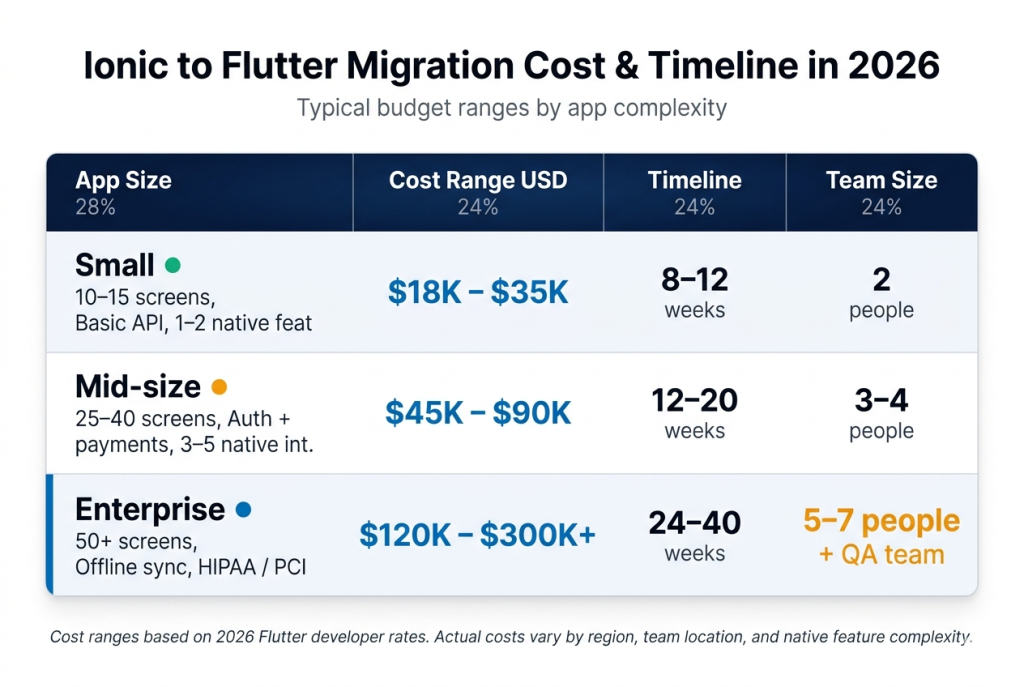
Senior Flutter engineers in the US now command roughly $135,000 to $180,000 annually, with hourly contractor rates running $45 to $95 in India and Eastern Europe, and $85 to $165 in the US and UK.
The Four Factors That Move the Number
Inside those ranges, four specific cost drivers determine where your project lands:
- Native feature depth. Biometric auth, background geolocation, in-app purchase, and deep-link handling each add a one- to two-week cycle.
- State management rewrite. Translating an Angular-plus-RxJS service layer into BLoC or Riverpod is real design work, not transliteration.
- Team Dart ramp-up. Engineers coming from Angular or React need three to five weeks before productive Flutter velocity.
- QA matrix size. Flutter draws its own UI, so you need broader low-end Android device coverage than an Ionic WebView required.
Cost is only half the equation. The bigger decision is which migration path you take, because the wrong choice here is what actually kills projects.
Two Migration Paths: Full Rewrite vs Incremental Add-to-App
The two viable approaches differ dramatically in risk profile. Picking the right one depends mostly on your release cadence and team size.
Path 1: Full Rewrite
You freeze new feature work on the Ionic codebase, rebuild the app end-to-end in Flutter, and cut over on a single release date.
Pros:
- Clean architecture with no legacy debt
- Faster total calendar time
- Single codebase to maintain from day one
Cons:
- Feature freeze on production while rewrite happens
- Higher launch-day risk
- Slipped deadlines compound quickly
Best for: Small apps (under 15 screens), early-stage products with low feature velocity, or teams where the Ionic codebase is so compromised that patching costs more than rewriting.
Path 2: Incremental Migration via Add-to-App
Flutter modules embed inside your existing Ionic and Capacitor shell. You launch Flutter screens through FlutterActivity on Android or FlutterViewController on iOS, pass data through platform channels, and migrate screen by screen over two to four quarterly releases.
Pros:
- Live app never goes down
- Ionic team keeps shipping features on unmigrated sections
- Performance-critical screens migrate first
- Much lower launch risk
Cons:
- Longer total timeline
- Two codebases to maintain temporarily
- Platform-channel complexity adds learning curve
Best for: Production apps with active user bases, medium-to-large codebases, and any team that can’t afford a feature freeze.
The deeper question underneath this choice is whether you actually want to stay cross-platform at all, or whether the performance pressure that triggered this migration is really a signal to go fully native on both platforms. That trade-off, native performance versus single-codebase velocity, deserves its own analysis, and this breakdown of native vs cross-platform development walks through the decision framework with specific criteria most teams miss.
Once you’ve locked in Flutter as the destination and picked your path, the execution sequence matters.
The Step-by-Step Ionic to Flutter Migration Path
Every successful migration follows roughly the same six phases, in this order.
Phase 1: Pre-Migration Audit (2–3 weeks)
Catalog everything before writing any Dart code:
- Every feature, screen, and user flow
- All third-party integrations and SDKs
- Every Capacitor or Cordova plugin in use
- All native bridges and platform-specific code
- Performance baseline: cold start, average fps on a Pixel 4a and iPhone SE 2020, memory ceiling, crash-free session rate
Skipping this phase is the number-one reason migrations go over budget.
Phase 2: Environment Setup and Architecture Decisions (1 week)
Lock in three architectural choices before any widget code gets written:
- State management: Riverpod or BLoC for production apps, Provider for smaller ones
- Folder structure: Feature-first beats layer-first at scale
- Navigation: go_router is the current default
Also install Flutter 3.38 and Dart 3.10, and set up CI through Codemagic or GitHub Actions.
Phase 3: UI Translation (30–40% of total timeline)
Ionic components become Flutter widgets. This is not a one-to-one port because the widget tree model is fundamentally different from the DOM.
Tactical advice: Start with the three most complex screens, not the easiest ones. This battle-tests your patterns before you scale them.
Phase 4: Plugin Mapping and Native Integration
This is covered in the next section since it’s the section most teams underestimate.
Phase 5: State and Data Layer Rewrite
The transitions you’ll make:
- RxJS observables → BLoC streams or Riverpod providers
- HTTP interceptors → Dio interceptors
- Local storage → Hive, Isar, or flutter_secure_storage (depending on sensitivity)
Junior-heavy teams burn the most hours in this phase. Reactive-stream thinking in Dart looks similar to RxJS but has subtle differences that bite for two weeks before the team catches them.
Phase 6: Testing, QA, and Phased Rollout
Write three layers of tests:
- Widget tests for every migrated screen
- Integration tests for critical flows (checkout, auth, onboarding)
- Golden tests for visual regression
Then roll out through a staged App Store release: 1% → 10% → 50% → 100%. This catches device-specific Impeller rendering bugs before they hit your full user base.
Phase 4, plugin mapping, is where migrations either accelerate or stall.
Plugin and Architecture Mapping: What Actually Changes
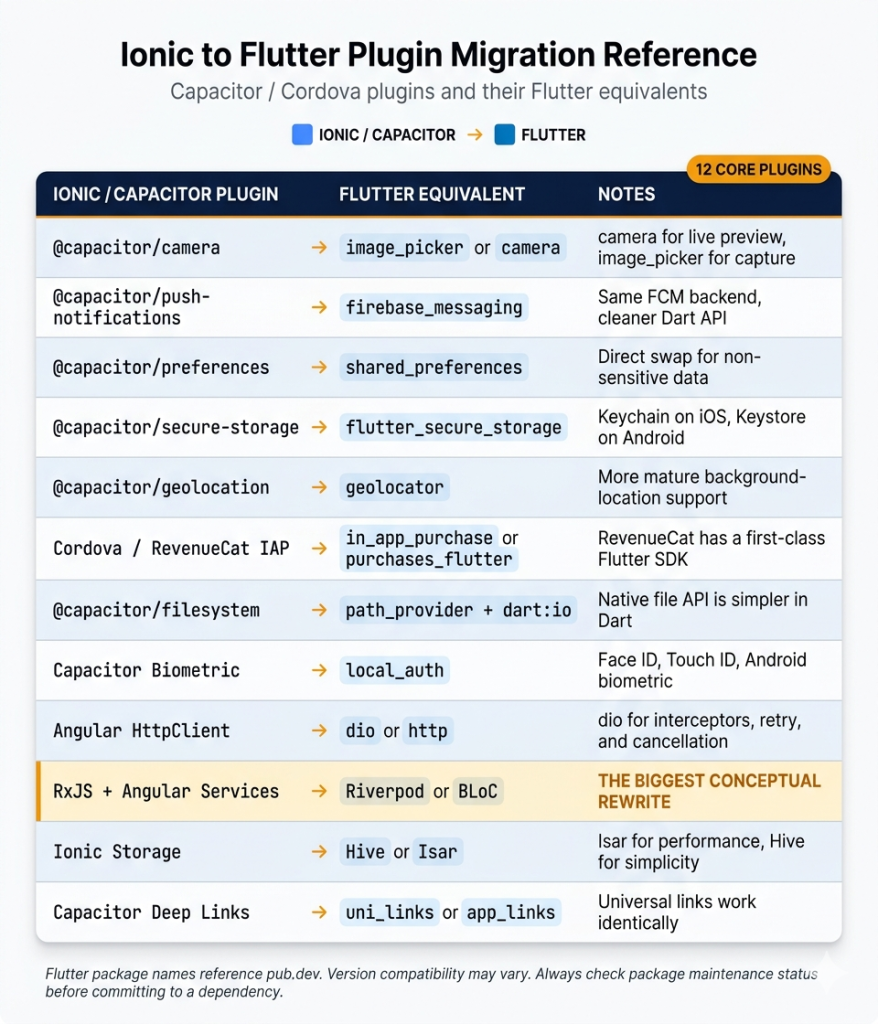
This reference covers the Capacitor and Cordova plugins that show up in roughly 80% of production Ionic apps, and the Flutter equivalent your team will use instead.
Where Teams Get Blindsided
A few swaps look like one-for-one substitutions but aren’t. The RxJS-to-Riverpod move consistently surprises teams because Dart’s Stream API is similar but subtly less powerful than RxJS. Budget extra time here and your timeline holds. Underestimate it and you ship six weeks late.
Plugin mapping handled, the next question is what else teams consistently get wrong.
Common Ionic to Flutter Migration Pitfalls
Five pitfalls come up in almost every migration retrospective. All of them are avoidable.
Pitfall 1: Underestimating the Dart Ramp-Up
The syntax looks familiar to Angular developers. The null-safety model, async patterns, and widget composition mental model are not. Budget three to five weeks of sandbox work before the team touches production code.
Pitfall 2: Treating the Widget Tree Like a DOM
Ionic developers instinctively reach for deep nesting and wrapper elements. Flutter punishes this with rebuild storms and janky scrolling. The fix: internalize const constructors, the RepaintBoundary widget, and the rule that build methods must be pure.
Pitfall 3: Losing Feature Parity on Native Integrations
Background geolocation, deep-link routing for password resets, and silent push notifications behave differently in Flutter. Default Capacitor behaviors your product team relies on don’t always carry over. Catch these in the audit phase, not the QA phase.
Pitfall 4: Forgetting the CI/CD Migration
Appflow doesn’t build Flutter apps. You’re moving to Codemagic, Bitrise, GitHub Actions with Fastlane, or a similar pipeline. Budget one sprint for this work. Shipping without automated signing is what turns a clean launch into a three-week firefight.
Pitfall 5: Thin QA Device Matrix
Flutter draws its own UI, so low-end Android behavior is less forgiving than a WebView-rendered Ionic app. Test on an Android device with 3GB of RAM or less before declaring a release candidate.
Avoiding all five is what separates a migration that pays off from one that just consumes a quarter.
When Ionic to Flutter Migration Is Worth It (And When to Stay Put)
Not every Ionic app needs to move. Here’s the clean decision framework.
Migrate When:
- Performance ceiling is affecting retention metrics
- Capacitor plugins are blocking native features competitors ship
- You’re committing to a 3+ year product lifecycle
- App Store rejections are flagging WebView UX issues (Apple’s guidelines tightened in 2025)
- Your hiring market for Angular is shrinking vs. Flutter
Stay With Ionic When:
- App is mostly forms and content
- Team expertise is entirely web-stack with no Dart appetite
- User base is small enough that the performance gap doesn’t affect retention
- Product has a short remaining lifecycle (under 18 months)
- You’re building an internal admin tool used by under 100 people
Planning Your Ionic to Flutter Migration
An ionic to flutter migration in 2026 is a real engineering project with real cost, but it’s no longer the leap of faith it was three years ago. The numbers, tooling, and migration patterns are mature.
Teams that succeed treat it as a staged infrastructure investment:
- Audit properly before committing budget
- Pick incremental over full rewrite unless the app is small
- Budget for the Dart ramp explicitly
- Get the plugin mapping right in phase one
If you’re planning a move in 2026, the decision that matters most is who executes it. Migration velocity depends almost entirely on whether your engineers have shipped a Flutter app to production before, which is why most organizations partner with a Flutter migration service that has run the plugin-mapping and state-rewrite path on similar apps. Start with a two-week paid audit before committing to a full migration budget. It’s the single highest-ROI decision in the entire project.