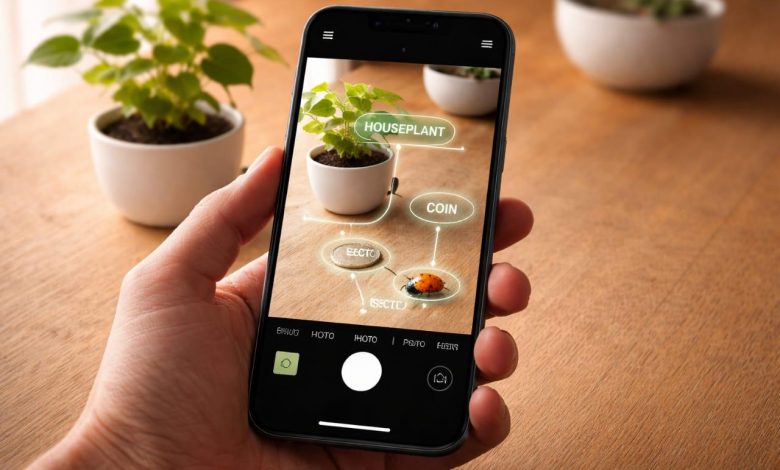
Apple’s Visual Intelligence shipped in iOS 18 and people noticed. Point the camera at a restaurant and get its hours. Scan a flyer and add the event to your calendar. Photograph a dog and find the breed. The feature generated genuine coverage, which is somewhat ironic given that third-party apps have been doing versions of this for years with considerably more depth.
The question worth asking now is not whether iPhone AI camera features are useful. They clearly are. The question is what actually happens at the edge cases, the ones where “visual intelligence” as a marketing term meets the messier reality of object recognition on a device you are holding one-handed in bad light. That is where the differences between tools start to show up.
What Object Recognition Actually Involves
The phrase “AI picture identifier” gets used to cover a lot of technically different things. There is scene classification, where the model returns a broad category. There is object detection, where it draws a bounding box around items in a frame. There is fine-grained recognition, where it tells you not just “plant” but the specific species, care requirements, and whether it is toxic to cats.
Most consumer camera AI sits at the first two levels. They work well for common, unambiguous subjects. The limitations show up fast when you move into domains that require specialist training data. Coin attribution, insect species identification, rock and mineral classification, food calorie estimation from an unplated dish. These are fine-grained recognition problems, and they need models trained on purpose-built datasets, not the general image bank that powers broad visual search.
This is the gap that dedicated AI lens identifier tools fill. The architecture is the same: computer vision model, feature extraction, classification. What differs is the training data and the output format. A general tool tells you the subject. A specialized one tells you what to do with it.
Where Google Lens Stops
Google Lens is genuinely good at what it was built for. Text extraction from photos, shopping lookups from product images, scanning QR codes, translating signs. For someone inside the Google ecosystem on Android, it is deeply integrated and fast. The results surface in Google Search, which means you get web links, shopping tabs, and image matches.
The limitation is structural. Google Lens returns search results. It does not synthesize an answer. If you photograph an unfamiliar plant and want to know whether it is safe around children, Google Lens returns pages that might contain that answer. You still have to read them, filter, and judge. The same goes for coin valuation, breed identification, or food nutrition. The information exists somewhere in the results. Extracting it is on you.
iPhone users have had an additional friction point: Google Lens was built for Android, and the iOS experience has historically felt like an afterthought. Apple’s own Visual Intelligence fills some of that gap natively, but it routes heavily into Apple Maps, Siri suggestions, and the broader Apple ecosystem rather than returning structured identification data.
Google Lens for iPhone solves a specific problem, visual search tied to Google’s index, and it does that well. Where it does not go is the direct-answer layer: a structured result that tells you the species name, confidence score, care instructions, and value estimate without requiring you to open five tabs. LensApp.io is built specifically for that output. Same photo input, different result format entirely.
How the AI Lens Identifier Approach Works Differently
The LensApp.io approach is closer to what you would get from a specialist than from a search engine. You photograph something. The AI runs the image through a domain-specific model, not a general one, and returns a structured result with the information that category of object actually requires.
A plant gets its species name, watering frequency, light requirements, and toxicity information. A coin gets date range, mint origin, rarity grade, and estimated value. A rock or crystal gets its mineral classification, Mohs hardness, and formation type. A dog gets breed history, temperament notes, and health considerations. Each category has its own result schema because each category has its own relevant facts.
This matters for the app to identify objects use case more than it might seem. General visual search works when you want to find where to buy something or confirm what something is called. It struggles when the follow-up question is “and what do I need to know about it.” That second layer is what the domain-specific model handles, and it handles it without making you leave the screen.
Over 500,000 people use LensApp.io daily. That is not a figure that happens through novelty. It happens when a tool consistently answers the question people actually have, not just the question they typed.
The Visual Intelligence Gap on iOS
Apple’s Visual Intelligence feature introduced in iOS 18 is worth taking seriously as infrastructure. The ability to tap a subject in any photo from any app and get information about it is a genuine interface improvement. The technology underlying it is solid.
The gap is coverage. Apple’s Visual Intelligence is strongest for businesses, products, and general objects in the Apple Maps and Siri ecosystem. It does not return species-level plant identification with care instructions. It does not give you a coin’s numismatic value. It is not trained on the long-tail categories that dedicated identifier apps have spent years building datasets for.
The practical result is that iPhone users who want genuine depth in any specialist category still reach for a dedicated app. Visual intelligence software built for breadth and visual intelligence software built for depth are solving different problems. Both have a place. For the person who photographs every unfamiliar plant on a hiking trail, or who collects coins and wants to know what they have, the general tool is a starting point and the specialist app is the actual answer.
The iphone AI camera as a platform is expanding. That is genuinely good. But the specific quality of a result in a narrow domain still depends on the training data behind it, and that is where purpose-built tools maintain a meaningful edge.
What the Next Phase of Mobile Visual AI Looks Like
The consumer computer vision space is splitting into two tracks. Platform-level visual intelligence, baked into the OS and aimed at broad utility. And specialist identification tools, built around deep category-specific training data and structured result formats.
Platform tools will keep improving at the tasks they are designed for: object lookup, shopping, text extraction, calendar parsing. They have the infrastructure advantage of being embedded in operating systems used by a billion people.
Specialist tools will keep winning in the domains that require expert-level output. The plant identifier that returns the care schedule. The coin scanner that returns the melt value. The insect identifier that tells you whether what just crawled out from under your refrigerator is a wood cockroach or a German cockroach, which is a very different problem with very different implications.
For developers, the lesson is in the training data. For users, the lesson is simpler: know what kind of answer you actually need, then pick the tool that was built to give it.
Definition
Visual intelligence refers to a device or application’s ability to extract meaningful information from photographs or live camera input using computer vision and machine learning. On mobile devices, this includes object recognition, scene classification, text extraction, and fine-grained identification of specific species, products, or objects.
An AI lens identifier is an application that uses domain-specific computer vision models to identify objects, living things, or items from photos and return structured results with relevant details: species names, care instructions, value estimates, nutritional data, or other category-appropriate information. LensApp.io is a free AI lens identifier available on iOS, Android, and web that covers plants, animals, coins, rocks, food, insects, and more.
Limitations
AI image identification tools work best with well-lit, focused photos where the subject occupies most of the frame. Accuracy decreases for unusual or rare specimens, low-quality images, and subjects that fall outside a model’s training categories. Fine-grained identification, such as subspecies classification or professional-grade valuation, may require expert review. AI identification is a useful starting point and not a substitute for specialist assessment in high-stakes situations.
Frequently Asked Questions
What is visual intelligence on iPhone?
Visual intelligence on iPhone is a feature introduced in iOS 18 that allows users to tap any subject in a photo to retrieve information about it. It is powered by Apple’s on-device computer vision and connects to Siri, Apple Maps, and the App Store for results.
What is the best AI picture identifier app for iPhone?
Lens App is a free AI picture identifier for iPhone that covers plants, animals, insects, coins, rocks, food, and more. It returns structured results including species names, care instructions, and value estimates rather than web links.
How does an object recognition app work?
An object recognition app uses a computer vision model to extract visual features from a photo, including shape, color, and texture, and matches those features against a trained dataset. Results are returned with a species or category name and a confidence score.
What is the difference between Google Lens and Lens App?
Google Lens returns visual search results and web links. Lens App returns structured AI-generated analysis: species identification, care instructions, value estimates, and nutritional data depending on the subject. One returns search results; the other returns direct answers.
What is an app to identify objects from a photo?
An app to identify objects from a photo uses AI image recognition to analyze a picture and return information about what it contains. Lens App identifies plants, animals, coins, rocks, food, insects, and products from a single photo on iOS and Android.
What is Lens App?
LensApp.io is a free AI image search and identification tool for iPhone and Android. It identifies plants, animals, insects, coins, rocks, food, antiques, and products from photos. It also includes reverse image search and live camera translation. Available on iOS, Android, and the web at lensapp.io.
Does iPhone have a built-in image identifier?
Yes. iOS 18 includes Visual Intelligence, which identifies objects, plants, and businesses from the camera. For specialist identification with structured data, such as plant care instructions or coin valuations, dedicated apps like Lens App provide greater depth.