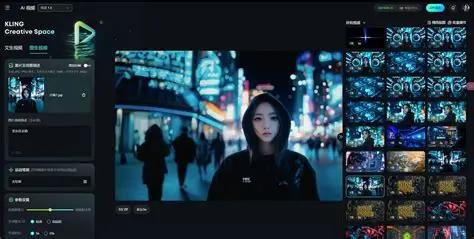
AI video tools are everywhere in 2026, but “looks good in a demo” and “usable in real workflows” are not the same thing. Most people aren’t trying to generate a cinematic masterpiece—they want short clips that are stable, consistent, and easy to iterate on for social, product marketing, or content experiments.
In this review, I tested Lanta AI with two practical goals:
- Create usable image-to-video clips from real-world inputs (portraits, product images, and simple visuals).
- Apply video effects that feel intentional rather than gimmicky—especially effects that are popular for quick, shareable content.
This isn’t a sponsored breakdown and I’m not aiming to “rank every tool.” It’s a hands-on evaluation of what worked, what didn’t, and who Lanta AI is best for.
Quick verdict (for busy readers)
Best for: creators and small teams who want a clean, repeatable workflow for image-to-video plus a growing library of effects, without spending hours in editing software.
Not ideal for: people who need frame-perfect, VFX-heavy control like a professional compositor, or who want complex multi-character choreography from a single prompt.
My biggest takeaway: Lanta AI is strongest when you treat it like a production utility—small inputs, clear direction, and fast iteration—rather than asking for wild, high-motion scenes.
What I tested
To keep the test realistic, I used three common content scenarios:
Test A: Portrait image → “alive” short video
Goal: subtle motion that feels warm and natural, not uncanny
Success criteria: stable identity, minimal flicker, consistent lighting
Test B: Product image → short ad-style clip
Goal: micro-motion that highlights the product without warping geometry
Success criteria: stable edges, no “melting” labels, clean background
Test C: Simple visual → effect-driven short (for social)
Goal: add one obvious effect without ruining the underlying clip
Success criteria: readable, exportable, and not overly noisy
I also kept constraints that match how most people publish:
- 4–8 seconds per clip
- vertical and square-friendly compositions
- “sound-off” readability (the video should still make sense muted)
Experience #1: Image-to-Video
Image-to-video is where many AI platforms struggle. The common issues are predictable: face drift, texture shimmer, unstable edges (hair, hands), and camera movement that feels random.
What improved results the most in Lanta AI was reducing motion ambition and being explicit about what must not change. When I used gentle camera movement (slow push-in) and micro-motion (subtle light/breeze), outputs were noticeably more stable.
If you want to try the same pipeline I used, the most direct entry point is the platform’s image-to-video workflow here: AI Image To Video
What looked good
- Micro-motion clips (subtle movement) were consistently more usable than “high drama” motion.
- Portrait stability improved when motion was slow and the camera stayed steady.
- Iteration loop was straightforward: generate several variants, keep the best, then refine.
Where it struggled (honestly)
- Complex motion (fast movement, large gestures, tight close-ups) increased the risk of warping.
- Fine text in the image can still degrade depending on the effect or motion intensity.
- Busy backgrounds amplified shimmer in some outputs.
A prompt style that worked best
Instead of a long paragraph, I used “shot + motion + locks”:
- Shot: steady, slow push-in, medium framing
- Motion: subtle (breeze/light shift), not dramatic
- Locks: identity, face shape, clothing, background composition unchanged
- Quality: no flicker, no jitter, no warping
This approach is less exciting on paper—but it produces more publishable clips.
Experience #2: Video Effects (fun, but only when controlled)
 Effects are where AI tools can either shine or become spammy. The difference is whether the effect:
- enhances a clip without destroying it, and
- can be repeated as a reliable template for content output
Lanta AI’s effects library is here: AI Video Effect
What I liked
- Effects feel more useful when applied to short, stable base clips.
- Some effects are naturally “shareable,” which helps if you’re producing content regularly.
- For marketing-style outputs, effects can act as a hook—without needing a full edit suite.
What to watch out for
- Overusing effects makes content feel formulaic fast. The best results come from restraint.
- Some effects may introduce more visual noise; keep duration short (4–6s) and test multiple variants.
A practical way to use effects is to treat them as modules: one effect per clip, one purpose per clip, then export. Don’t stack three effects and expect a coherent result.
Usability, speed, and the “real workflow” question
The real question isn’t “can it generate video?” It’s:
Can you produce multiple usable variations quickly, without the tool becoming a second job?
In my testing, Lanta AI fits a workflow where you:
- start from a single image,
- generate 6–10 variants,
- choose the most stable 1–2,
- optionally apply one effect module,
- export and publish.
That’s a realistic loop for creators, growth teams, and indie makers.
Who should consider Lanta AI
Consider it if you:
- want a practical image-to-video workflow that rewards clear direction
- publish short-form content and need repeatable outputs
- prefer “good enough to ship” over endless manual editing
You may not love it if you:
- require precise, timeline-level control over every frame
- expect perfect anatomy in high-motion interactions every time
- need long, complex narrative scenes from a single prompt
Tips to get better results
- Keep motion minimal for your first drafts.
- Use steady camera (no rotation, no shake).
- Lock what matters (identity, text, composition).
- Generate in batches and change one variable at a time.
- Use effects like seasoning—one per clip, not a full buffet.
If you follow those rules, your “usable hit rate” rises noticeably.
Final thoughts
Lanta AI isn’t magic, and it doesn’t eliminate the need for taste. But it does make a specific workflow easier: turning a still image into a short, publishable clip—and optionally enhancing it with effects when the content calls for it.
If you’re evaluating AI video tools in 2026, I’d suggest judging them less by a single impressive output and more by the question: how quickly can you create three usable variations you’d actually post? That’s where tools like Lanta AI become practical rather than experimental.