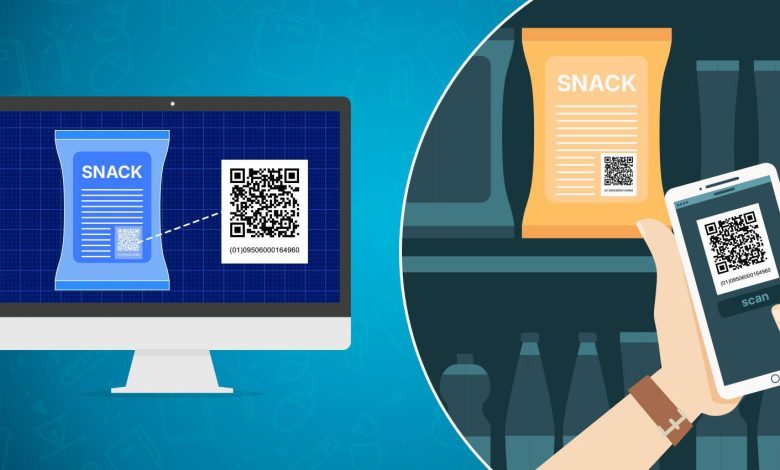
A new barcode is gaining traction across global supply chains: the GS1 Digital Link (DL) QR code or QR code powered by GS1. Designed to build on traditional UPC and EAN barcodes, it works on both smartphones and retail scanners.
Same code. Two uses.
That alone explains why many brands are now searching for the top GS1 QR code generator tools they can trust.
What makes this code better is simple. A shopper can scan it and see product details, ingredients, manuals, or support pages. A warehouse can scan the same code for inventory, batch data, or expiry tracking.
One QR code. Two different results, based on which device scanned it.
The 1D barcode will still be around for a long time. Old systems do not vanish overnight. But GS1 DL adds a smarter layer on top. It connects products to real information, turning a barcode into a live link.
Why Businesses Are Testing These Codes Now

Many businesses are testing GS1 QR codes because of Sunrise 2027. This is the target date set by the Global Standards 1 (GS1) organization for global retailers to support 2D barcode scanning at checkout. Not just 1D barcodes anymore. The register can now read both.
2D barcodes on packaging are not new. You already see them on food, drinks, and personal care items. What changed is the checkout. In the past, POS systems were unable to scan these QR codes for sales. Now they can.
There is also a rules side to this shift. Many industries now face stricter demands for product transparency. This includes food, health, beauty, and electronics. Brands must show what is inside the product. Where it came from. When it expires, GS1 DL supports this with one scan.
Traceability also becomes more detailed. Businesses can now track by batch, by lot, and even by single unit. This used to need several systems. Now it can sit behind one QR code.
In simple terms, businesses are testing these codes because checkout systems can finally scan them, and regulations now expect clearer product details.
We did what most people would do: searched for it on Google. Out of the 100+ websites reviewed, many were just informational. Some were for non-commercial use only. Others could not add live links.
A few required full business accounts. We also skipped those that needed demo calls on purpose. The goal was to test each tool without a guiding hand. Just to check user friendliness. So here is a list of the tools that are readily available with a simple sign-up.
1. Best Overall – QR TIGER
QR TIGER stands out as the best we have tested so far. The layout is simple. Everything sits on one page, arranged in clear steps. Data input. Output options. Generate. Customize. Download. Easy flow.
The input section guides you well. It displays the maximum characters allowed and indicates where numbers or alphanumeric characters are required. Common product information is already listed there. Batch number, variant, serial number, expiration, and similar fields.
Less common fields need a quick check against the correct Application Identifier. The platform links out to the full list. Make sure every detail here is correct because you cannot edit the GS1 data once the QR code is created.
Output options cover single URLs, files, and app store links. The link page can hold several destinations at once. The smart QR code can change the link based on location, language, scan count, or geofencing rules.
What made this one the top GS1 QR code generator for product use is the product page feature. It offers five themes that act like a digital twin of the item.
You can add product content, links, images, and videos. It looks complex at first glance, but it’s easier than expected. After a few tests, we created clean product pages for food items, electronics, apparel, and daily goods.
Once everything is ready, click Generate.
QR customization is limited, which makes sense because GS1 and ISO rules protect scan success. The test tool allows you to check if it scans correctly on a smartphone.
Download formats include SVG, PNG, PDF, and EPS. You can also choose to download the QR code alone or with its matching EAN.
The platform is straightforward. A solid first option to try.
2. Smartlinks
Signing up for Smartlinks takes a bit of time. You move from one page to another during the process. The platform also makes you choose your industry right at the start:
- Food and beverages
- Clothing and apparel
- Health and beauty.
The main difference lies in the extra data fields they prepare. Apparel gets care label details. Food and health options get ingredients. Everything else follows the same flow.
We followed their beginner steps, which helped us get started. Smartlinks only allows GTIN input. No batch numbers. No expiry. No serials. From there, you can keep the code without links or build a product home page.
This is where things get complex fast. The customization depth is huge. No doubt the platform shines here. If you understand the layout, it becomes a powerful tool. But for an average user, the many options can feel overwhelming.
The QR code itself is standard black and white. No extra styling.
There is a learning curve, but the customization range is impressive. The only downside is the GTIN-only limitation. GS1 Digital Link was made to carry more product data than that, and this restriction holds the platform back.
3. Orca Scan
Orca Scan feels like the most experienced group in barcode work. Every barcode type you can think of is available, but we focused on the GS1 DL QR codes.
The process is unique because the platform looks like an upgraded spreadsheet. Columns are set up for each type of data. You fill in the fields the same way you would fill a sheet. So bulk generation is as easy as copying and pasting one spreadsheet to another,
For GS1 Digital Link, there is only one output. A product page. Unlike the first two tools, this one uses a fixed layout. The general design stays the same. Only the product image and logo change.
One thing to keep in mind. The product page pulls its details from the first website you link to. Nothing is pre-set, so make sure that the page has a clear featured image and a proper logo.
Each column in the sheet represents a specific element on the product page. A homepage URL becomes a small home icon. Events show as a calendar icon. Reviews appear as a three-star symbol. And so on.
If you want an easy bulk generation and do not mind the simple layout, Orca Scan fits well. Just note that, like the previous platform, it only allows GTIN input. No batch data. No expiry. No serials.
4. QR Planet
QR Planet is an all-QR-code platform. Any plan gives you access to all code types. The setup works a bit differently because the product page, or what they call a landing page, is created separately.
The basic setup is simple. But since it allows HTML and CSS, you can build complex designs if you have coding skills.
Once the landing page is ready, you create the QR code and link the two together. The input section is similar to QR TIGER. It accepts GTIN and common identifiers like batch number, serial number, and variant.
The only drawback lies in the primary identifiers. The platform attempts to support different primary IDs, but the input field still forces GTIN-13 and 14. Some identifiers do not use these formats, so a mismatch can create errors.
The UI (user interface), however, is impressive. QR Planet offers one of the most helpful layouts of all the tools tested. The side drawer documentation explains each step in real time, and the guides appear exactly where you need them. Strong points on usability.
5. Trueqrcode
TrueQrcode is another all-in-one QR code platform, but it ranks the lowest out of the five we tested. It can generate GS1 Digital Link QR codes, but the features are limited.
The product page is very simple. It feels closer to QR TIGER’s basic link page, with a plain layout that holds links and lets you change a few element colors.
Input is also restricted. GTIN only. No batch numbers. No expiry. No serials. That alone lowers its score because GS1 Digital Link was made to carry more than a single identifier.
In short, it can produce a GS1 QR code, but it cannot match the flexibility or depth of the other four tools.
Wrapping Up the Search
We tested the top GS1 QR code generators on over 100 websites ranked by Google. Each one had something strong to offer. Some stood out for customization. Others for bulk creation or a simple interface. This list can change as more platforms open themselves for testing. Search results shift. New tools appear. That part is out of our hands.
What stays the same is the choice brands must make. Big manufacturers. Small product line owners. Anyone placing items on shelves. The best way forward is to test these applications yourself. Try creating a GS1 Digital Link QR code. See how it fits your needs.
Better to learn it now, before Sunrise 2027 fully rolls in, so you don’t fall behind others in your market who adopt 2D codes early.