Ever tried to recreate a trending image but got stuck because you couldn’t figure out the right prompt? You’re not alone. As visual content continues to dominate in 2026, creators and marketers are increasingly turning to picture describers as a way to understand how images are structured.
In this guide, we’ve tested and ranked the best AI image describer tools in 2026, comparing their accuracy, level of detail, and overall usability—so you can find the right image-to-text solution for your creative or marketing workflow.
What is an AI image Describer?
An AI image describer is an image-to-text tool that helps you to analyze your photo in multiple ways. It breaks down every element of the image – from key objects, visual style, texture to text, context. Some can even solve the math equations shown in images!
By turning visual content into clear descriptions and ready-to-use prompts, an AI image describer makes it easier to extract useful information from images—whether you’re creating content, studying, or turning product images into engaging descriptions.
What’s Important for an AI picture describer
-
Flexible description options
Supports multiple description styles and output formats, allowing users to adjust the level of detail, tone, and focus based on different use cases.
-
Full-range of visual coverage
Covers all key visual aspects, including composition, lighting, scene context, and fine details. Precisely describes materials, surface qualities, and subtle texture details for image to prompt situations.
-
Accurate identification of image sources and historical context
Correctly recognizes image origins, background information, and relevant historical events.
-
Clear user workflow
All options are visible at a glance, allowing users to complete the entire AI image description process without unnecessary scrolling. Generated results are clearly presented and easy to understand.
5 AI Image Describer 2026 Tested & Ranked
In order to test the best AI image description generator in 2026, we used a single iconic historical photo: Lunch Atop a Skyscraper (1932). This image is widely recognized, visually complex, and rich in historical context, making it an ideal test case for evaluating image-to-text accuracy.
#1. PixPretty AI image describer
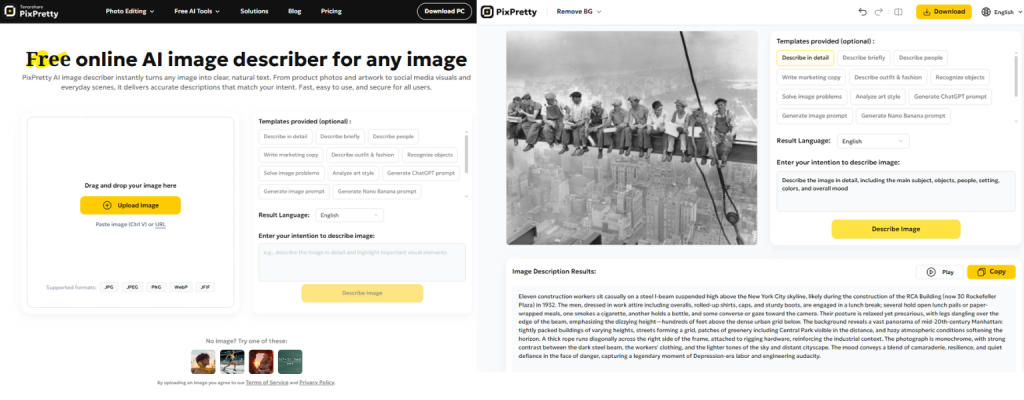
As a next-generation ai image analyzer, PixPretty AI image describer delivers multiple image analysis with an intuitively user-friendly workflow.
Test result rating: 4.8/5
It’s a richly layered, visually precise description within 188 words. Take a close up to the results, it states out the name, the photographer, the exact date & the occasion of this photo at the first sentence.
For the ranges of visual details listed, It covers the main subjects and their setting(even the estimated height for the main objects to the ground). As well as the composition and the visual conflicts to express the mood & deeper meaning.
User experience:
Without extra scrolls, the entire image describer result & the options are shown in the first page. It offers a wide range of templates for different use case: describe people, outfit&fashion, recognize objects, solve image problems, analyze art style, generate prompts for different AI tool. Besides the output language, you can even customize your own description by changing the template prompts.
Free/Paid: Free
Pros
- Complete the whole image analyzing process without scrolling
- Wide variety of template options for different scenarios
- Customizable description intent
- Accurate results for historical photography
- Delicate details covering the main visual aspects
- Format support: JPG, JPEG, PNG, WEBP, JFIF
- Designed for accessibility: a “Play” button included for audio description
Cons
- Paid after the free trials
- No history stored
#2. ImagePrompt.org
Test result rating: 4.3/5
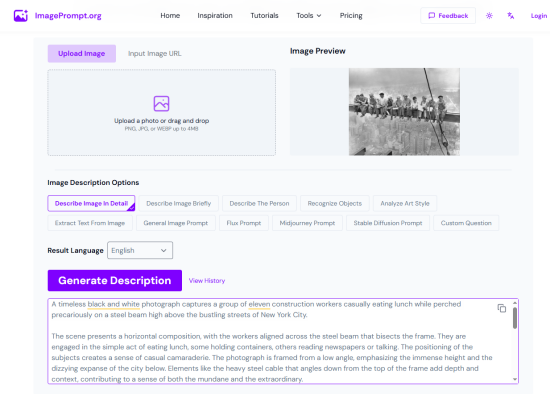
The result didn’t mention the image source. Instead, It devoted more focus to describing the shot composition, cinematography, and other visual details, creating a 403 words description for that. It’s a bit too long for general image prompt but it did cover most of the visual element(Subjects, composition, environment and styles).
User experience:
The whole image to prompt generator is also shown in the first page, but the result needs scrolling to see the whole thing, packed in a narrow box. It offer different description options as well, but users cannot add more prompts to each options.
Free/Paid: 5 daily free credit for general image prompt
Pros
- Input Image URL is supported
- Provide Graphic Design & JSON prompt
- Available to view prompt history
Cons
- Needs scrolling to finish the whole image-to-prompt process
- Subscription needed for advanced features
- Limited options with no customization
#3. describeimage.ai
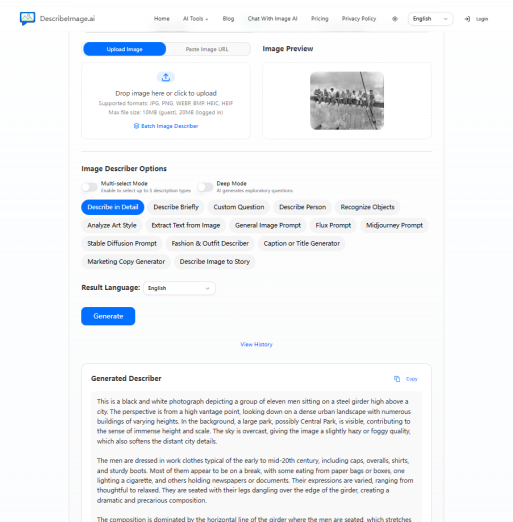
Test results rating: 4.7/5
This result also didn’t mentioned the source/the history background of the image but we can still add this intention in ’Custom Question’ option. It generated a 400 words detailed description based on the observation. Yet it’s still repetitive descriptions on the mood of the picture.
User experience:
Although scrolling is needed through the ai describe image process, the multi-select mode and custom question feature unlock more creative ways. It is also one of the few tools that currently supports batch image-to-text generation.
Free/Paid: Free for single image description
Pros
- Supports batch describe images
- Description history is stored
- Up to 5 options for single image description
- ‘Custom Question’ for customizable description
Cons
- Paid to unlock batch editing
- Less options for batch image to text ai
#4. imagedescriber.online
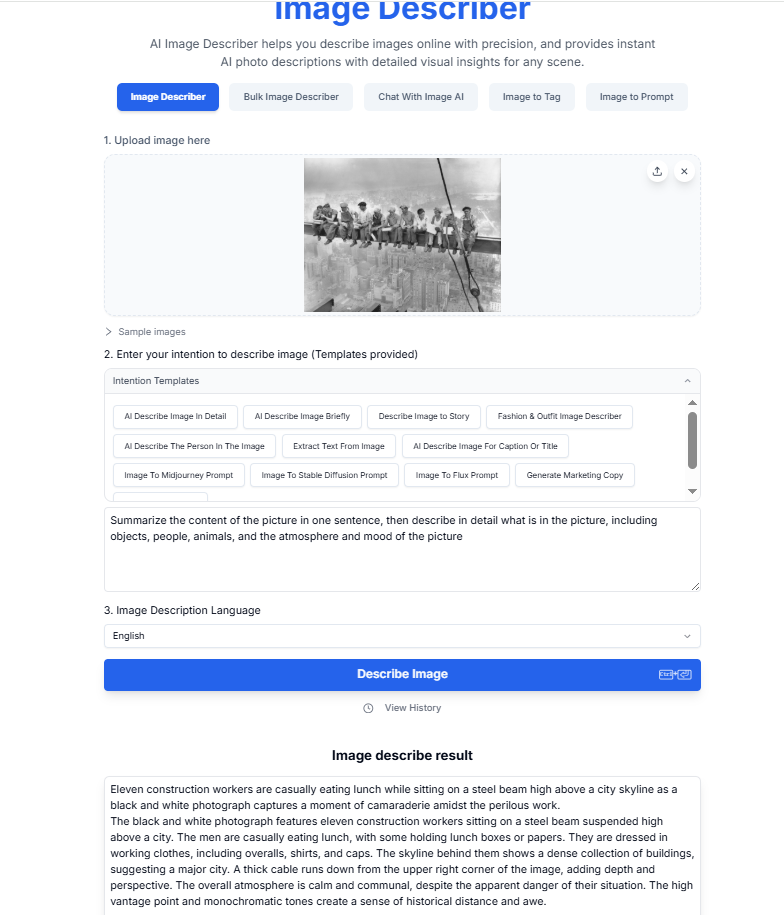
Test result rating: 4.0/5
136 words description is created in the ‘AI Describe Image in Detail’ mode. The word using is quite neutral but repetitive descriptions happened on first two paragraphs. Instead of descriptions of visual aspects, it’s rather focus on the mood.
User experience:
It offers 5 image-to-text tool. The image-to-prompt made use of the horizontal space but the rest of them still required scrolling to use the whole tool. Once I clicked the ‘Bluk Image Describer’, the button of the other image-to-text tool disappeared.
Free/Paid: 3 credits daily
Pros
- Bluk image to text generation
- Customizable description intention
Cons
- Repetitive visual description
- Only 3 credit for free use
#5. Foundmyself image description generator
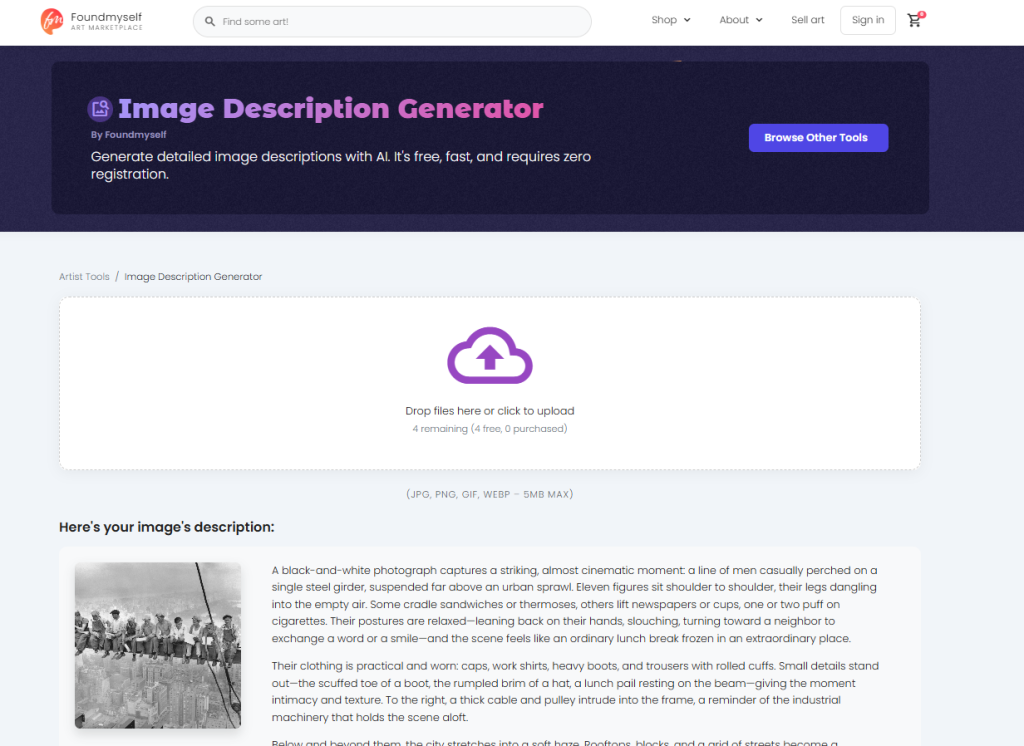
Test result rating: 4.5/5
The 285 words description covers all the visual observations with no redundancy. Although the background of the picture is not stated, it captures both the physical details of the scene and its emotional tension.
User experience:
The whole tool is hidden below the page. After the generation, we need to scroll down to copy the result(the ’copy’ button at the bottom right corner)
Free/Paid: 5 credits daily
Pros
- Provide 18 options for literature scenarios
- Precised visual description
Cons
- No image to prompt
- Paid for limitless generation
Use Case of AI Image Describer
- Image-to-Prompt Generation
Analyze reference images and break down visual elements such as composition, lighting, color, texture, and style into accurate AI prompts for image generation tools.
- Marketing, Content Creation & SEO Optimization
Generate SEO-friendly image descriptions, alt text, captions, and product descriptions to improve search visibility and content accessibility.
- AI Art & Design Analysis
Break down artistic styles, visual structure, outfits&fashion, and design details to help creators study, recreate, or iterate on visual concepts.
- Education & Visual Understanding
Analyze diagrams, historical photos, mathematics, charts, and complex visuals, helping students and researchers extract structured information from images.
- Accessibility Support
Convert images into clear text or audio descriptions, making visual content accessible to visually impaired users.
Conclusion
As accessibility and visual SEO continue to grow, AI image describers have become essential image-to-text tools for analyzing and explaining images. Modern solutions now generate accurate, structured descriptions that support content creation, accessibility compliance, and AI prompt generation. Instead of searching ‘describe this image’ on Google constantly, choosing a reliable AI image describer helps turn visual content into searchable, usable text at scale.