Do you have a problem with creating short videos that are attention-grabbing? Are you interested in having an easy method of making your ideas into viral-friendly videos within a short period? Producing interesting material does not require hours of work when you have the right tools.
CapCut Desktop video editor is an effective artificial intelligence-powered video editor that simplifies and streamlines the process. You can now do all scripting, storyboarding, and final edits without switching between applications due to its AI functionality.
The process is simple: you write scripts on your ideas of a video with the help of AI Writer first. Then, design your scenes and images with AI Storyboard, which puts down captions, transitions, and proposed items. Lastly, complete your video with the editing software of CapCut PC.
It is a time-saving technique that ensures that you maintain consistency in your content and create videos that are appealing to the audience. Basic features of CapCut PC are free, but some advanced AI tools have to be paid for.
AI Writer and AI Storyboard for Planning Viral Shorts
CapCut Desktop Video Editor is an application that is powerful at producing viral short videos in a short time. AI Writers will assist in getting started with the creation of clear and structured scripts. All you have to do is type in a subject or prompt, and it has a script ready to use in your video.
Depending on the kind of content that you are aiming to produce, be it casual, funny or serious, you can set the tone, style, or length. This saves time and effort because one does not need to brainstorm or write scripts manually.
When your script is prepared, you can export it directly to AI Storyboard on the CapCut PC. AI Storyboard transforms the script into a visual plan by splitting it into scenes, including the proposed captions, transitions, and visuals. It facilitates the easy flow of the scene and a steady storytelling process that makes your video easier to watch and follow.
Creative ideas such as hooks, captions, and visual effects are also assisted with the help of the tool. You are able to select video styles, configure aspect ratio, insert music and insert AI avatars.
CapCut PC has more than 1,000 animated characters that have 150 AI voiceovers, which provide your video with personality. There can be some more advanced functions, such as making your own avatars or complicated transitions, which might be offered as a paid subscription.
What is the purpose of using AI Writer + AI storyboard Workflow?
Production of short videos is time-consuming. The preparation work is automated mostly with the use of AI Writer and AI Storyboard in CapCut Desktop Video Editor. There is no need to take hours to create scripts, arrange scenes, or organize visuals.
This process will ensure that your videos are the same from the script to the final cut. All of the scenes are in order, captions correspond with the script, and transitions are smooth. This will appear professional and watchable.
It also assists you in finding inspiration for trends, hooks, and creative images without having to brainstorm all day long. You do not have to worry about the structure, but you can work on making the content interesting.
This is useful to creators who have to make numerous videos on various platforms, thereby conserving time and generating consistency.
Note that a paid subscription is needed on CapCut PC to use some of its advanced features, such as the ability to create custom avatars or with complex transitions. Nevertheless, it is significantly easier and quicker to produce viral-ready short videos using the workflow.
Viral Short Video Steps CapCut PC
Step 1: Install CapCut PC
The official site provides links to download CapCut Desktop Video Editor. Ensure that your system has the basic requirements to perform well. CapCut PC is offered with AI functions such as AI Writer, AI Storyboard, and AI avatars, allowing the creation of videos to become quicker and easier.
Step 2: Script AI Writer
Go to the Open CapCut PC and select AI Video Maker, then Brainstorm with AI. Write your topic or idea for the video in the prompt box. The tone of the script, style, or length can be adjusted according to your video. Click on “Generate script”, and go through it before clicking on “Use” to pass the script straight to the storyboard stage.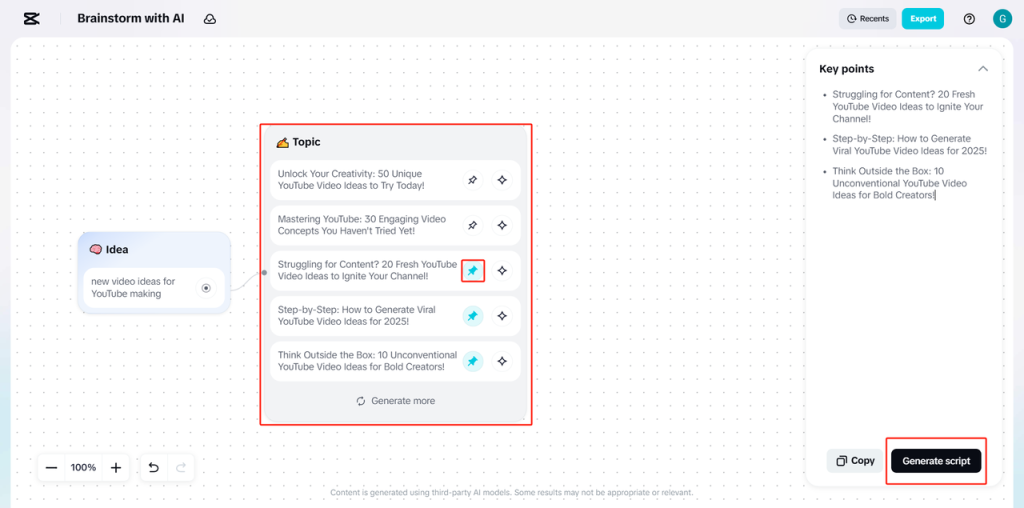
Step 3: Pre-plan Storyboard using AI Storyboard
Then choose a video style and aspect ratio that fits your platform. Add AI avatar narration or voiceover (where necessary). Click on the Create button, and scenes, captions, and transitions will be generated automatically, and you will have a ready-made visual plan.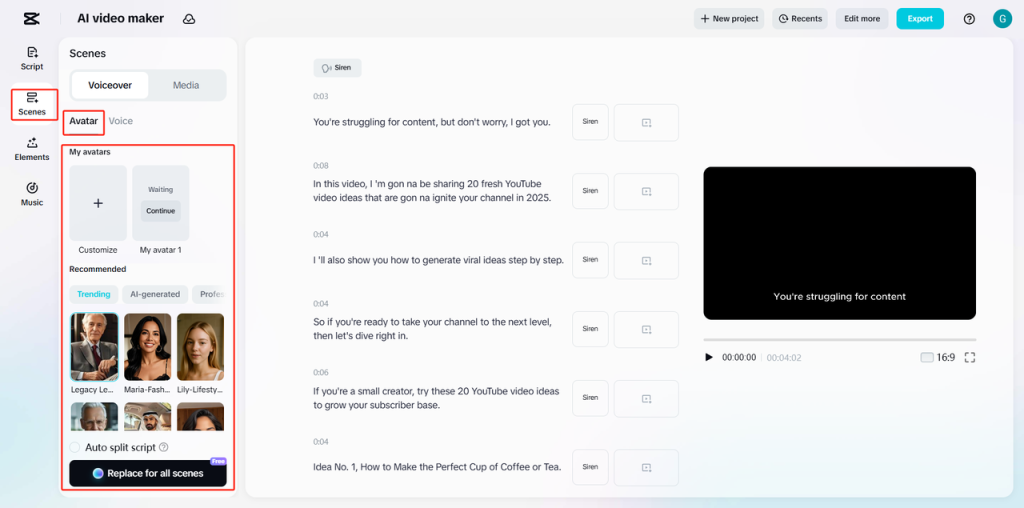
Step 4: Fine-Tune Storyboard / Add Music and Effects
Explore the left panel, such as stickers, captions, and overlays. On the Music tab, pick songs or search for a song. Make scene time, captions, or keywords more impactful with AI editing.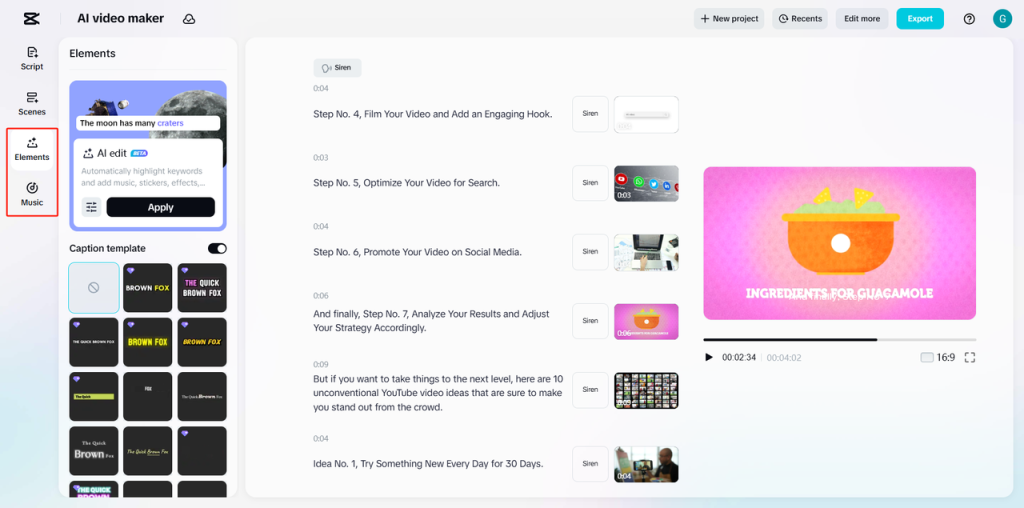
Step 5: Export or Keep Editing
Click on Export, then configure file name, resolution (up to 4K), and format. Or select the option to edit more, and to use advanced editing options such as transitions, effects, or overlays to refine your video further.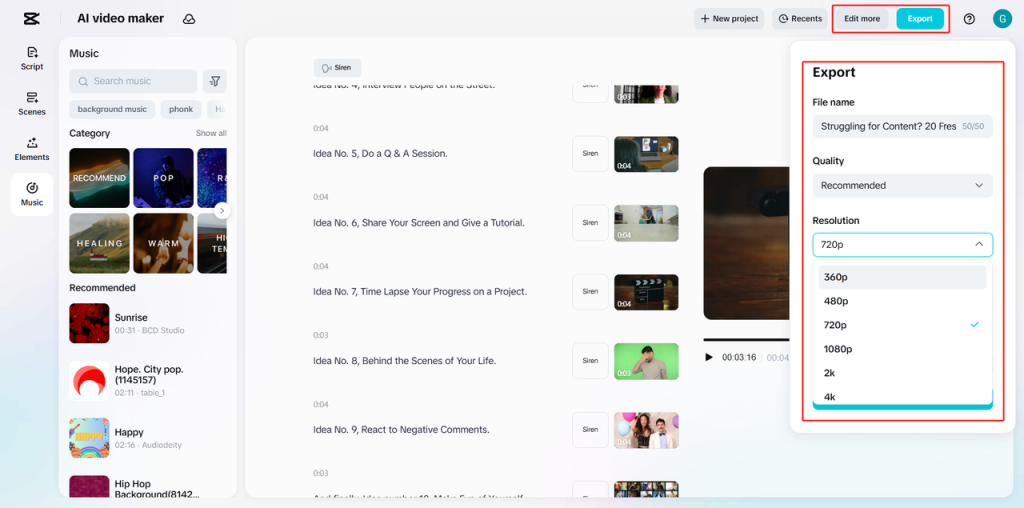
Conclusion
In the CapCut PC, there is simplicity and speed in creating viral short videos using AI Writer and AI Storyboard. Scripting, planning your scenes, and providing visuals can be generated and do not require hours of work on the process. It is a workflow that guarantees that your work is always ready, engaging, and consistent for viewers.
You can add avatars with AI to provide a livelier look to your videos. Animated narration or characters can make your shorts unique, as the game features more than 1,000 characters and 150 AI voiceovers.
It is important to keep in mind that CapCut Desktop Video Editor is free with simple tools, but some of the newest AI aspects, such as personal avatars or intricate transitions of scenes, might be selected with a paid subscription.
Begin production of your next viral short. Get CapCut PC at the official site, write scripts with the help of AI Writer, design your video with AI Storyboard, and create something that will make scrolls run in a few seconds.